Joomla Hosting BLOG

Blog about Joomla, Technologies and Hosting Service

ASPHostPortal.com Proudly Launches ASP.NET 5 Hosting

clock December 10, 2014 05:46 by author ben

ASPHostPortal.com, The Best, Cheap and Recommended ASP.NET Hosting proudly announced the availability of ASP.NET 5 Hosting in their hosting deals. ASPHostPortal offer ASP.NET 5 Hosting at affordable price, easy and instant setup, and best customer support.

Finally, the long awaited release of ASP.NET 5, ASPHostPortal are happy to announce the availability of the .NET Framework 5 for all our hosting packages. It is a highly compatible, in-place update to the .NET Framework 4, 4.5 and 4.5.2. ASP.NET 5 has been re-imagined from the ground up to provide a faster development experience, best in class performance, full side-by-side support.

ASP.NET 5 is clean and free of bugs and is a composable .NET stack for building modern web applications for both cloud and on-premises servers. ASP.NET 5, with the help of Visual Studio 2015, lets you create modern web applications. Modern web applications not only target all devices, including PCs, Macs, Tablets and smartphones, but also work with any browser or operating system.

ASP.NET 5 gives you greater flexibility by being able to run on three runtimes:

Full .NET CLR

The full .NET CLR is the default runtime for projects in Visual Studio. It provides the entire API set and is your best option for backwards compatibility.

Core CLR (cloud-optimized runtime)

The Core CLR is a lean and completely modular runtime for ASP.NET 5 projects. This CLR has been re-designed into components so you have the flexibility to include only those features that you need in your app. You add the components as NuGet packages. When you are finished, your app is dependent only on required features. By re-factoring the runtime into separate components, we can deliver improvements to the components more quickly because each component is updated on its own schedule. The Core CLR is about 11 megabytes instead of around 200 megabytes for the full .NET CLR. The Core CLR can be deployed with your app and different versions of the Core CLR can run side-by-side (both of these advantages are described in greater detail below).

Cross-Platform CLR

Microsoft will release a cross-platform runtime for Linux and Mac OS X. When released, this runtime will enable you to develop and run .NET apps on Mac and Linux devices. They will work closely with the Mono community on this effort. Until its release, you can use the Mono CLR for cross-platform development.

ASPHostPortal.com is The Best, Cheap and Recommended ASP.NET Hosting. With the ASP.NET 5 in their hosting deal will make ASPHostPortal continue to be the Best ASP.NET hosting providers. To learn more about ASP.NET 5 Hosting, please visit http://asphostportal.com/ASPNET-5-Hosting.

About ASPHostPortal.com :

ASPHostPortal.com is The Best, Cheap and Recommended ASP.NET Hosting. ASPHostPortal.com has ability to support the latest Microsoft and ASP.NET technology, such as: WebMatrix, WebDeploy, Visual Studio 2012, .NET 4.5.2/ASP.NET 4.5.1, ASP.NET MVC 6.0/5.2, Silverlight 5 and Visual Studio Lightswitch. ASPHostPortal include shared hosting, reseller hosting, and sharepoint hosting, with speciality in ASP.NET, SQL Server, and architecting highly scalable solutions. ASPHostPortal.com strive to supply probably the most technologically advanced hosting solutions available to all consumers the world over. Protection, trustworthiness, and performance are on the core of hosting operations to make certain each and every website and/or software hosted is very secured and performs at the best possible level.


Joomla 3.4 Hosting - ASPHostPortal.com :: How To Install tems using the tmp folder in Joomla 3.4

clock December 4, 2014 05:51 by author ben

How to install items using the tmp folder in Joomla 3.4

A question that frequently crops up on our ticket and forum systems is “why won't the T3 plug-in install correctly via the joomla installer?” - this problem is frequently due to the hosting file upload limit being set too low. One solution is to upload an extension via the tmp folder. This tutorial looks at how you can utilise this method to install Joomla extensions.

The Uploading Process

  • Download the extension archive to the hard drive. The T3 plug-in is being used in this example.
  • Extract the archive into a folder – in this case the Zip file has been extracted to a folder called t3.
  • Using FTP upload the folder and its contents to the tmp folder, which is found in the root of the Joomla site as shown here.

Joomla Admin

  • Navigate to the Joomla installer via extensions > Extension Manager.
  • Click the text “Install from Directory” in the second tab.
  • In the “install Directory” input box type the folder name - in this example I have typed t3.
  • Hit install.
  • Extension should now successfully install.

Alternative Solution

An alternative is to increase the hosting account upload limit (although this may not be possible with some hosts).


Joomla 3.4 Hosting - ASPHostPortal :: Greatest Joomla Remarks Extensions And Why You Ought to Use One

clock December 3, 2014 06:05 by author ben

Wordpress was developed strictly as being a website system, around the other hand, Joomla from its starting was an entire feature CMS. These are the key factors to the differences between these two material administration methods. WordPress comes outfitted with a number of functions constructed into Core, a single of these is remark system. Although Joomla 3.4 never have in-build feedback, and probably even in long term version 3.5 will don't get it, you've possibility to put in & use them in a simple and fast way. And probably you have even more possibilities how they should work for you.


Advantages of Comments

Feedback can be used for different ways, like a standard comment for articles (all or selected), for reviews of products and much more. It is up to you how to use this function in your web project. But the most important reason for their use remains unchanged, users (registered or not) it is a great way of developing unique on-page content sometimes even each day as well as allowing visitors to share their insights. The content material which is also indexed by Google and can help your SEO. If users can read independent reviews of an individual article, offer or service, they see how real users perceive products, not only the manufacturer or reseller description.

In particular, also if you going to run a small business weblog section based on Joomla!, 1 of the most important areas is the remark section. Interaction and audience participation plays a big role in the success of your website, with direct remarks as well as social media sharing.
Two solutions but many extensions

In general we have two principal feedback storage solutions: as a content material in your CMS or as a social commenting system (Disqus, Facebook Remarks, Google Plus feedback) but in second option - those feedback do not belongs to you database, because they are hosted on their "social" platforms.

When we are talking about Joomla and you will check number of extensions on JED for feedback you might lost. What to choose and what will be good for me.

K2 - this is not a simple comments method, it can be even called additional material management inside Joomla because it has so many attributes, options etc. When you are using K2 you never have to worry about feedback because it have in-build such a system. There are also solutions which allows you to replace this system with other.

JComments - it's very popular and known since 2009 AJAX based remark program (extension) for Joomla. If you used it on Joomla 1.5 you will still love it because there is a edition for both Joomla 2.5 and Joomla 3.4. It has flexible ACL, smiles, BBCodes and avatars support, Antispam (CAPTCHA) and flood protection, Ban Ip, Quick moderation (from e-mails) and much more functions. On project website you can find also modules which allows you to show latest remarks, latest commented or most commented articles. Greatest advantage, it is still a free component, but it inserts a backlink to the developer, this might be not good for you in some cases.


Komento - without a doubt features a shorter historical past than JComments, simply because initial version was published in Might 2012, but crew powering this answer is powerful and completed a great job. Maybe which is why Komento was a single of the winners in the Community Choice Extensions inside the JED in December 2012 as a result of its effective and beneficial attributes. It utilizes the very best confirmed options from remarks sytems, furthermore, updates happen really regularly. It handles comments in K2, EasySocial, JomSocial, FlexiContent, ZOO, EasyBlog, VirtueMart, AceShop, redSHOP, Ohanah , Sobi Pro , Mosets Tree in Skilled model. When you can examine it's two edition free of charge and industrial.


Joomla 3.4 Hosting :: ASPHostPortal.com - How to Secure Joomla and Protect it Against Hacker Attacks

clock November 27, 2014 05:41 by author ben

How to Secure Joomla and Protect it Against Hacker Attacks

As any open source application Joomla is subjected to all sorts of hacking attacks. This is why it is important to take all possible measures to protect your Joomla site and improve its security. Follow the instructions in this tutorial in order to minimize the chance to get hacked.

Step 1 Keep Joomla and its extensions up-to-date

Probably the most important part of securing your Joomla website is to keep it updated to the latest version. In almost all version releases there are fixes for security issues. For more information on how to update Joomla to the latest version.
Keeping your Joomla extensions up-to-date is equally important for the security of your website. Actually, there are more attacks that utilize security issues in extensions than in the actual Joomla core files. For more information on how to keep your Joomla components, modules and plugins up-to-date

Step 2 Use Strong Login Details

First, you should avoid using default user names like "admin" or "administrator". Those will be first in the list of words a potential attacker would try.
Next, it is important to have a strong password for your website. Many attackers try to brute-force your login details. This means that they use a list of commonly used passwords to guess yours. There are several tips that will help protect you against such attacks:

  • Don't use common words for passwords like love, god, pass, admin, admin123, etc.
  • Avoid personal information in passwords like your personal or family name.
  • Avoid password generators. Password generators use algorithms to generate the passwords which can be compromised by an attacker.
  • Use as many special characters ( *!@#)$ ), numbers and capital letters in your password as possible.

Step 3 Use Proper File Permissions & Ownership

Another important part of having a secured Joomla website is to set the right permissions for your Joomla files and folders. We recommend that you follow these suggestions for your permissions:

  • Set the permissions for your Joomla folders to 755
  • Set the permissions for your Joomla files to 644
  • Set the permissions for your configuration.php file to 444
  • Never use 777(full access) permissions!

For more information on how to change your files and folders permissions, please refer to our File Permissions Tutorial.

Step 4 Use Joomla Security Extensions

Using security extensions is another easy way to improve your Joomla website security. We have developed our own security extension (jHackGuard) that is free for download by anyone. Below you will find a list of the most popular Joomla security extensions:

  • jHackGuard
  • Akeeba Admin Tools
  • jomDefender
  • jSecure

Step 5 Often Backup your Joomla Site

It is essential to backup your Joomla site as often as possible. You should always keep a backup copy of your Joomla files and database on your local computer just in case something happens. For more information on the best Joomla backup practices.

Step 6 Protect Your Administrative Page

You can greatly improve the security of your Joomla website if you restrict the access to your admin area. First, you can password protect the /administrator folder of your site. To do this, follow the instructions in our tutorial on How to Password Protect Folders. Once you protect your /administrator folder an additional password will be required in order to see the standard administrator login form.

Next, you can restrict the access to the /administrator directory only to your IP address. If there isn't a file named ".htaccess" in the /administrator directory, create one and upload it via FTP for example, otherwise, just add the following lines at the end of the .htaccess file:

Deny from ALL
Allow from x.x.x.x

"Note that you need to replace x.x.x.x with your actual public IP address. To find out your address, you can use the What Is My IP website for example. To add multiple IPs, simply replicate the Allow from x.x.x.x command to a new line and change the address".

Important If your Internet service provider is giving you a dynamic IP address, the IP restriction option might not be suitable for you because you'll have to edit the .htaccess file each time your IP changes.


Joomla 3.4 Hosting - ASPHostPortal :: How to Fix Joomla Update Error

clock November 26, 2014 06:03 by author ben

Simple Trick to Fix Joomla Update Error

For some case, after you update your Joomla to the Joomla 3.4 version you may get an error like 0 SQL=SHOW FULL COLUMNS FROM `pos_postinstall_messages` while navigating to the System > Control Panel. This error happened because the database is not updated in sync with the platform update. This is what you should do to update the ‘database’ and fix the error:

Steps to Fix Joomla Update Error

Step 1. Click on Extensions > Extension Manager

Step 2. In the following page > Click on Database on the left > and then Click Fix in the top-left of the page.
Step 3.
You should now see a message > Database table structure updated.
Finish. The error should now be resolved.

That is so easy trick right?


ASPHostPortal.com to Launch New Data Center in Hong Kong

clock November 25, 2014 08:13 by author ben

ASPHostPortal.com to Start New Data Center in Hong Kong on November 2014

ASPHostPortal is known for credible and loyal hosting solutions. Apart from the reliability in the ASPHostPortal Uptime, which features 99.9 per cent common uptime, ASPHostPortal also provides outstanding data center which displays ASPHostPortal large speed and large overall performance web hosting package deal. Lately, ASPHostPortal.com launch its new Data Center in Hons Kong on November 2014 with space for more than 10.000 physical servers, and allowing customers’ to satisfy their  data residency needs.


The brand new facility will provide consumers and their finish customers with ASPHostPortal.com providers that meet up with in-country info residency needs. It will also complement the existing ASPHostPortal.com Asia (Singapore) Data Center. The Hong Kong Data Center will offer the full variety of ASPHostPortal.com website hosting infrastructure services, which includes bare steel servers, virtual servers, storage and networking.

ASPHostPortal offers the perfect mixture of affordability and dependability. They have an excellent uptime history with numerous months this 12 months boasting a lot more than 99.9% typical uptime. Their hosting bundle displays velocity and efficiency. Their information heart might take significantly from the credit rating for such superb providers. The brand new data center will allow clients to copy or integrate data between Asia Data Center with higher transfer speeds and unmetered bandwidth (at no charge) in between amenities.

“With ASPHostPortal, picking the Data Center area is really a totally free function and alternative to all consumers. The shopper just chooses US, Europe, Asia or Australia. It is straightforward, intuitive and convenient. The choice is totally free, and there will never be any other cost to the person related with this choice,” said Dean Thomas, Manager at ASPHostPortal.com.

Customers that have any questions on the feature and also the choice which is most suitable for his or her functions ought to truly feel totally free to get in touch with ASPHostPortal via their 24/7/365 customer assistance crew. ASPHostPortal may help you select the right choice that will best fit your needs.

To find out more about new data center in Hong Kong, please visit http://asphostportal.com/Hosting-Data-Center-HongKong.

About ASPHostPortal.com:

ASPHostPortal.com
is a hosting business that greatest support in Windows and ASP.NET-based hosting. Solutions consist of shared web hosting, reseller hosting, and SharePoint hosting, with specialty in ASP.NET, SQL Server, and architecting very scalable solutions. Like a top little to mid-sized company web hosting provider, ASPHostPortal.com attempt to supply essentially the most technologically advanced hosting options obtainable to all customers across the world. Security, reliability, and efficiency are in the core of web hosting operations to make certain every site and/or software hosted is extremely secured and performs at ideal stage.


Joomla 3.4 Hosting :: ASPHostPortal.com - How to find JavaScript conflict in Joomla

clock November 20, 2014 05:39 by author ben

How to find JavaScript conflict in Joomla?

While JavaScript are beautiful and very handy, they can also bring down a site if in conflict with each other. One can expect JavaScript conflicts to appear as more and more extensions are installed in a Joomla site. The extensions may be using different JavaScript libraries or different library versions or libraries made by different developers which can be in conflict to each other.
It is not all that difficult to rule out such conflicts and extension / template developers can be asked for help then on.

What causes JavaScript conflicts?

The different versions of Mootools library and jQuery library can make a lot of JavaScript conflicts. Event when you use the same libraries versions but those libraries made by different developers (i.e jQuery and Mootools conflict), JavaScript conflict can also occur.

Here is a case study:

  • Template A loads Mootools library version 1.5.0
  • Plugin B loads own Mootools library version 1.2.6
  • Module C loads jQuery library version 1.11
  • Component D loads jQuery library version 2.1.1

An other cause of JavaScript conflict is browser, some non-standard browsers handle JavaScript and the browser's JavaScript conflicts with JavaScript loaded from your site.

How to detect JavaScript conflicts?

So when your site is not working as expected, one should rule out conflicts. But how to check and find the JavaScript conflict?

"The ANSWER is checking the JavaScript console".

There are multiple ways to do it based on browsers. For example, in Firefox and Chrome, the available tools are Firebug, Web Developer toolbar, Debugger, Error Console, etc.
If your site has JavaScript error, the tools will provide you error messages that will help you to figure out the problem and zero in on the extension / feature of website causing this problem. The error message also gets you the names of file in conflicts.

You can detect the problem by checking which extensions cause the problem, here are the steps:

  • Switching to default Joomla template and disable your installed extensions then reload your site and check if the JavaScript error still exist or not.
  • Publish your installed extensions one by one and reload your site. Repeat the process until you discover which parts are in conflict.

How to resolve JavaScript conflicts?

There is no universal step to resolve JavaScript conflict as it varies from case to case and are best resolved by the developers. But here are few things that you can try:

  • Put jQuerry into no-conflict mode

The jQuery library and all of its plugins are contained within the jQuery namespace. Global objects are stored inside the jQuery namespace, by the way so you shouldn't get a clash between jQuery and any other library such as prototype.js, MooTools.

  • Putting jQuery in no-conflict mode immediately after it is loaded onto the page and before you attempt to use jQuery in the page.

<!-- Another way to put jQuery into no-conflict mode. -->
<script src="/prototype.js"></script>
<script src="/jquery.js"></script>
<script>
jQuery.noConflict();
jQuery( document ).ready(function( $ ) {
    // You can use the locally-scoped $ in here as an alias to jQuery.
    $( "div" ).hide();
});
// The $ variable in the global scope has the prototype.js meaning.
window.onload = function(){
    var mainDiv = $( "main" );
}
</script>

Ask for help from extension provider

If you can not resolve the JavaScript conflict by yourselves, you can search for solutions on internet, ask on forums or ask for support of the extension provider for solution.

My site has different issues?

JavaScript conflict is just one error type, errors can also be produced by PHP, SQL, etc. You can detect those errors using Joomla error reporting, follow THIS LINK for more details.


Joomla 3.4 Hosting - ASPHostPortal :: How to use SSL in a Joomla site ?

clock November 19, 2014 08:05 by author ben

Introduction

Joomla Force SSL is a Joomla feature to activate the SSL Certificate on your Joomla website. SSL stands for Secure Sockets Layer, it is a security protocol that transmits private information over your Joomla site to the scrambled format. As needs be, connections with/inside your site will be on the protected https protocol rather than the standard http prefix.

Your site really needs SSL Certificate?

if you have an ecommerce or business site, SSL Certificate is about a must to ensure your important information is protected. See this Knowledge section for the definite examination.

How to set up SSL in your Joomla site?

Let’s consider if SSL Certificate is necessary for your site.

1. Checklist for your set up

To get SSL Certificate enabled for your Joomla site, you should have these followings in advance :

  • SSL Certificate, which has been installed successfully on your server.
  • Your dedicated IP Address, which is unique for one SSL Certificate.

2. Enable Force SSL in your Joomla site

Note: we used Joomla 3 in this tutorial, for Joomla 2.5, it’s the same.

Step 1: configure your configuration.php file

> Open your configuration.php file
> Find the following line:
var $live_site ='';
> Replace with:
var $live_site = 'https://www.your-domain.com';
> Next, open .htaccess file then add the following code to the bottom of the file.
RewriteEngine On
RewriteCond %{HTTPS} OFF
RewriteRule (.*) https://%{HTTP_HOST}%{REQUEST_URI}

Step 2: enable Force SSL in your Joomla site

> In the Admin Panel, navigate through System >> Global Configuration or simply click the Global Configuration button.

> Within the Server tab, in the Server Settings section, there are 3 Force SSL alternatives that you can select, namely:

  • None: SSL will not be enabled in your Joomla site.
  • Administrator Only: connections to your administrator will be on HTTPS.
  • Entire Site: connections all over your website will be on HTTPS.

> Hit the Apply/Save button. You are done now! So let's check your site now.

Tips: 

In the event that you need to enable Force SSL in some particular pages of your Joomla site. This alternative is really not available in Joomla back-end settings. More over, there are different Joomla extensions permitting you to redirect your chose pages into HTTPS. SSL Redirect could be an extraordinary pick, this extension is good with both Joomla 2.5 and Joomla 3.


Joomla 3.4 Hosting - ASPHostPortal.com to Launch New Data Center in Paris

clock November 10, 2014 10:46 by author ben

ASPHostPortal.com to Launch New Data Center in Paris, France on November 2014

ASPHostPortal is known for credible and unswerving web hosting solutions. Apart from the reliability of the ASPHostPortal Uptime, which features 99.9 per cent average uptime, ASPHostPortal also offers outstanding data center which reflects ASPHostPortal high speed and high performance hosting package.  Recently, ASPHostPortal.com launch its new data center in Paris, France on 9th November 2014 with room for more than 10,000 physical servers, and allowing customers’ to meet their France data residency requirements.

The new facility will provide customers and their end users with ASPHostPortal.com services that meet in-country data residency requirements. It will also complement the existing ASPHostPortal.com Amsterdam data center and London data center, to provide European customers redundancy options within the region. The Paris data center will offer the full range of ASPHostPortal.com web hosting infrastructure services, including bare metal servers, virtual servers, storage and networking.

ASPHostPortal offers the perfect combination of affordability and reliability.  They have an excellent uptime history with several months this year boasting more than 99.9% average uptime.  Their hosting package reflects speed and performance.  Their data center can take much of the credit for such superb services. The new data center will allow customers to replicate or integrate data between Paris, London and Amsterdam data centers with high transfer speeds and unmetered bandwidth (at no charge) between facilities.

“With ASPHostPortal, choosing the data center location is a free feature and option to all customers. The customer simply chooses US, Europe, Asia or Australia. It's simple, intuitive and convenient. The option is free, and there will never be any other cost to the user associated with this option,” said Dean Thomas, Manager at ASPHostPortal.co

Clients who have any questions about the feature and the option that is most suitable for their purposes should feel free to contact ASPHostPortal through their 24/7/365 customer support team. ASPHostPortal will help you choose the right option that will best suit your needs.

For more information about new data center in France, please visit http://asphostportal.com/Hosting-Data-Center-France.

About ASPHostPortal.com:

ASPHostPortal.com is a hosting company that best support in Windows and ASP.NET-based hosting. Services include shared hosting, reseller hosting, and SharePoint hosting, with specialty in ASP.NET, SQL Server, and architecting highly scalable solutions. As a leading small to mid-sized business web hosting provider, ASPHostPortal.com strive to offer the most technologically advanced hosting solutions available to all customers across the world. Security, reliability, and performance are at the core of hosting operations to ensure each site and/or application hosted is highly secured and performs at optimum level.


Joomla 3.3 Hosting - ASPHostPortal.com :: How to Improve your Joomla Speed

clock November 10, 2014 08:22 by author ben

How to Optimize Joomla 3 to Improve Site Performance

We know that speed is amongst the most important factors for the success of your website. By default, Joomla isn't slow but you can do a lot to optimize it and achieve great speed for your site. Here you will find the most essential actions you can take to speed up your Joomla 3 website. Here are few things you can easily do to speed-up Joomla:
Keep Joomla and its Extensions Updated

Having the latest version of Joomla is important for your site speed because in each version there are multiple code improvements. Even if the changes are small - new Joomla versions are generally performing better than previous ones. For more information on how to update Joomla to the latest version check out our Joomla Update Tutorial.

Keeping your Joomla extensions up-to-date is as important for the speed of your website as the Joomla itself. For more information on how to keep your Joomla 3 components, modules and plugins up-to-date, please refer to our tutorial on How to Upgrade Joomla.

Enable Joomla Caching

If cache is not enabled, every time your visitors load one of your pages, Joomla has to do few things - fetch the content from its database, load all the plugins, components and modules, you have installed, load your template file and combine all that into a single page. Needless to say this process takes time. This is where the internal Joomla caching system comes to help. When you enable the cache, the first time someone loads your page, the result from the above mentioned actions is stored. Then, all the following visitors will directly get the stored version of that page as if it was a simple, plain HTML file which is much, much lighter and loads faster. This is why caching is one of the most important things to enable in order to have a fast Joomla site.

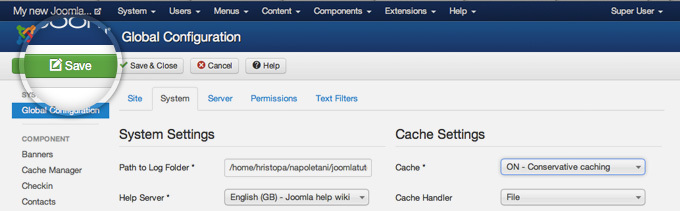
To enable the Joomla caching, first go to System -> Global Configuration.
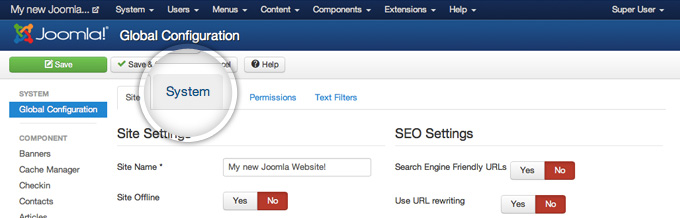
Next, you need to click on the System tab to get to the caching settings.
 

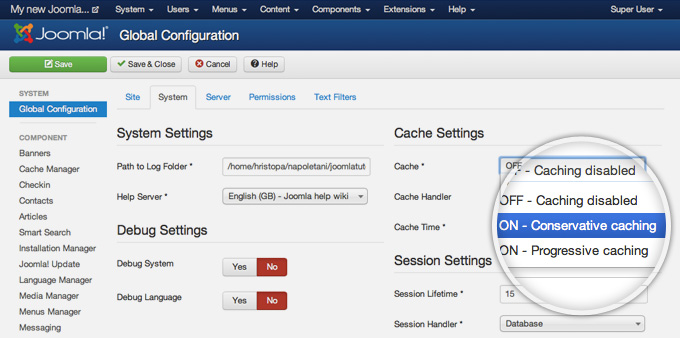
On the right part of this page you will find the Cache Settings. Find the Cache label and click on the drop-down next to it. From the list, please select the ON - Conservative caching option. The other available option - Progressive Caching works a bit different - it stores cached version of your site per each one of your visitors. It is useful in some particular cases and we don't recommend you to use it unless you're absolutely sure you need such caching enabled.
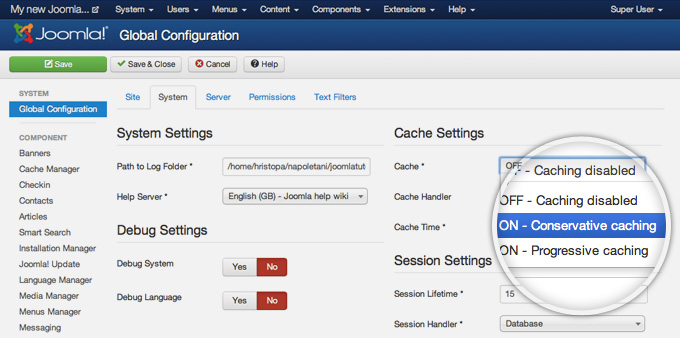
Once you set the caching to Conservative Caching, click on the green Save button at top of your page.
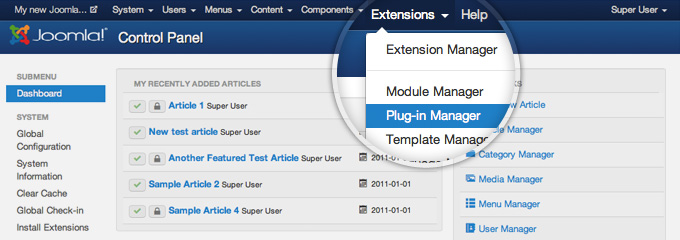
There is one final step that you need to make before the Joomla caching system actually starts working - to enable the System - Cache core Joomla 3 plugin. To do this go to Extensions -> Plugin Manager.
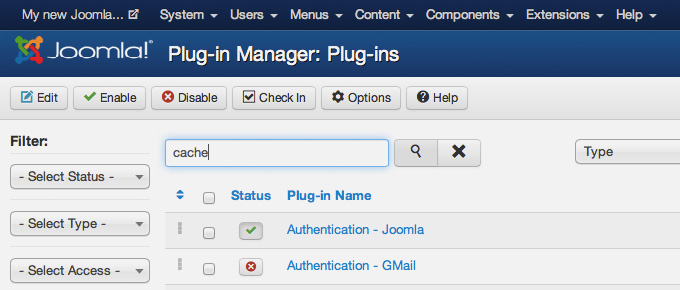
Here you will see a big list of all the plugins, currently installed in your Joomla application. The easiest way to locate the caching plugin is to use the search field. Just type in cache and press the magnifying glass button next to the search field.
Once you do that, you will see the System - Cache plugin and a red cross button next to it indicating that the plugin is disabled. To change its status to enabled press on the red button.
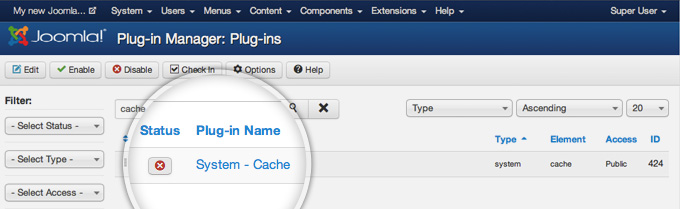
Finally, the status button next to the caching plugin will turn green and you'll see a message, indicating that the plugin has been enabled successfully.
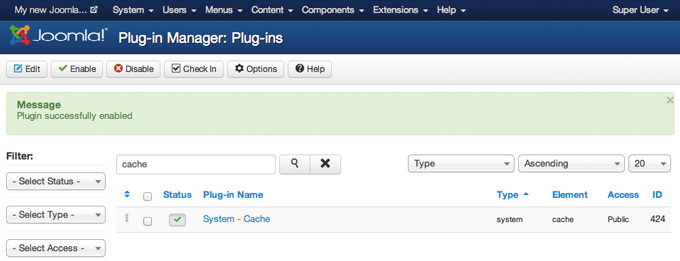
That's it! Your Joomla caching system is now enabled and functional!

Enable Joomla Compression

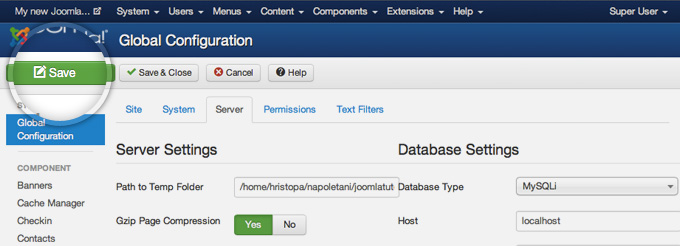
Another thing that will greatly improve the performance of your Joomla website is the compression. If you enable the internal Joomla compressions system, the page that your visitors will download will be compressed before it is transferred to them. When your webpage size is reduced through compression, it will load much faster. To enable the Joomla compression, first access your admin area and go to System -> Global Configuration.
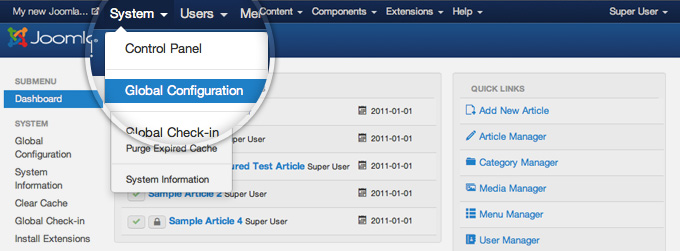
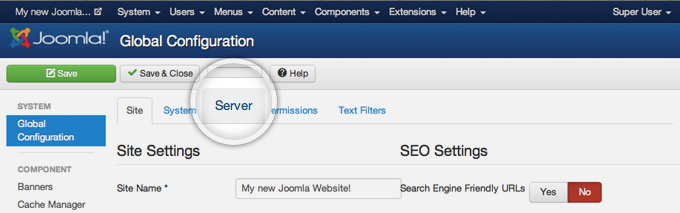
On this page you will see numerous settings. Click on the Server tab to view the server-related options you can change.
Here, locate the Gzip Page Compression label and press the Yes button next to it to enable the Gzip compression for Joomla.
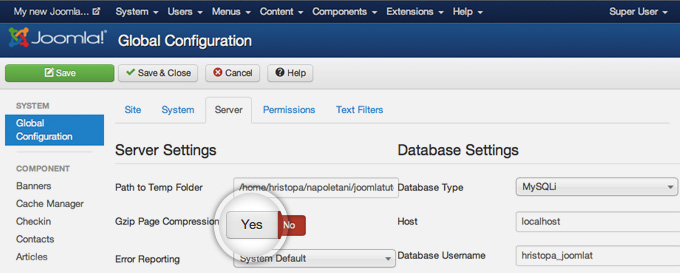
You will notice that the indicator will turn green showing that the compression is enabled. Finally, press the green Save button in the top left part of the page to commit your changes.
That's it, the compression of your Joomla 3 site is enabled. You can use one of the many free online tools for testing the Gzip compression such as http://checkgzipcompression.com for example. If everything is alright, you should see a notification that the compression is enabled successfully as well as some information about the change in size of your pages. As you can see from the screenshot below, we've reduced the size of our sample page three times simply by enabling the compression.
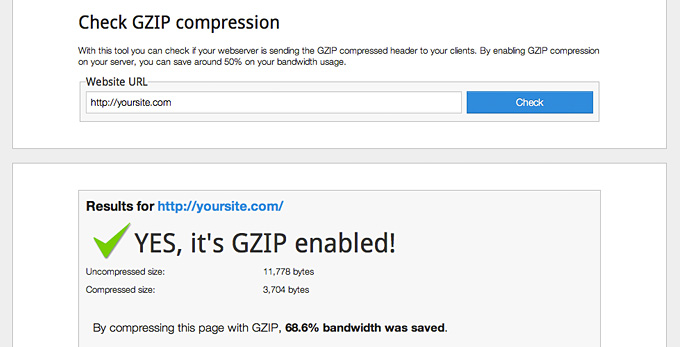
Warning In same cases enabling the Gzip compression may cause errors. The most probable reason for such errors is that Gzip is either not installed or not configured correctly on your server. Please contact the support team of your hosting provider for further assistance.

Add .htaccess Optimization Rules

Htaccess files handles the way your webservers process your site. There are few rules you can add at the end of the .htaccess file that will improve the performance of your Joomla site:

  • ETag - tells browsers when one image has already been downloaded and can be fetched from the local browser cache instead from the server
  • Expires headers - similar to ETag but allows you to set different expiration times for different file type
  • AddOutputFilterByType DEFLATE - minifies the source code of your compiled HTML files by removing empty lines, breaks and spaces

########## Begin - ETag Optimization
## This rule will create an ETag for files based only on the modification
## timestamp and their size.
## Note: It may cause problems on your server and you may need to remove it FileETag MTime Size
# AddOutputFilterByType is now deprecated by Apache. Use mod_filter in the future.
AddOutputFilterByType DEFLATE text/plain text/html text/xml text/css application/xml application/xhtml+xml application/rss+xml application/javascript application/x-javascript
# Enable expiration control
ExpiresActive On
# Default expiration: 1 hour after request
ExpiresDefault "now plus 1 hour"
# CSS and JS expiration: 1 week after request
ExpiresByType text/css "now plus 1 week"
ExpiresByType application/javascript "now plus 1 week"
ExpiresByType application/x-javascript "now plus 1 week"
# Image files expiration: 1 month after request
ExpiresByType image/bmp "now plus 1 month"
ExpiresByType image/gif "now plus 1 month"
ExpiresByType image/jpeg "now plus 1 month"
ExpiresByType image/jp2 "now plus 1 month"
ExpiresByType image/pipeg "now plus 1 month"
ExpiresByType image/png "now plus 1 month"
ExpiresByType image/svg+xml "now plus 1 month"
ExpiresByType image/tiff "now plus 1 month"
ExpiresByType image/vnd.microsoft.icon "now plus 1 month"
ExpiresByType image/x-icon "now plus 1 month"
ExpiresByType image/ico "now plus 1 month"
ExpiresByType image/icon "now plus 1 month"
ExpiresByType text/ico "now plus 1 month"
ExpiresByType application/ico "now plus 1 month"
ExpiresByType image/vnd.wap.wbmp "now plus 1 month"
ExpiresByType application/vnd.wap.wbxml "now plus 1 month"
ExpiresByType application/smil "now plus 1 month"
# Audio files expiration: 1 month after request
ExpiresByType audio/basic "now plus 1 month"
ExpiresByType audio/mid "now plus 1 month"
ExpiresByType audio/midi "now plus 1 month"
ExpiresByType audio/mpeg "now plus 1 month"
ExpiresByType audio/x-aiff "now plus 1 month"
ExpiresByType audio/x-mpegurl "now plus 1 month"
ExpiresByType audio/x-pn-realaudio "now plus 1 month"
ExpiresByType audio/x-wav "now plus 1 month"
# Movie files expiration: 1 month after request
ExpiresByType application/x-shockwave-flash "now plus 1 month"
ExpiresByType x-world/x-vrml "now plus 1 month"
ExpiresByType video/x-msvideo "now plus 1 month"
ExpiresByType video/mpeg "now plus 1 month"
ExpiresByType video/mp4 "now plus 1 month"
ExpiresByType video/quicktime "now plus 1 month"
ExpiresByType video/x-la-asf "now plus 1 month"
ExpiresByType video/x-ms-asf "now plus 1 month"

Reduce Your Images Size

Images are big part of your website. In most of the cases images can be optimized. There are several tips that you should follow when you use images in your pages:

Never use large photos and then scale them using HTML - it takes the browser time to scale the images and they look worse than the original. Always optimize your images. Applications like Adobe Photoshop and online services like  Smush it for example offer easy to use tools that will reduce the size of your images without lowering their quality greatly. Don't add too many images to a single page. If you have an article with many photos for example, try splitting it into pages.

Remove unused and unoptimized extensions

Each Joomla extension you add to your website requires system resources, database and disk space to operate. Having many extensions will increase the overa ll size of your website and make it slower. This is why, it is important to make sure that you have only extensions that you're actually using installed on your Joomla site. People often test different plugins, component and modules and forget to remove them once they finish working with them. It's great idea to do a clean-up of such extensions once in a while just to make sure there isn't any unnecessary content added to your site. Last but not least, when you choose the best extensions for the functionality you want to add to your Joomla site, always check for user reviews regarding the load it creates. Some components are poorly written and can affect the performance of your entire site.

Use Optimization Extensions

There are many extensions that try to improve the performance of your Joomla website. During the years of experience we've gathered while working with Joomla sites, there are few that we can recommend:

  • JCH Optimize - Combines JavaScript & CSS, combines images into sprites, minifies and compresses JavaScript
  • Jbetolo - All the functionality that JCH Optimize has plus CDN support
  • JotCache- Improves the built-in Joomla caching system
  • Cache Cleaner- easily clean the cache from the Joomla admin panel


About ASPHostPortal.com

We’re a company that works differently to most. Value is what we output and help our customers achieve, not how much money we put in the bank. It’s not because we are altruistic. It’s based on an even simpler principle. "Do good things, and good things will come to you".

Success for us is something that is continually experienced, not something that is reached. For us it is all about the experience – more than the journey. Life is a continual experience. We see the Internet as being an incredible amplifier to the experience of life for all of us. It can help humanity come together to explode in knowledge exploration and discussion. It is continual enlightenment of new ideas, experiences, and passions

 photo ahp banner aspnet-01_zps87l92lcl.png

Corporate Address (Location)

ASPHostPortal
170 W 56th Street, Suite 121
New York, NY 10019
United States

Sign in