
November 26, 2014 06:03 by
 ben
benSimple Trick to Fix Joomla Update Error
For some case, after you update your Joomla to the Joomla 3.4 version you may get an error like 0 SQL=SHOW FULL COLUMNS FROM `pos_postinstall_messages` while navigating to the System > Control Panel. This error happened because the database is not updated in sync with the platform update. This is what you should do to update the ‘database’ and fix the error:
Steps to Fix Joomla Update Error
Step 1. Click on Extensions > Extension Manager
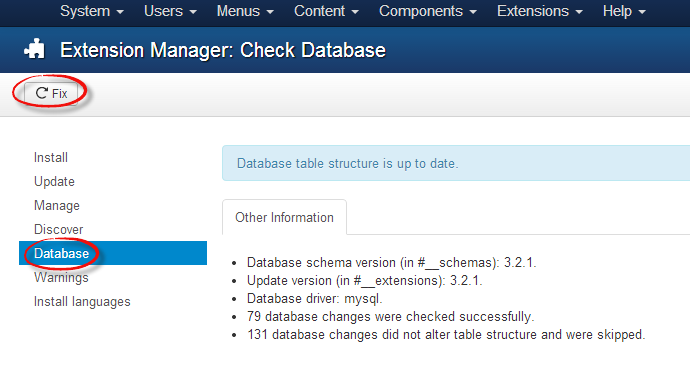
Step 2. In the following page > Click on Database on the left > and then Click Fix in the top-left of the page.
Step 3. You should now see a message > Database table structure updated.
Finish. The error should now be resolved.
That is so easy trick right?
2b67b92d-505a-442a-a007-4d392b5c3acb|0|.0