
July 31, 2015 06:22 by
 ben
benIf you’re a Joomla user who has connected his sites to Google Webmaster, you might have received the following message from the Google Search Console: “Google can’t access CSS and JS files”.

A while ago, Google announced that whether a website is mobile friendly or not is a factor in ranking websites. This message seems to be a result – Google is actively scanning websites using Webmaster and testing if they’re mobile friendly.
Since you’re blocking files Google wants to access, it could make the big G think that your site is, in fact, not mobile friendly. To avoid this, you need to tweak your robots.txt file. This is a file in your root folder which determins which robots – like Google’s bots that scan your site – can and can’t visit which folders.
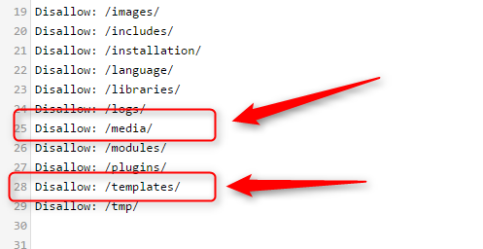
To resolve this problem, you need to remove two lines from the robots.txt file; the line which disallows /media/ and /templates/. Doing this will grant Google access to the files it needs to analyze your website.
Best Joomla Hosting Recommendation
ASPHostPortal.com provides our customers with Plesk Panel, one of the most popular and stable control panels for Windows hosting, as free. You could also see the latest .NET framework, a crazy amount of functionality as well as Large disk space, bandwidth, MSSQL databases and more. All those give people the convenience to build up a powerful site in Windows server. We offers Joomla hosting starts from $5/month only. We also guarantees 30 days money back and guarantee 99.9% uptime. If you need a reliable affordable Joomla Hosting, we should be your best choice.
0ff3dbc0-426e-4373-bdad-84164ae2bbc6|0|.0