
February 28, 2014 07:06 by
 ben
ben
Great! Joomla 3.2.2 Stable has been released. This has been a great effort with contributions from over 30 volunteers. A heartfelt thanks goes out to all contributors.
This release is a bug fix release, but we recommend that users perform a Joomla upgrade in order to take advantage of the fixes that have been released.
A Joomla upgrade can be performed directly in the Joomla administrative backend.
One of the best new features in the latest version of Joomla is Content History.
Enable within Article Manager
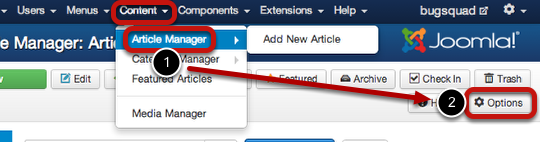
First step, go to "Content" -> "Article Manager" ->"Options"
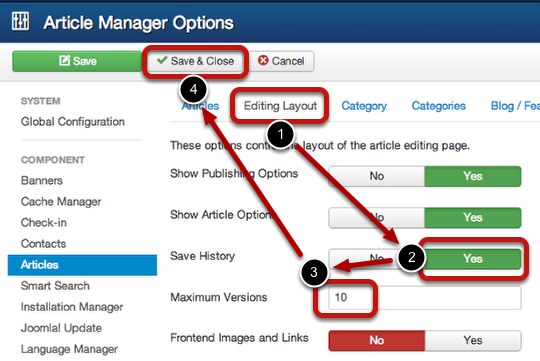
After that, go to "Editing Layout" tab;
In "Save History" coloum, choose "Yes";
Adjust the "Maximum Versions" setting to your preference. This sets the number of latest revisions to save for the article.
And click "Save & Close".
Test the Feature
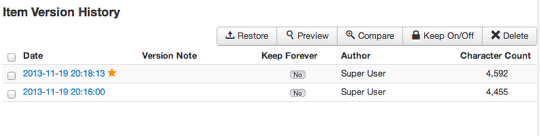
For make test feature, enter an article, make a few revisions, then click "Save". Make a few more revisions, then click "Save" again. Finally, click on the "Versions" button to see the saved changes.
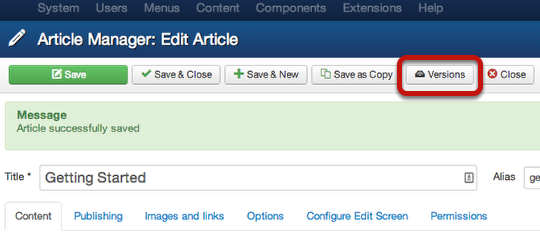
In the above screenshot everything's working. I can now preview a revision, restore it, compare it to another, keep it on, and delete it.Remember, the function of Keep On/Forever option is to store that version indefinitely. We using an example in this tutorial because it is an easy way to explain this feature.
Do you know about the function of the Maximum Versions setting? If you set that to 5, then 5 versions of that article are saved. On the 6th one, the 1st version gets deleted so that there are still 5 versions left total. What if you want to keep the first one or any other article? That's where the Keep On setting comes into play. If you enable it for that article version, it won't automatically get deleted from the list, but rather will remain there untouched. It's basically a "lock" feature that prevents deletion.
13397b48-8e50-4d69-896b-34fa5a3e33fd|0|.0