Joomla Hosting BLOG

Blog about Joomla, Technologies and Hosting Service

Joomla 3.2 Hosting - ASPHostPortal.com :: How to fix a blank screen after upgrading to Joomla 3.2

clock December 20, 2013 07:46 by author ben

In the process of updating some of our Joomla template packages from Joomla 2.5 to Joomla 3.2, I've just come across an easily circumvented bug during the update process.

What is the error?
The error occurs during the installation of the Joomla 3.2 via the Joomla Update component and ends in the user being presented with a blank screen. In most cases a blank screen means that there is a php error and because error reporting is set to default the error is not displayed on the screen and so all we see is a blank screen.


How to turn error reporting on in Joomla if you can't access the administrator.
To confirm the error that you are dealing with you need to turn error reporting on in the site's global configuration. Normally this is accessible via the control panel however since it's not possible to access any pages in the administrator you need to adjust the setting manually.

1. In your site's root locate the file called configuration.php


2. Open the file with a text or code editor and edit the current setting for error reporting.


3. The default setting is usually "default" and so in order to display errors on the page you need to change this settign to maximum.


4. After doing this and refreshing the front or back end of your site you should see the following error.

Fatal error: Call to a member function get() on a non-object in /PATH-TO-YOUR-SITE/plugins/system/remember/remember.php on line 94

Now we know what we are dealing with
So now that we have a discernible error on the page we know which fiel is causing the issue and gives us some material to start doign a google search with.

The solution
The solution is to temporarily disable the remember.php file which is a part of the core Joomla installation. Renaming files in your installation with error reporting on is a very useful tool to investigate the cause of errors in your Joomla installation.


If all goes well after you refresh the page you should now be able to navigate around the administrator.
Renamed the remember.php file to the original name again the site functioned properly.


Enterprise Email Hosting :: ASPHostPortal.com Launches Reliable and Scalable Enterprise Email Hosting

clock December 17, 2013 05:26 by author ben

ASPHostPortal.com, a leading Windows web hosting provider, proudly announces Enterprise Email Hosting for all costumer. With Email Hosting Services from ASPHostPortal.com, you’ll find the perfect hosted email solution for your small business. These professional tools and features enable you to access and manage your email and communicate and collaborate from your desktop or mobile devices anywhere in the world.

Enterprise Email Hosting uses the Internet to communicate information about promotions, company offerings, product updates and more. It is a valuable dialogue between a prospective or current customer and a company. Enterprise Email Hosting is more cost effective, and achieves results faster than traditional direct mail marketing. Most importantly, This service is twice as effective as traditional direct mail in getting a response from the targeted audience.

ASPHostPortal.com offer Enterprise Email hosting with the following features:

  • 2 GB Mailbox Space
  • Support Blackberry
  • WebMail Access
  • POP/SMTP/IMAP
  • Total Bulk Email up to 10.000 emails/month

"An  enterprise email hosting account costs $8.00 per month and gives you 10 mailbox that you can access using your smartphone especially Blackberry, Webmail and POP3 Email programs like Outlook.  Once it is ordered it is available to use immediately."said Dean Thomas, Manager at ASPHostPortal.com.

Web hosting is gaining huge amount of popularity because of its several benefits. The most popular hosting of all is Email hosting. A good email hosting has the ability to protect all the important emails.

Where to look for the best email hosting service? How to know more about the different types of hosting services? Read more about it on http://www.asphostportal.com.


About ASPHostPortal.com:

ASPHostPortal.com is a hosting company that best support in Windows and ASP.NET-based hosting. Services include shared hosting, reseller hosting, and sharepoint hosting, with specialty in ASP.NET, SQL Server, and architecting highly scalable solutions. As a leading small to mid-sized business web hosting provider, ASPHostPortal.com strive to offer the most technologically advanced hosting solutions available to all customers across the world. Security, reliability, and performance are at the core of hosting operations to ensure each site and/or application hosted is highly secured and performs at optimum level.


Free, Best and Reliable Entity Framework 6 Hosting with ASPHostPortal.com

clock December 11, 2013 05:34 by author ben

Entity Framework is actively developed by the Entity Framework team which is assigned to the Microsoft Open Tech Hub and in collaboration with a community of open source developers. Together we are dedicated to creating the best possible data access experience for .NET developers.
The Entity Framework version 6 Release Candidate is now available to developers for immediate download. The open source object-relational mapper is designed to enable .NET developers to work with relational data using domain-specific objects. Entity Framework allows programmers to create a model by writing code or using boxes and lines in the EF Designer. Both of these approaches can be used to target an existing database or create a new database

There are The Top features of Entity Framework 6 :

  • Connection Resiliency - enables automatic recovery from transient connection failures.
  • Async Query and Save - dds support for the task-based asynchronous patterns that were introduced in .NET 4.5. With .NET 4.5 Microsoft introduced async and await keywords but in EF 5 Microsoft didn't have time to add support for async query and save but now with EF6 it is supported.
  • Code-Based Configuration - gives you the option of performing configuration - that was traditionally performed in a config file - in code.
  • Dependency Resolution - introduces support for the Service Locator pattern and we’ve factored out some pieces of functionality that can be replaced with custom implementations.
  • Interception/SQL logging - provides low-level building blocks for interception of EF operations with simple SQL logging built on top.
  • Testability improvements - make it easier to create test doubles for DbContext and DbSet.
  • Features that come for free - These are capabilities that are part of the core. You don’t even have to know they’re there to benefit from them, much less learn any new coding. This group includes features such as performance gains brought by a rewritten view-generation engine and query compilation modifications, stability granted by the ability of DbContext to use an already open connection, and a changed database setting for SQL Server databases created by Entity Framework.
  • DbContext can now be created with a DbConnection that is already opened - which enables scenarios where it would be helpful if the connection could be open when creating the context (such as sharing a connection between components where you can not guarantee the state of the connection).

Top Reasons To Choose Entity Framework 6 Hosting

  • Fast and Secure Server - Our powerfull servers are especially optimized and ensure the best Entity Framework 6 performance. We have best data centers on three continent, unique account isolation for security, and 24/7 proactive uptime monitoring.
  • Best and Friendly Support - Our support team is extremely fast and can help you with setting up and using Entity Framework 6 on your account. Our customer support will help you 24 hours a day, 7 days a week and 365 days a year.
  • Dedicated Application Pool - With us, your site will be hosted using isolated application pool in order to meet maximum security standard and reliability.
  • Uptime & Support Guarantees - We are so confident in our hosting services we will not only provide you with a 30 days money back guarantee, but also we give you a 99.9% uptime guarantee.
  • World Class Control Panel - We use World Class Plesk Control Panel that support one-click installation.

So, you'll get the best, cheap and reliable Entity Framework 6 hosting with us. Why wait longer?


Joomla Hosting :: New Features of Joomla 3.2

clock December 4, 2013 07:38 by author Mike

Joomla 3.2 is an award-winning content management system (CMS), which enables you to build Web sites and powerful online applications. Many aspects, including its ease-of-use and extensibility, have made Joomla the most popular Web site software available. Best of all, Joomla is an open source solution that is freely available to everyone.

Joomla 3.2 is truly a Something New for Everyone release, which standard-term support release and is a one-click upgrade (not a migration) from previous Joomla 2.5 and 3 series releases.

Joomla 3.2 Hosting Features
Here is a list of the top new features worth checking out in Joomla 3.2:

  • Content History - Content versioning is Joomla's feature for storing, comparing, and reverting content. For example, you can use it to change back to a previous revision of an article if a mistake happens.
  • JUX Improvements -There have been dozens of improvements to the Joomla User eXperience (JUX) to provide a more user-friendly CMS. Two of my favorites are the cleaned up control panel and top menu. I especially love the way the new control panel looks.
  • Front-end Administration of Global Configuration Settings - Joomla now has two new menu item types that allow end-users to change some of the settings from the front-end. The component uses a web-services approach to change the settings.
  • TinyMCE Update - TinyMCE has been updated to 4.0 and it looks amazing. Just compare the before (above) and after (below) screenshots to decide for yourself.
  • Install from Web - The Install from Web feature will include free and commercial extensions, with commercial extensions redirecting to the developers' sites for payment, then automatic installation.
  • Joomla Multilingual-site Automatic - For those wanting a multi-lingual site, you'll now be able to set one up automatically during Joomla's initial installation saving you precious setup time.
  • Improved Template Manager - All that could be done in Template Manager was to edit pre-existing CSS files of templates, to edit root template files, and to duplicate templates.
  • Post-install Messages - There's now a post-install component that is used to notify admins of important information when Joomla or an extension is installed or updated.
  • RAD (Rapid Application Development) Layer - Joomla's new RAD layer is a rapid application development framework on top of Joomla.
  • AJAX Interface - oomla 3.2 has also added an interface for AJAX entry points. This will save development time and also provide standardization for 3rd party custom extensions.
  • Micro-data Semantics Library - Another Library that has been added for developers is one that implements http://schema.org micro-data semantics.
  • HTML5 Form Fields and Attributes - improvement for developers is the addition new HTML form fields and attributes.
  • Two Factor Authentication - TFA produces an extra temporary security code that is then sent privately to the user (e.g. to their smart phone app) and which allows them to login. This prevents unauthorized login attempts.
  • BCrypt encryption of Passwords - Joomla now provides an even stronger password encryption method using BCrypt.
  • MooTools to jQuery Conversion - Much of the Joomla Core has been converted from MooTools to jQuery, as jQuery has become the default Joomla library in Joomla 3.


Joomla Hosting :: How to Setting Permission for Users in Multiple User Groups in Joomla 2.5

clock November 27, 2013 04:51 by author Mike

Joomla! allows site administrators to place Users into multiple Groups. This article explains that Permissions are applied to Groups and not to individual Users. Thus, a User receives Permissions based on the Group or Groups that he or she belongs to. If a User is placed into one User Group, that User only has the Permissions belonging to that group. It s a simple concept. However, it is less clear when the User is a member of multiple Groups. This article explains how Permissions are assigned to a user that is a member of multiple Groups, as well as how to view the Permissions that are assigned to an individual User.

Permissions For Users in multiple Groups

As explained earlier in this series of articles, Permissions in Joomla! can be set to one of three settings: Not Set, Allowed, and Denied. The "Allowed" settings grant that Permission, and the"Not Set" and "Denied" settings take away Permission. But what happens when a User is assigned to two or more groups and Permissions in one Group are set differently than they are in the other Group? In that scenario, the "Allowed" setting will override the "Not Set" setting, and the "Denied" setting will override both the "Allowed" and "Not Set" settings.

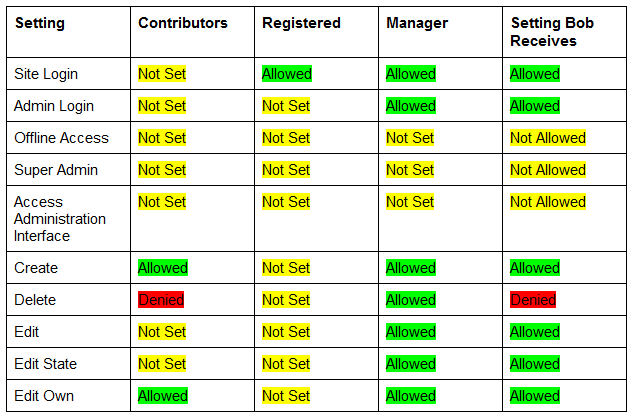
To illustrate how this works, let’s create an example. Let’s say you have created a Group called Contributors which has the Create and Edit Own permissions set to "Allowed", the Delete permission set to "Denied", and all other Permissions set to "Not Set". You have also created a user named Bob, and placed him into the Contributors and Registered Groups. The Registered Group is a preset group within your Joomla! application. It has the Site Login Permission set to "Allowed", and all other Permissions set to "Not Set". With this setup, Bob will receive the Site Login, Create, and Edit Own Permissions.

Now let’s say you add Bob to the Manager Group which has Site Login, Admin Login, Create, Delete, Edit, Edit State, and Edit Own Permissions set to "Allowed". The other Permissions are set to "Not Set". At this point, Bob will now receive the Site Login, Admin Login, Create, Edit, Edit State, and Edit Own Permissions. You may be wondering why Bob does not receive the Delete permission since the Manager Group has the Delete Permission set to "Allowed". This is due to the fact that the Contributors Group (which Bob is a part of) has the Delete Permission set to "Denied" - this will override the "Allowed" setting in the Manager Group. To make it easier to see how these settings are applied to Bob, the table below lists the settings for each Permission in each of the groups that Bob is assigned to and the end result:
permmulti1

Viewing Permissions assigned to individual Users

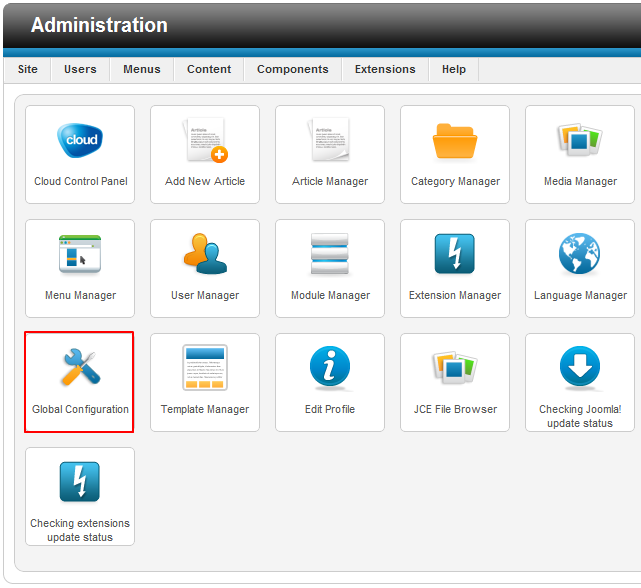
As you can see, figuring out which Permissions have been given to an individual User that is in multiple Groups can become difficult rather quickly. To make things a bit easier, Joomla! includes a built-in tool to view all of the Permissions that have been assigned to an individual User. To turn this feature on, go to Global Configuration are from the control panel in the Administration area (the back end) of your site.
permmulti2

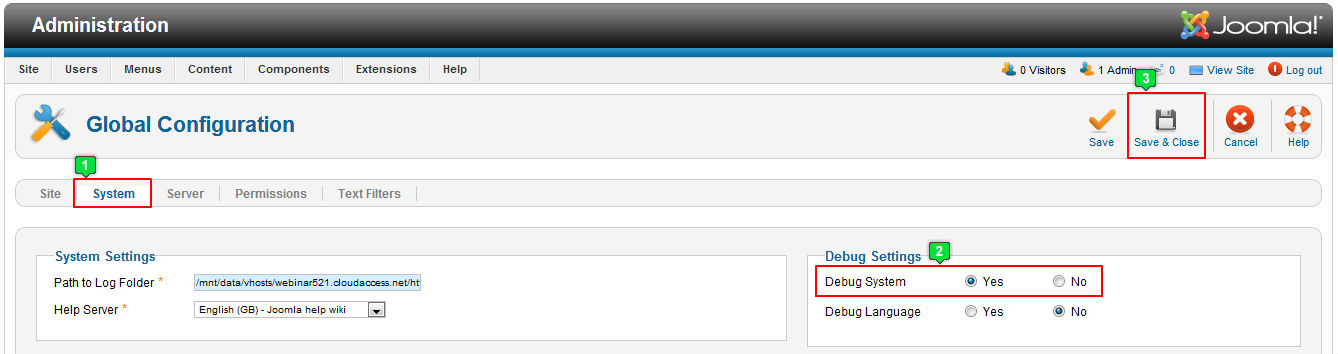
Go to the System tab, and enable the Debug System option by clicking on "Yes". Be sure to save your work when you re done.
permmulti3

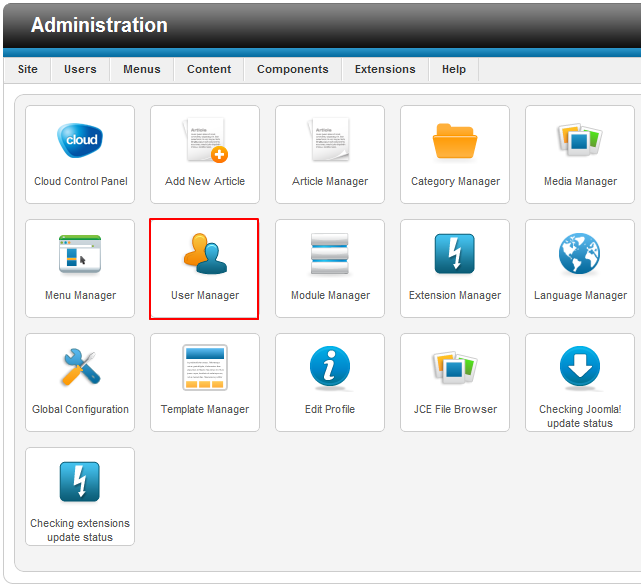
Next, go to the User Manager.

permmulti4

Once inside the User Manager, you ll notice a Debug Permissions Report button next to each Username.
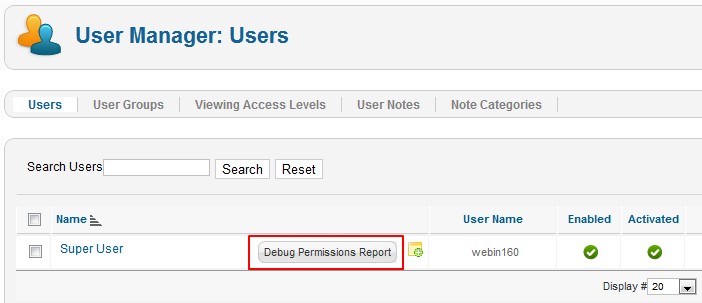
permmulti5

You will also see this button next to each Group in the Group Manager.
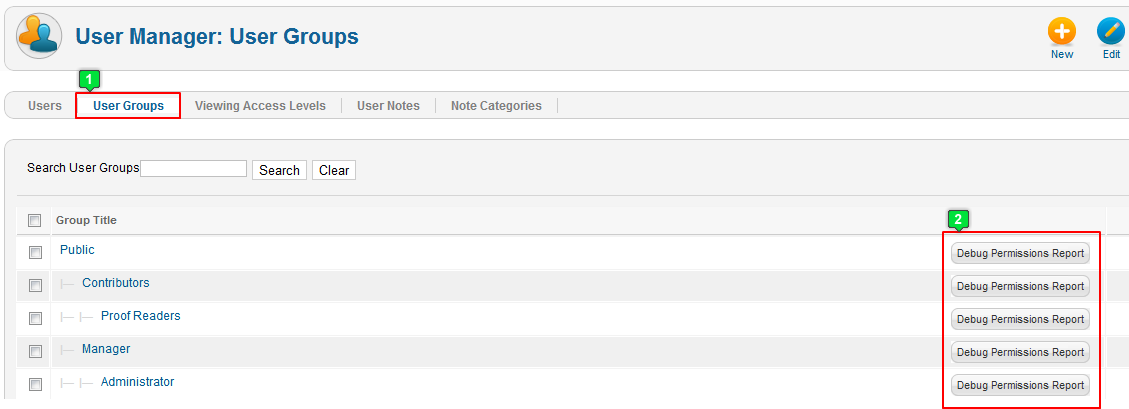
permmulti6


The Debug Permissions Report will show you which Permissions that User or Group has for each area of your site including Articles, Categories, Contacts, Menus and Menu Items, Modules, and Components.
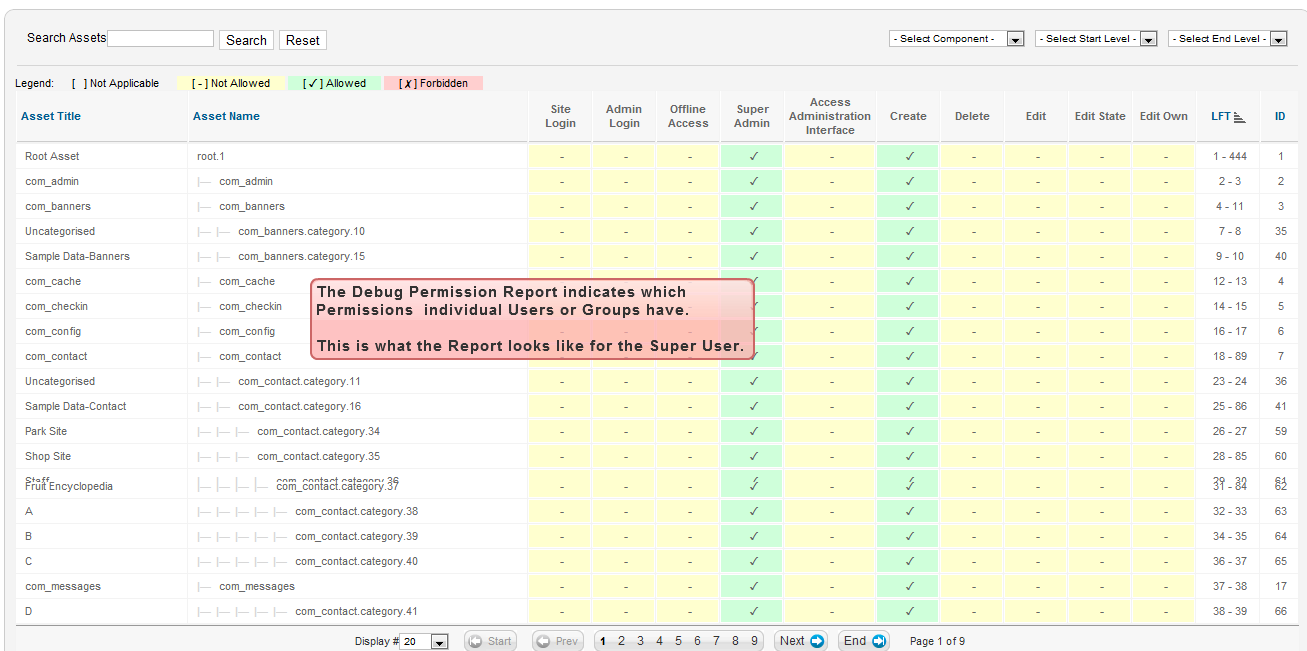
permmulti7


Joomla 3.1 Hosting - ASPHostPortal.com :: How To Add Bootstrap To Joomla 3.1 Template

clock November 15, 2013 06:47 by author ben

Now that we have added the CSS and JS files to the Joomla 3.0 template that we are creating, we will now add the Necessary bootstrap files.
While the bootstrap Necessary files can be downloaded from the official site, Joomla 3.0 actually includes the Necessary bootstrap css and javascript files as well. As a template developer, this will the make incorporating these files much Easier.

Some bootstrap loaded with <jdoc:include type="head" />
When we added <jdoc:include type="head" /> within our template's head tag, Joomla automatically added a few JavaScript and CSS files. In the list of files below that Joomla added, you will notice that we've highlighted the bootstrap files that it included:


According to the official bootstrap documentation, we need to include the following files:
1. bootstrap.css (or bootstrap.min.css)
2. bootstrap.js (or bootstrap.min.js)
As <jdoc:include type="head" /> already included bootstrap.min.js for us, we only need to include bootstrap.min.css. To do this, we will update our template's index.php on our Joomla hosting server to include this file. You can see the code we added below that includes bootstrap.min.css, which we've highlighted:


After editing our template's index.php on the server and saving the changes, our template is taking a little more form. You can see in the screenshots below how our template looks with and without this css file.

  • BEFORE bootstrap.min.css

  • AFTER bootstrap.min.css


Free Trial Web Deploy 3.5 Hosting :: ASPHostPortal.com Proudly Launches Web Deploy 3.5 Hosting

clock November 1, 2013 10:50 by author Mike

Professional web hosting provider – ASPHostPortal.com proudly announced the integration of the latest Web Deploy 3.5 in all  web hosting plans. We are the first few hosting company that provide ASP.NET hosting plan that support the brand new Web  Deploy 3.5 Hosting.


WebDeploy v3.5 is now available and there are a few features to consider in this minor release:

  1. Load Balancer Support with Session Affinity. 
  2. Encrypting web.config Settings Post-Publish.
  3. App Offline Template.
  4. Seamless integration with IIS Manager (IIS7 and above), Visual Studio (2010 and above) for creating packages and  deploying them onto a machine, both locally and remotely.
  5. Integration with WebMatrix for deploying and downloading web applications.
  6. Seamless integration with the Web Platform Installer to install community web applications simply and easily.
  7. Web application packaging and deployment.
  8. Web server migration and synchronization.
  9. Automatic backup of Web Sites before making any changes.
  10. In addition to the IIS Manager, Visual Studio 10, Web Matrix tasks can be performed using the command-line, PowerShell  Cmdlets or public APIs.

According to ASPHostPortal.com, it's Web Deploy 3.5 offerings are distinguished by their low cost, with many of the hosting  services supporting the technology being of the more expensive variety.
For more information about this topics or have any enquiries related to Web Deploy 3.5 hosting, please visit  http://www.asphostportal.com

About ASPHostPortal.com:
ASPHostPortal.com is a hosting company that best support in Windows and ASP.NET-based hosting. Services include shared  hosting, reseller hosting, and sharepoint hosting, with specialty in ASP.NET, SQL Server, and architecting highly scalable  solutions. As a leading small to mid-sized business web hosting provider, ASPHostPortal strive to offer the most  technologically advanced hosting solutions available to all customers across the world. Security, reliability, and  performance are at the core of hosting operations to ensure each site and/or application hosted is highly secured and  performs at optimum level.


Joomla Hosting - ASPHostPortal.com :: How To Protect Your Joomla Site From Force Attacks

clock October 22, 2013 07:22 by author ben

Even if you have a relatively small website, it is likely that you eventually have to deal with hackers. One of the most common methods of hacking is the brute force attack – here hackers will cycle through numbers and letters to try to crack your password. It has happened to Joomla users in recent memory, so it is important to be prepared as much as possible.

The reason that these brute force attacks were successful encompasses a number of different factors. First, you have unlimited login attempts with the Joomla platform. This means that brute force hackers can continue to try until they gain access or are detected. While there is not much the average user can do about this, you can use different tactics to make your site more secure against these hackers.


1. Don’t use the admin username
Many times, the most common usernames are targeted such as admin, webmaster, administrator, test, etc. These all are very common usernames and that’s why, it makes sense to avoid using them. Don’t worry, from the backend, you can select a different name that’s publicly visible. This means that your username can be “amazingme” and you can choose a different name to be displayed on the front-end.


2. Use a strong password

Use a strong password and avoid common passwords such as fghj, 2221, 12345, your name, etc. The brute force attack targets all the common passwords first, and that’s why you should use a strong password that is a combination of uppercase and lowercase letters, numbers and special characters like #@*^. For example; a strong password would be something like h@LL003v3ryB0dy^^#. Also, never use the same password at two different places.


3. Limit login attempts
It is highly recommended that you limit login attempts. This can be done by using a security plugin like Better Joomla Security, or by using Limit Login Attempts plugin.


4. Update core and add-ons to improve Joomla security
Since the most common successful attacks are due to known vulnerabilities in outdated Joomla versions and add-ons, one of the most important tasks for anyone responsible for Joomla security is to ensure that all the software remains up to date.
Thus, one of the most important features that has been added to Joomla is the new Joomla Update Manager which can be used to easily update many extensions, as well as the Joomla Update component to update Joomla itself.

5. Backup often
Take regular backup of your complete Joomla site. Some people don’t give importance to backup, and unfortunately, they realize the value of backup only after a disaster strikes. Also don’t rely much when your host says that they regularly perform backup, because if they don’t, then it will create more problems.


Joomla Hosting :: Joomla Redirecting Multiple URLs - Home Page with .htaccess

clock October 21, 2013 08:47 by author Mike

If you've changed menu items or aliases on your website, the old links will still be indexed on Google until it gets back around to checking them again. This means that if someone is linked to your website in Google and it gives them an old link, they will get a 404 error and won't be able to view anything.

This is where redirecting comes in. We need to redirect all the old links to the new ones to ensure a viewer still gets to the correct page. This can be done individually but can take hours - this is where we can utilise a batch redirect to speed up our process. This basically enables you to take any links with a certain alias and point it to a new alias.

Here is what a default Joomla htaccess file looks like:

##
# @package		Joomla
# @copyright	Copyright (C) 2005 - 2013 Open Source Matters. All rights reserved.
# @license		GNU General Public License version 2 or later; see LICENSE.txt
##

##
# READ THIS COMPLETELY IF YOU CHOOSE TO USE THIS FILE!
#
# The line just below this section: 'Options +FollowSymLinks' may cause problems
# with some server configurations.  It is required for use of mod_rewrite, but may already
# be set by your server administrator in a way that dissallows changing it in
# your .htaccess file.  If using it causes your server to error out, comment it out (add # to
# beginning of line), reload your site in your browser and test your sef url's.  If they work,
# it has been set by your server administrator and you do not need it set here.
##

## Can be commented out if causes errors, see notes above.
Options +FollowSymLinks

## Mod_rewrite in use.

RewriteEngine On

## Begin - Rewrite rules to block out some common exploits.
# If you experience problems on your site block out the operations listed below
# This attempts to block the most common type of exploit `attempts` to Joomla!
#
# Block out any script trying to base64_encode data within the URL.
RewriteCond %{QUERY_STRING} base64_encode[^(]*\([^)]*\) [OR]
# Block out any script that includes a <script> tag in URL.
RewriteCond %{QUERY_STRING} (<|%3C)([^s]*s)+cript.*(>|%3E) [NC,OR]
# Block out any script trying to set a PHP GLOBALS variable via URL.
RewriteCond %{QUERY_STRING} GLOBALS(=|\[|\%[0-9A-Z]{0,2}) [OR]
# Block out any script trying to modify a _REQUEST variable via URL.
RewriteCond %{QUERY_STRING} _REQUEST(=|\[|\%[0-9A-Z]{0,2})
# Return 403 Forbidden header and show the content of the root homepage
RewriteRule .* index.php [F]
#
## End - Rewrite rules to block out some common exploits.

## Begin - Custom redirects
#
# If you need to redirect some pages, or set a canonical non-www to
# www redirect (or vice versa), place that code here. Ensure those
# redirects use the correct RewriteRule syntax and the [R=301,L] flags.
#
## End - Custom redirects

##
# Uncomment following line if your webserver's URL
# is not directly related to physical file paths.
# Update Your Joomla! Directory (just / for root).
##

# RewriteBase /

## Begin - Joomla! core SEF Section.
#
RewriteRule .* - [E=HTTP_AUTHORIZATION:%{HTTP:Authorization}]
#
# If the requested path and file is not /index.php and the request
# has not already been internally rewritten to the index.php script
RewriteCond %{REQUEST_URI} !^/index\.php
# and the request is for something within the component folder,
# or for the site root, or for an extensionless URL, or the
# requested URL ends with one of the listed extensions
RewriteCond %{REQUEST_URI} /component/|(/[^.]*|\.(php|html?|feed|pdf|vcf|raw))$ [NC]
# and the requested path and file doesn't directly match a physical file
RewriteCond %{REQUEST_FILENAME} !-f
# and the requested path and file doesn't directly match a physical folder
RewriteCond %{REQUEST_FILENAME} !-d
# internally rewrite the request to the index.php script
RewriteRule .* index.php [L]
#
## End - Joomla! core SEF Section.

To add our redirects, we must ensure we put them before the Joomla SEF rewrites which is generally the last part of the file. See below how you can rewrite a URL.

######PTP SEO Redirections -- BEGIN
#301 Redirect Entire Old directories
RewriteRule blog/blog-category-1(.*)$ blog/blog-category-2$1 [R,L]
######PTP SEO Redirections -- END

This basically tells anything that has blog/blog-category-1 in it to redirect to the URL blog/blog-category-2. so the url withblog/blog-category-1/sub-category/item-to-view will automatically update toblog/blog-category-2/sub-category/item-to-view

Below is where we need to add this into our htaccess file - just before the SEF rewrites.

######PTP SEO Redirections -- BEGIN
#301 Redirect Entire Old directories
RewriteRule blog/blog-category-1(.*)$ blog/blog-category-2$1 [R,L]
######PTP SEO Redirections -- END

# RewriteBase /

## Begin - Joomla! core SEF Section.
#
RewriteRule .* - [E=HTTP_AUTHORIZATION:%{HTTP:Authorization}]
#
# If the requested path and file is not /index.php and the request
# has not already been internally rewritten to the index.php script
RewriteCond %{REQUEST_URI} !^/index\.php
# and the request is for something within the component folder,
# or for the site root, or for an extensionless URL, or the
# requested URL ends with one of the listed extensions
RewriteCond %{REQUEST_URI} /component/|(/[^.]*|\.(php|html?|feed|pdf|vcf|raw))$ [NC]
# and the requested path and file doesn't directly match a physical file
RewriteCond %{REQUEST_FILENAME} !-f
# and the requested path and file doesn't directly match a physical folder
RewriteCond %{REQUEST_FILENAME} !-d
# internally rewrite the request to the index.php script
RewriteRule .* index.php [L]
#
## End - Joomla! core SEF Section.


Free ASP.NET hosting - ASPHostPortal.com :: ASPHostPortal.com Proudly Announces Free Trial Windows ASP.NET Hosting

clock October 3, 2013 10:58 by author ben

ASPHostPortal.com is a premier Windows and ASP.NET Web hosting company that specializes in Windows and ASP.NET-based hosting. We proudly announces 7 Day Free Trial Windows and ASP.NET Hosting to all new customers. The intention of this FREE TRIAL service is to give our customers a "feel and touch" of our system. This free trial is offered for the next 7 days and at anytime, our customers can always cancel the service.


The 7 Day Free Trial is available with the following features:

- Unlimited Domains
- 5 GB Disk Space
- 60 GB of Bandwidth
- 2 MS SQL Database
- Unlimited Email Account
- Support ASP.NET 4.5
- Support MVC 4.0
- Support SQL Server 2012
- Free Installations of ASP.NET And PHP Applications

ASPHostPortal.com believes that all customers should be given a free trial before buying into a service and with such approach, customers are confident that the product / service that they choose is not faulty or wrong. Even we provide free trial service for 7 days, we always provide superior 24/7 customer service, 99,9% uptime guarantee on our world class data center. On this free trial service, our customer still can choose from our three different data centre locations, namely Singapore, United States and Amsterdam (The Netherlands)

Anyone is welcome to come and try us before they decide whether or not they want to buy. If the service does not meet your expectations, our customer can simply cancel before the end of the free trial period.

For all the details of packages available visit ASPHostPortal.com

About ASPHostPortal.com:

ASPHostPortal.com is a hosting company that best support in Windows and ASP.NET-based hosting. Services include shared hosting, reseller hosting, and sharepoint hosting, with specialty in ASP.NET, SQL Server, and architecting highly scalable solutions. As a leading small to mid-sized business web hosting provider, ASPHostPortal strive to offer the most technologically advanced hosting solutions available to all customers across the world. Security, reliability, and performance are at the core of hosting operations to ensure each site and/or application hosted is highly secured and performs at optimum level.


About ASPHostPortal.com

We’re a company that works differently to most. Value is what we output and help our customers achieve, not how much money we put in the bank. It’s not because we are altruistic. It’s based on an even simpler principle. "Do good things, and good things will come to you".

Success for us is something that is continually experienced, not something that is reached. For us it is all about the experience – more than the journey. Life is a continual experience. We see the Internet as being an incredible amplifier to the experience of life for all of us. It can help humanity come together to explode in knowledge exploration and discussion. It is continual enlightenment of new ideas, experiences, and passions

 photo ahp banner aspnet-01_zps87l92lcl.png

Corporate Address (Location)

ASPHostPortal
170 W 56th Street, Suite 121
New York, NY 10019
United States

Sign in