Joomla Hosting BLOG

Blog about Joomla, Technologies and Hosting Service

ASPHostPortal.com Announces Moodle 2.9.1 Hosting Solution

clock September 22, 2015 08:45 by author ben

Choosing a Moodle hosting company can be a tedious process because of the large numbers of number of hosting companies on the market, considerations to make and options to choose from. Going through all of them to check is a near impossible task. But ASPHostPortal.com is Moodle hosting provider that must be in your consideration. We offer Moodle 2.9.1 hosting with excellent service, faster and stable network.

Moodle is the open source platform that lets you build the perfect education solution for your needs. The Moodle learning platform is based on strong pedagogical principles, providing a private learning space for you to design online courses with flexible content and collaborative activities so your students are constantly experiencing feedback. Moodle platform has been used worldwide by millions of users from vast corporations in village classrooms with all shapes, sizes and flavours in between. They were empowered learning everywhere.

Moodle is a modular system based on plugins, which are like Lego blocks that you put together to build whatever you want. There are plugins for different kinds of content, and plugins for all kinds of collaborative activities, which is where Moodle really shines. As an example their Workshop plugin manages a full peer assessment process, so you can get hundreds of students accurately grading each other’s assignment (that can save you a lot of time!). Add some tracking and reports and the ability to add more plugins from the community or even ones you write yourself, and you can build some pretty amazing education environments.

ASPHostPortal.com provides Premium Moodle 2.9.1 Hosting on high performance servers and high-speed internet connection in the world. Every server is equipped with at least 2x Intel Xeon Quad-Core processors and massive amounts of memory. We are using SSD's for storage, which provides much higher performance in terms of I/O and data transfer speed. The servers are connected to the network using multiple 1Gbps ports (bond network). So your Moodle education environment won’t be down and always up at the high rate speed connection. To learn more about their Moodle 2.9.1 Hosting, please visit http://asphostportal.com/Moodle-2-9-1-Hosting

About ASPHostPortal.com :
ASPHostPortal.com is The Best, Cheap and Recommended ASP.NET & Linux Hosting. ASPHostPortal.com has ability to support the latest Microsoft, ASP.NET, and Linux technology, such as: such as: WebMatrix, WebDeploy, Visual Studio 2015, .NET 5/ASP.NET 4.5.2, ASP.NET MVC 6.0/5.2, Silverlight 6 and Visual Studio Lightswitch, Latest MySql version, Latest PHPMyAdmin, Support PHP 5.x, etc. Their service include shared hosting, reseller hosting, and sharepoint hosting, with speciality in ASP.NET, SQL Server, and Linux solutions. Protection, trustworthiness, and performance are on the core of hosting operations to make certain every website and software hosted is so secured and performs at the best possible level.


Joomla 3.4.4 Hosting - ASPHostPortal :: What's New in Joomla 3.4.4?

clock September 21, 2015 09:47 by author ben

What's New in Joomla 3.4.4?

What's Joomla?

Joomla is a free and open-source content management system (CMS) for publishing web content. It is built on a model–view–controller web application framework that can be used independently of the CMS. Joomla is written in PHP, uses object-oriented programming (OOP) techniques and software design patterns, stores data in a MySQL, MS SQL, or PostgreSQL database, and includes features such as page caching, RSS feeds, printable versions of pages, news flashes, blogs, search, and support for language internationalization.

Jommal provides an online collaborative community manual for Joomla! users, developers or anyone interested in learning more about Joomla! Currently, they have over 4000 articles written and maintained by Joomla! community members.

New in Joomla 3.4.4

  • Further en-GB language cleanup
  • Fixes for MSSQL and PostgresSQL Joomla installations
  • jQuery, HTML5Shiv and CodeMirror updates
  • Finished implementing the Joomla codestyle rules

Joomla can be used for

  • Specialist websites
  • Simple websites
  • Custom applications
  • Many design options

The benefits of having a Joomla website:

  • Website is easy to update
  • Website can be updated from anywhere with an internet connection
  • Multiple people can access the administration site at the same time
  • Design changes are easy to implement
  • There is no need to pay a specialist to do the updates
  • You control when you want to do the updates

Best Joomla Hosting Recommendation

ASPHostPortal.com provides our customers with Plesk Panel, one of the most popular and stable control panels for Windows hosting, as free. You could also see the latest .NET framework, a crazy amount of functionality as well as Large disk space, bandwidth, MSSQL databases and more. All those give people the convenience to build up a powerful site in Windows server. We offers Joomla hosting starts from $5/month only. We also guarantees 30 days money back and guarantee 99.9% uptime. If you need a reliable affordable Joomla Hosting, we should be your best choice.


ASPHostPortal.com Announces WordPress 4.3 Hosting Solution

clock September 15, 2015 09:00 by author ben

Although WordPress is free and usually you can use it as a separate individual without any problem, for any business website you need a web hosting and your own domain to make a business out of your blog or business website. Using open source WordPress with your own domain having a unique identity makes it profitable brand. Purchasing a domain name is easy, but you have to consider certain factors while choosing a hosting provider for WordPress websites. ASPHostPortal.com is reliable and powerful WordPress hosting provider for you. Today, they offer WordPress 4.3 hosting with excellent service and complete WordPress package.

WordPress is a publishing platform used for building websites and blogs. It allows for a highly customizable user interface. WordPress powers millions of websites in worldwide, and many big brands use WordPress: CNN, PlayStation, New York Times Blogs, People Magazine, and even Ford- they all use WordPress. Pretty impressive list of users, if it’s good enough for the big boys, it’s good enough for your site.

A great thing about WordPress is, it's completely open source which means that the source code used to run WordPress is available to the general public. This means that anyone on the planet can modify the code if necessary and customize WordPress even further to be what they need. Often, this isn't necessary, but it also means that some plugins and themes (templates) created for the platform are also open source. Imagine a world-wide community working together to add more features and functionality to WordPress, you're not limited to only being able to use specific employees or developers to produce customizations, which means it's a powerful CMS system ready to do what you need it to, it's flexible, and easy to customize.

ASPHostPortal.com is a web hosting provider dedicated to providing high quality web hosting at an affordable price. They care for the clients, ensuring each and every client is more than just satisfied day in and day out. They only use the best hardware, super fast network, covered by 24/7 Support Team. They have locations in 8 world class data centers, located USA, Europe, Asia and Australia. Each of locations will provide with amazing performance. To learn more about their WordPress 4.3 Hosting, please visit http://asphostportal.com/WordPress-4-3-Hosting

About ASPHostPortal.com :

ASPHostPortal.com is The Best, Cheap and Recommended ASP.NET & Linux Hosting. ASPHostPortal.com has ability to support the latest Microsoft, ASP.NET, and Linux technology, such as: such as: WebMatrix, WebDeploy, Visual Studio 2015, .NET 5/ASP.NET 4.5.2, ASP.NET MVC 6.0/5.2, Silverlight 6 and Visual Studio Lightswitch, Latest MySql version, Latest PHPMyAdmin, Support PHP 5.x, etc. Their service include shared hosting, reseller hosting, and sharepoint hosting, with speciality in ASP.NET, SQL Server, and Linux solutions. Protection, trustworthiness, and performance are on the core of hosting operations to make certain every website and software hosted is so secured and performs at the best possible level.


Joomla Hosting - ASPHostPortal.com :: How to Migrate Blogger to Joomla

clock September 11, 2015 06:00 by author ben

I'm hoping to make a website for myself, which I want this blog to be a part of. But how to do it. Well, at first I thought I'd just have it as a feed, but actually I want to incorporate it fully into the joomla site. So.... as for blogger posts, here is the way to do it:

Export from Blogger

Log into your blogger account, go into the Settings page of the blog that you want to export. Under Blog Tools, click Export Blog. Click on Download in the next page. Download the .xml file that Blogger packs for you. It is a collection of all your posts, comments, settings, widgets and template.

Upload .xml to Server

Upload the file you downloaded to your server.

Feed2Post configuration

After that, download Feed2Post for Joomla. It is a commercial component that costs $15. If you want to download it for free, source it on your own :).

Log into Joomla, install Feed2Post component. Go to Component>Feed2Post>View/Edit Entries

  • Put in your feed title. The title will not appear in the posts you import.
  • Point the URL to the address of the .xml file that you have uploaded to your server. It should be something like http://yourdomain.com/blog-xx-xx-xxxx.xml
  • Fill in the Section and Category that you want the posts to appear in. If you intend to import into different categories, you need to repeat this procedure.
  • For Post as User, you can assign the author of the blog posts to your current username. If you have multiple authors, you need to repeat this procedure.
  • Make sure that Full Text Gather, Show Intro, Open Readmore Link at iframe and Include Original Date is set to No.
  • Set feed date as created date to Yes and Store Author to Don’t Store.
  • Save.

Importing Posts

  • Go back to the View/Edit Entries page and check the feed that you have just created. Make sure that the feed is set to Published.
  • Click on Items next to Post All at the top right corner.
  • You may need to wait a bit for it to load. When the page loads, you will be able to view all comments and blog posts from your Blogger account.
  • Check those items that you want to export as blog posts to the Category (and author) that you have defined earlier.
  • Once that is done, click Post at the top right corner.
  • This may take quite long to load if you select a lot of items.
  • If the import is successful, you should see a notification. Your posts should now be in the Article Manager. Your job is done if you are importing all the posts into one category.

If you have Multiple Categories and Authors Set Up..

  • Go back to View/Edit Entries page and check the feed. Click on the Change button at the top.
  • Set the Section, Category and Post as User to the next setting.
  • Repeat the steps in Importing Posts above.

If this helped you, I would appreciate a word of thanks or a tweet. :) I am still trying to import comments into Joomla. If anyone can help, it’ll be great!

Best Joomla Hosting Recommendation

ASPHostPortal.com provides our customers with Plesk Panel, one of the most popular and stable control panels for Windows hosting, as free. You could also see the latest .NET framework, a crazy amount of functionality as well as Large disk space, bandwidth, MSSQL databases and more. All those give people the convenience to build up a powerful site in Windows server. We offers Joomla hosting starts from $5/month only. We also guarantees 30 days money back and guarantee 99.9% uptime. If you need a reliable affordable Joomla Hosting, we should be your best choice.


Joomla 3.4.3 Hosting - ASPHostPortal :: How to insert a PDF file in a Joomla article with JCE File Manager

clock August 24, 2015 10:23 by author ben

How to insert a PDF file in a Joomla article with JCE File Manager

Joomla is an open source content management system that allows you to build web sites and powerful online applications. This award-winning web site software contains easy-to-use features and it is freely available to everyone. In this tutorial, I will show you how to accomplish the same using the File Manager plug-in for JCE.

Using the JCE File Manager makes the job a lot easier. The File Manager is a plug-in to the very popular Joomla Content Editor. The plug-in is part of the package you get when subscribing. JCE itself is free, but the File Manager, Media Manager, Image Manager Extended and some other plug-ins are paid.

 

This is how you insert a PDF file into a Joomla article with JCE:

Create a new article and a text. Select the text and click the "Insert / edit File" button
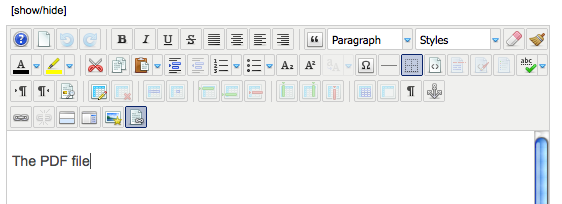
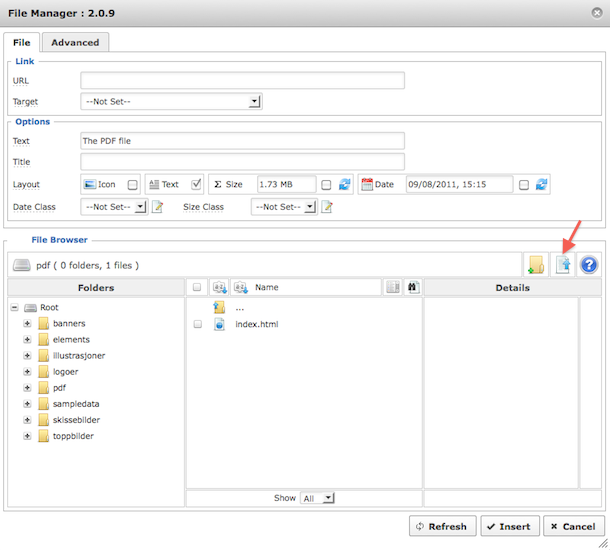
You will see the File Manager window.

Select the folder you want to upload your file to (or create it using the "New Folder" button).

Then, click the "Upload file" button.
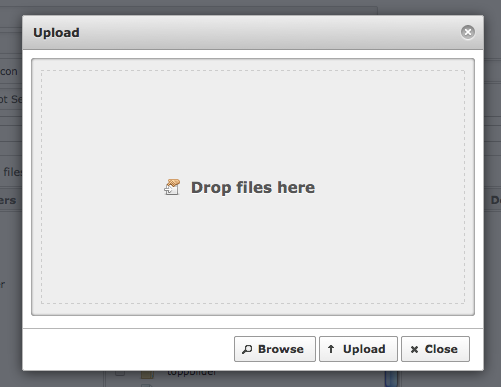
You will see the upload window.

Click "Browse" and select the file from your harddisk. If you're using Firefox, you can drag and drop the file into the upload window. You can add as many files as you want to in this step.
If you try to upload a file that is bigger than 1024 Kb, you will get an error message like this:
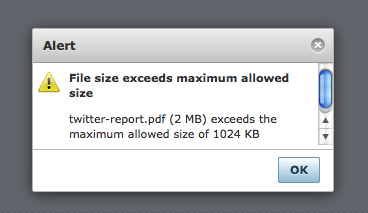
To adjust the file size allowed, go to JCE Administration -> Profiles -> The profile you are using (normally "Default").

Then click the"Plugin Parameters" tab at the top and the "File Manager" tab on the left.

You can now see your server's max upload size and adjust the allowed size. In the below example I've set it to 5 Mb (5000 Kb).
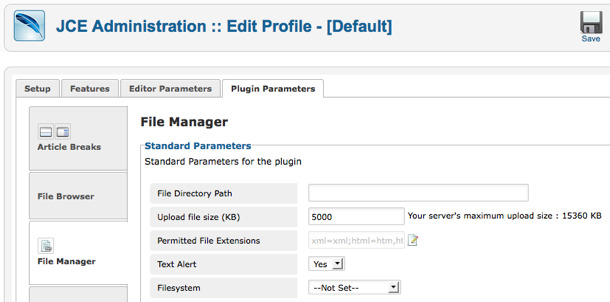
Go back to your article and try to upload again.

You should now see the file(s) in the upload window after browsing for them (as long as they are below your set maximum upload size, that is).

Click "Upload"-
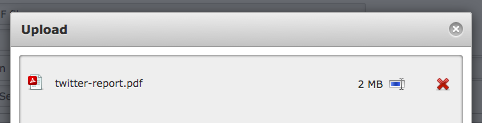
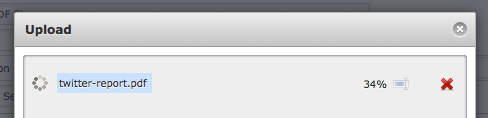
The file(s) will upload to the web server
When the file(s) are uploaded, close the upload window and you will see the file(s) in the File Manager.
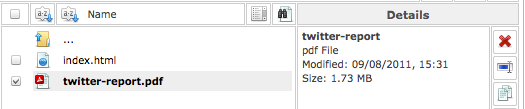
You can now adjust the parameters available before you insert the PDF link into the article.
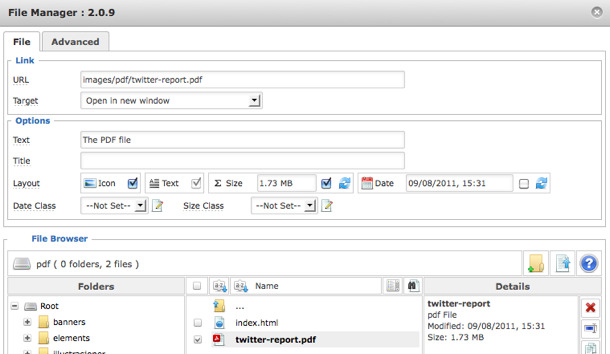
As you can see, you can add an icon (will be set automatically according to the file type), a size parameter or the date. You can also adjust the actual anchor text (the link text) from this window as well. When clicking the document file, you will notice that the File Manager asks you if you want to change the link text to the file name. Sometimes this is a good idea, other times I want to have a more descriptive text as the link. That's really up to you to decide.

Click "Insert" and you will return to the article with the link inserted.
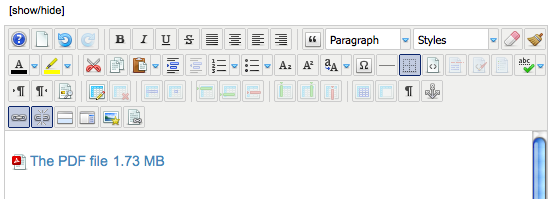
In this case, I chose to add the size to the link. However, if I decide that I don't want it after all, I can remove it directly from the editor. It is actually a normal link, so it behaves exactly the same way as any other link. So, if I remove the size, I get the final PDF link like this:
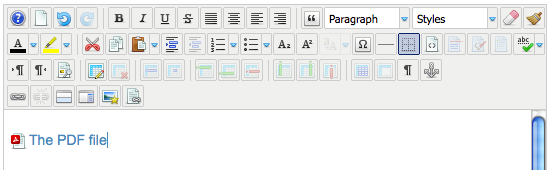
Even though it seems like a lot og steps, once you get the hang of the technique it is really fast to do. And much more efficient than doing it with the Joomla core, which really is a kind of workaround.


Joomla Hosting - ASPHostPortal.com :: How to fix cannot access the private section of this site on Joomla

clock August 19, 2015 06:32 by author ben

This was a pretty interesting issue to find and resolve. It's an database 'error' of sorts that is pretty simple to fix. First of all this is all due to a parent<-child condition that has gone horribly wrong in an update or something else. Most likely you will find this issue in the table "assets". You will need to find your database prefix fist of all, easiest found in the configuration and the option "$dbprefix". I will call it "prefix_" here for ease of typing.

So to find if you have this issue you can run the following in an sql manager of your choosing (mysql or phpmyadmin shoulden't make any differents, i did it in the cli mysql)

SELECT id,parent_id,title FROM `prefix_assets` WHERE parent_id=0;

If you find that there are multiple rows then hit the above do the following

UPDATE `prefix_assets` SET parent_id=1 WHERE parent_id=0 AND NOT id=1;

You should also verify that the "Root Asset" has id 1 and parent_id 0

SELECT id,parent_id,title FROM `prefix_assets` WHERE id=0 OR parent_id=0;

this should give the result

id    parent_id    title
 1    0               Root Asset

if not run

UPDATE `prefix_assets` SET parent_id=0 WHERE title="Root Asset";

This should have fixed the issue.

Best Joomla Hosting Recommendation

ASPHostPortal.com provides our customers with Plesk Panel, one of the most popular and stable control panels for Windows hosting, as free. You could also see the latest .NET framework, a crazy amount of functionality as well as Large disk space, bandwidth, MSSQL databases and more. All those give people the convenience to build up a powerful site in Windows server. We offers Joomla hosting starts from $5/month only. We also guarantees 30 days money back and guarantee 99.9% uptime. If you need a reliable affordable Joomla Hosting, we should be your best choice.


ASPHostPortal.com Announces ASP.NET 4.6 Hosting Solution

clock August 13, 2015 09:14 by author ben

Nowadays, anybody can afford to order a feature-packed web hosting plan for next to nothing; however, affordable price is not the only criterion which should be considered when purchasing web hosting services. The basics of what you should look for in choosing a web hosting company, not just concentrating on the best price and features, but also on reliability and honesty. You're investing your money and effort into finding paying customers and you wouldn't like to lose them in order to save a few dollars per month on a web hosting service. ASPHostPortal.com is reliable and honest ASP.NET hosting provider for you. Today, we offer ASP.NET 4.6 hosting with excellent service and responsive support.

ASP.NET is a web application framework developed and marketed by Microsoft to allow programmers to build dynamic web sites. It allows you to use a full featured programming language such as C# or VB.NET to build web applications easily. ASP.NET is in the process of being re-implemented as a modern and modular web framework, together with other frameworks like Entity Framework. The new framework will make use of the new open-source .NET Compiler Platform and be cross platform. ASP.NET MVC, ASP.NET Web API, and ASP.NET Web Pages will merge into a unified MVC 6.

ASP.NET 4.6 is an umbrella term used to describe updates existing Frameworks such as ASP.NET Web Forms/ MVC 5/ Web API 2 etc. You can build Web Apps using these Frameworks on the standard, desktop-enabled .NET Framework model. Apart from working on ASP.NET 5, we are also working on updating Frameworks in ASP.NET 4.6. You can expect changes around supporting platform updates. These includes updates in .NET for .NET Compiler Platform (Roslyn) and hosting changes in IIS to support HTTP/2.

ASPHostPortal.com serve people since 2008 and we know how to deliver Powerful, Fast and Reliable ASP.NET 4.6 Hosting with the Superior Customer Support. Fully managed and monitored around the clock, our servers run on Windows Operating system with lots of memory (RAM) and up multiple Quad-Core Xeon CPU's, utilizing power of the Cloud Services. Their ASP.NET 4.6 Hosting plans come with up to 99.99% uptime and 30-Day Full Money Back Guarantee. To learn more about ASP.NET  4.6 Hosting, please visit http://asphostportal.com/ASPNET-46-Hosting

About ASPHostPortal.com :
ASPHostPortal.com is The Best, Cheap and Recommended ASP.NET & Linux Hosting. ASPHostPortal.com has ability to support the latest Microsoft, ASP.NET, and Linux technology, such as: such as: WebMatrix, WebDeploy, Visual Studio 2015, .NET 5/ASP.NET 4.5.2, ASP.NET MVC 6.0/5.2, Silverlight 6 and Visual Studio Lightswitch, Latest MySql version, Latest PHPMyAdmin, Support PHP 5.x, etc. Their service include shared hosting, reseller hosting, and sharepoint hosting, with speciality in ASP.NET, SQL Server, and Linux solutions. Protection, trustworthiness, and performance are on the core of hosting operations to make certain every website and software hosted is so secured and performs at the best possible level.


Joomla Hosting - ASPHostPortal.com :: Solving cannot access the private section of this site on Joomla

clock August 10, 2015 06:17 by author ben

You just upgraded your Joomla site to latest Joomla 2.5 or 3.* and your regular, registered users cannot login to the frontend, seeing this error:

"You cannot access the private section of this site"

The causes are multiple, and there are many fixes out on the net. But the most common cause of this is the damaged "#_assets" table.

You can read more about how to fix it here.

But if you are in a hurry, and want a quick and dirty solution, try this:

  • Open your database with your favorite tool (phpMyAdmin is ready to use in most hosting accounts)
  • Locate the #_assets table (# is the replacement of your prefix)
  • Check if the Root asset has the "parent_id" is set to 0, "level" is set to 0 and the "lft" set to 1 (or 0). also check to not have any other entries set to "level=0"
  • If you are these fields set to any other values, try to reset them to 0 and 1 respectively.
  • If that does not fix it, try to set the "lft"value to 0 - is highly non-standard, but fixes in most cases the issues.

If that does not fixes it, you have still all the time on the Earth to read that great Joomla article! (Highly recommended).

Ah, almost forgot. Do a backup first. And be sure, that the backup works. And don't forget, that this is qualifying as a core hack. Don't do it withouth the safety belt on!

Best Joomla Hosting Recommendation

ASPHostPortal.com provides our customers with Plesk Panel, one of the most popular and stable control panels for Windows hosting, as free. You could also see the latest .NET framework, a crazy amount of functionality as well as Large disk space, bandwidth, MSSQL databases and more. All those give people the convenience to build up a powerful site in Windows server. We offers Joomla hosting starts from $5/month only. We also guarantees 30 days money back and guarantee 99.9% uptime. If you need a reliable affordable Joomla Hosting, we should be your best choice.


ASPHostPortal.com Announces Orchard 1.9 Hosting Solution

clock August 6, 2015 09:37 by author ben

ASPHostPortal.com is trusted web hosting provider since 2008. Our data center is located on 4 continents (US, Europe, Asia, and Australia). We provide Premium Orchard 1.9 Hosting plans on high performance servers and high-speed internet connection in the world. Every server is equipped with at least 2x Intel Xeon Quad-Core processors and massive amounts of memory. We are using SSD's for storage, which provides much higher performance in terms of I/O and data transfer speed. The servers are connected to the network using multiple 1Gbps ports (bond network), so your Orchard site will run smoothly with no downtime connection.

Orchard is a free, open source, community-focused Content Management System built on the ASP.NET MVC platform. Orchard is built on a modern architecture that puts extensibility up-front, as its number one concern. All components in Orchard can be replaced or extended. Content is built from easily composable building blocks. Modules extend the system in a very decoupled fashion, where a commenting module for example can as easily apply to pages, blog posts, photos or products. A rich UI composition system completes the picture and ensures that you can get the exact presentation that you need for your content.

Orchard 1.9 releases for powering your live sites, and is the result of years of development effort and contribution from the Orchard Team and their active community. Also be sure to check out the gallery website (and related open source project). This provides a simple way to upload and share your module and theme ideas. Orchard 1.9 fixes bugs and introduces the following changes and features likes ; Tokens are evaluated by layout elements, Fixed performance regression for widgets, Fixed localization string encoding, Improved native clipboard support in layout editor, New heading, fieldset and break elements for the layout editor, and etc.

ASPHostPortal.com support team has lots of experience in website designs using Orchard tools, particularly Orchard CMS. We know how to deliver Powerful, Fast and Reliable Orchard Hosting with the Superior Customer Support. We only use the best hardware, super fast network, covered by 24/7 Support Team. Our Orchard Hosting plans come with up to 99.99% uptime and 30-Day Full Money Back Guarantee. To learn more about Orchard 1.9 Hosting, please visit http://asphostportal.com/Orchard-Hosting

About ASPHostPortal.com :
ASPHostPortal.com is The Best, Cheap and Recommended ASP.NET & Linux Hosting. ASPHostPortal.com has ability to support the latest Microsoft, ASP.NET, and Linux technology, such as: such as: WebMatrix, WebDeploy, Visual Studio 2015, .NET 5/ASP.NET 4.5.2, ASP.NET MVC 6.0/5.2, Silverlight 6 and Visual Studio Lightswitch, Latest MySql version, Latest PHPMyAdmin, Support PHP 5.x, etc. Their service include shared hosting, reseller hosting, and sharepoint hosting, with speciality in ASP.NET, SQL Server, and Linux solutions. Protection, trustworthiness, and performance are on the core of hosting operations to make certain every website and software hosted is so secured and performs at the best possible level.


Joomla Hosting - ASPHostPortal.com :: Google can’t access your Joomla sites

clock July 31, 2015 06:22 by author ben

If you’re a Joomla user who has connected his sites to Google Webmaster, you might have received the following message from the Google Search Console: “Google can’t access CSS and JS files”.

A while ago, Google announced that whether a website is mobile friendly or not is a factor in ranking websites. This message seems to be a result – Google is actively scanning websites using Webmaster and testing if they’re mobile friendly.

Since you’re blocking files Google wants to access, it could make the big G think that your site is, in fact, not mobile friendly. To avoid this, you need to tweak your robots.txt file. This is a file in your root folder which determins which robots – like Google’s bots that scan your site – can and can’t visit which folders.

To resolve this problem, you need to remove two lines from the robots.txt file; the line which disallows /media/ and /templates/. Doing this will grant Google access to the files it needs to analyze your website.

Best Joomla Hosting Recommendation

ASPHostPortal.com provides our customers with Plesk Panel, one of the most popular and stable control panels for Windows hosting, as free. You could also see the latest .NET framework, a crazy amount of functionality as well as Large disk space, bandwidth, MSSQL databases and more. All those give people the convenience to build up a powerful site in Windows server. We offers Joomla hosting starts from $5/month only. We also guarantees 30 days money back and guarantee 99.9% uptime. If you need a reliable affordable Joomla Hosting, we should be your best choice.


About ASPHostPortal.com

We’re a company that works differently to most. Value is what we output and help our customers achieve, not how much money we put in the bank. It’s not because we are altruistic. It’s based on an even simpler principle. "Do good things, and good things will come to you".

Success for us is something that is continually experienced, not something that is reached. For us it is all about the experience – more than the journey. Life is a continual experience. We see the Internet as being an incredible amplifier to the experience of life for all of us. It can help humanity come together to explode in knowledge exploration and discussion. It is continual enlightenment of new ideas, experiences, and passions

 photo ahp banner aspnet-01_zps87l92lcl.png

Corporate Address (Location)

ASPHostPortal
170 W 56th Street, Suite 121
New York, NY 10019
United States

Sign in