Joomla Hosting BLOG

Blog about Joomla, Technologies and Hosting Service

Joomla Hosting - ASPHostPortal.com :: How to Migrate Blogger to Joomla

clock September 11, 2015 06:00 by author ben

I'm hoping to make a website for myself, which I want this blog to be a part of. But how to do it. Well, at first I thought I'd just have it as a feed, but actually I want to incorporate it fully into the joomla site. So.... as for blogger posts, here is the way to do it:

Export from Blogger

Log into your blogger account, go into the Settings page of the blog that you want to export. Under Blog Tools, click Export Blog. Click on Download in the next page. Download the .xml file that Blogger packs for you. It is a collection of all your posts, comments, settings, widgets and template.

Upload .xml to Server

Upload the file you downloaded to your server.

Feed2Post configuration

After that, download Feed2Post for Joomla. It is a commercial component that costs $15. If you want to download it for free, source it on your own :).

Log into Joomla, install Feed2Post component. Go to Component>Feed2Post>View/Edit Entries

  • Put in your feed title. The title will not appear in the posts you import.
  • Point the URL to the address of the .xml file that you have uploaded to your server. It should be something like http://yourdomain.com/blog-xx-xx-xxxx.xml
  • Fill in the Section and Category that you want the posts to appear in. If you intend to import into different categories, you need to repeat this procedure.
  • For Post as User, you can assign the author of the blog posts to your current username. If you have multiple authors, you need to repeat this procedure.
  • Make sure that Full Text Gather, Show Intro, Open Readmore Link at iframe and Include Original Date is set to No.
  • Set feed date as created date to Yes and Store Author to Don’t Store.
  • Save.

Importing Posts

  • Go back to the View/Edit Entries page and check the feed that you have just created. Make sure that the feed is set to Published.
  • Click on Items next to Post All at the top right corner.
  • You may need to wait a bit for it to load. When the page loads, you will be able to view all comments and blog posts from your Blogger account.
  • Check those items that you want to export as blog posts to the Category (and author) that you have defined earlier.
  • Once that is done, click Post at the top right corner.
  • This may take quite long to load if you select a lot of items.
  • If the import is successful, you should see a notification. Your posts should now be in the Article Manager. Your job is done if you are importing all the posts into one category.

If you have Multiple Categories and Authors Set Up..

  • Go back to View/Edit Entries page and check the feed. Click on the Change button at the top.
  • Set the Section, Category and Post as User to the next setting.
  • Repeat the steps in Importing Posts above.

If this helped you, I would appreciate a word of thanks or a tweet. :) I am still trying to import comments into Joomla. If anyone can help, it’ll be great!

Best Joomla Hosting Recommendation

ASPHostPortal.com provides our customers with Plesk Panel, one of the most popular and stable control panels for Windows hosting, as free. You could also see the latest .NET framework, a crazy amount of functionality as well as Large disk space, bandwidth, MSSQL databases and more. All those give people the convenience to build up a powerful site in Windows server. We offers Joomla hosting starts from $5/month only. We also guarantees 30 days money back and guarantee 99.9% uptime. If you need a reliable affordable Joomla Hosting, we should be your best choice.


Joomla 3.4.3 Hosting - ASPHostPortal :: How to insert a PDF file in a Joomla article with JCE File Manager

clock August 24, 2015 10:23 by author ben

How to insert a PDF file in a Joomla article with JCE File Manager

Joomla is an open source content management system that allows you to build web sites and powerful online applications. This award-winning web site software contains easy-to-use features and it is freely available to everyone. In this tutorial, I will show you how to accomplish the same using the File Manager plug-in for JCE.

Using the JCE File Manager makes the job a lot easier. The File Manager is a plug-in to the very popular Joomla Content Editor. The plug-in is part of the package you get when subscribing. JCE itself is free, but the File Manager, Media Manager, Image Manager Extended and some other plug-ins are paid.

 

This is how you insert a PDF file into a Joomla article with JCE:

Create a new article and a text. Select the text and click the "Insert / edit File" button
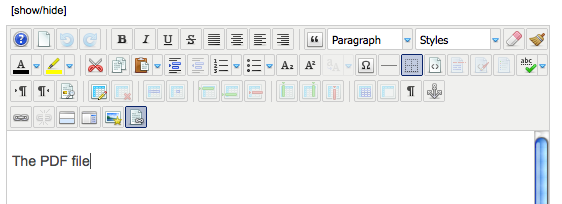
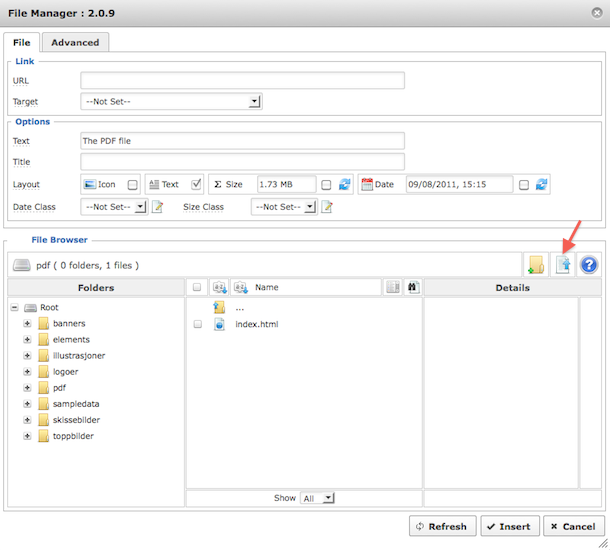
You will see the File Manager window.

Select the folder you want to upload your file to (or create it using the "New Folder" button).

Then, click the "Upload file" button.
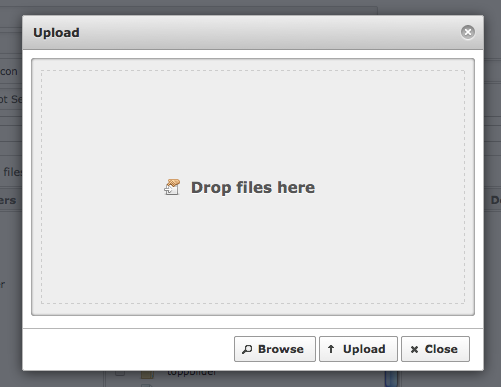
You will see the upload window.

Click "Browse" and select the file from your harddisk. If you're using Firefox, you can drag and drop the file into the upload window. You can add as many files as you want to in this step.
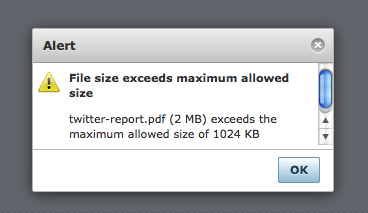
If you try to upload a file that is bigger than 1024 Kb, you will get an error message like this:
To adjust the file size allowed, go to JCE Administration -> Profiles -> The profile you are using (normally "Default").

Then click the"Plugin Parameters" tab at the top and the "File Manager" tab on the left.

You can now see your server's max upload size and adjust the allowed size. In the below example I've set it to 5 Mb (5000 Kb).
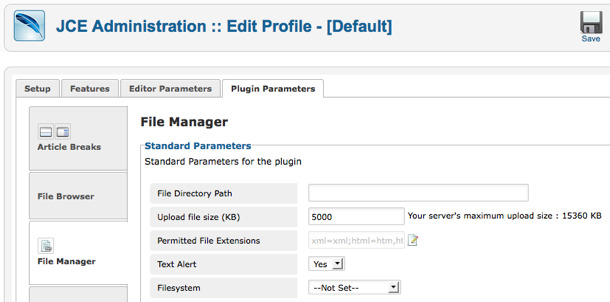
Go back to your article and try to upload again.

You should now see the file(s) in the upload window after browsing for them (as long as they are below your set maximum upload size, that is).

Click "Upload"-
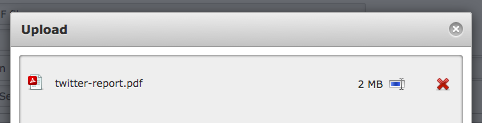
The file(s) will upload to the web server
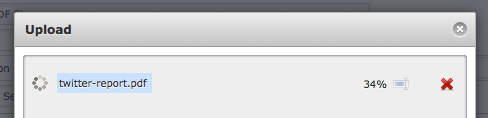
When the file(s) are uploaded, close the upload window and you will see the file(s) in the File Manager.
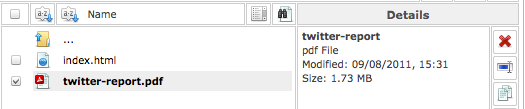
You can now adjust the parameters available before you insert the PDF link into the article.
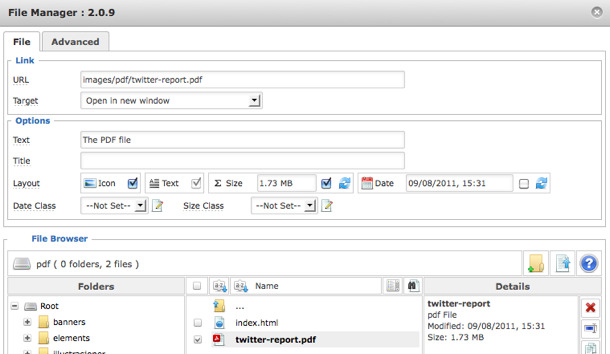
As you can see, you can add an icon (will be set automatically according to the file type), a size parameter or the date. You can also adjust the actual anchor text (the link text) from this window as well. When clicking the document file, you will notice that the File Manager asks you if you want to change the link text to the file name. Sometimes this is a good idea, other times I want to have a more descriptive text as the link. That's really up to you to decide.

Click "Insert" and you will return to the article with the link inserted.
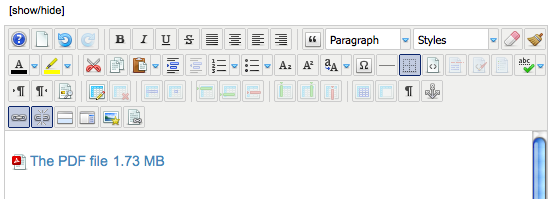
In this case, I chose to add the size to the link. However, if I decide that I don't want it after all, I can remove it directly from the editor. It is actually a normal link, so it behaves exactly the same way as any other link. So, if I remove the size, I get the final PDF link like this:
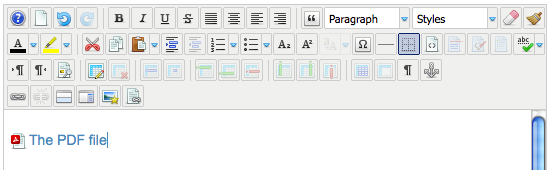
Even though it seems like a lot og steps, once you get the hang of the technique it is really fast to do. And much more efficient than doing it with the Joomla core, which really is a kind of workaround.


ASPHostPortal.com Announces Joomla 3.4.1 Hosting Solution

clock June 17, 2015 12:14 by author ben

ASPHostPortal.com is trusted web hosting provider since 2008. Our data center is located at 4 continents (US, Europe, Asia, and Australia). We provide Premium Joomla 3.4.1 Hosting plans on high performance servers and high-speed internet connection in the world. Every server is equiped with at least 2x Intel Xeon Quad-Core processors and massive amounts of memory. We are using SSD's for storage which provides much higher performance in terms of I/O and data transfer speed. The servers are connected to the network using multiple 1Gbps ports (bond network), so your joomla site will run smoothly with no downtime connection.

Joomla is a dynamic portal engine & free award-winning content management system that enables a web developer to build customized applications and dynamic websites. Joomla is most user friendly web development application. Users with minimal programming knowledge can also build websites on Joomla. Above all other benefits, Joomla is an open source solution that is freely available to everyone. Joomla is designed in such a way that it is easy to install and set up.

The core Joomla framework enables developers to quickly and easily build Data reporting tools, Application bridges, Inventory control systems, Reservation systems, Complex business directories, integrated e-commerce systems, Custom product catalogs and Communication tools. Since Joomla is based on PHP and MySQL, you're building powerful applications on an open platform that anyone can use, share, and support. The new MVC framework of Joomla is built to enable people with the basic Joomla knowledge to override the core of the CMS without actually modifying the original code.

At ASPHostPortal.com, we strive to make sure that people, the customer, have the finest web-hosting experience as possible. We have provided exceptional plans, at the lowest prices, for the best services possible, on fastest nodes ever with uptime and money back guarantee. To learn more about Joomla 3.4.1 Hosting, please visit http://asphostportal.com/Joomla-Hosting

About ASPHostPortal.com :
ASPHostPortal.com is The Best, Cheap and Recommended ASP.NET Hosting. ASPHostPortal.com has ability to support the latest Microsoft and ASP.NET technology, such as: such as: WebMatrix, WebDeploy, Visual Studio 2015, .NET 5/ASP.NET 4.5.2, ASP.NET MVC 6.0/5.2, Silverlight 6 and Visual Studio Lightswitch. ASPHostPortal include shared hosting, reseller hosting, and sharepoint hosting, with speciality in ASP.NET, SQL Server, and architecting highly scalable solutions. ASPHostPortal.com strives to supply probably the most technologically advanced hosting solutions available to all consumers the world over. Protection, trustworthiness, and performance are on the core of hosting operations to make certain every website and software hosted is so secured and performs at the best possible level.


Joomla Hosting - ASPHostPortal.com :: How to Solve Joomla Cannot Access Private Section

clock May 22, 2015 06:01 by author ben

Got the error "You cannot access the private section of this site." on one of my sites when trying to login as a "normal" user in front-end.

This was a pretty interesting issue to find and resolve. It's an database 'error' of sorts that is pretty simple to fix. First of all this is all due to a parent<-child condition that has gone horribly wrong in an update or something else. Most likely you will find this issue in the table "assets". You will need to find your database prefix fist of all, easiest found in the configuration and the option "$dbprefix". I will call it "prefix_" here for ease of typing.

So to find if you have this issue you can run the following in an sql manager of your choosing (mysql or phpmyadmin shoulden't make any differents, i did it in the cli mysql)

SELECT id,parent_id,title FROM `prefix_assets` WHERE parent_id=0;

If you find that there are multiple rows then hit the above do the following

UPDATE `prefix_assets` SET parent_id=1 WHERE parent_id=0 AND NOT id=1;

You should also verify that the "Root Asset" has id 1 and parent_id 0

SELECT id,parent_id,title FROM `prefix_assets` WHERE id=0 OR parent_id=0;

this should give the result

id    parent_id    title
 1    0               Root Asset

if not run

UPDATE `prefix_assets` SET parent_id=0 WHERE title="Root Asset";

Best Joomla Hosting Recommendation

ASPHostPortal.com provides our customers with Plesk Panel, one of the most popular and stable control panels for Windows hosting, as free. You could also see the latest .NET framework, a crazy amount of functionality as well as Large disk space, bandwidth, MSSQL databases and more. All those give people the convenience to build up a powerful site in Windows server. We offers Joomla hosting starts from $5/month only. We also guarantees 30 days money back and guarantee 99.9% uptime. If you need a reliable affordable Joomla Hosting, we should be your best choice.


Joomla with Free ASP.NET Hosting - ASPHostPortal.com :: 10 Tips For Joomla SEO

clock May 11, 2015 06:14 by author ben

The things you need to know about Joomla SEO

In this post, I talk about ten important factors you should consider when optimizing your site.
For me, SEO is about what you do every day. SEO is a long term strategy - not a quick fix. If you implement these factors, you will see increased search engine traffic to your site. All without breaking your neck performing them ;)

1. The TITLE tag is very important

Take time creating your TITLE tags – this is the tag Google takes most notice of so include your main keywords if possible. The Title tag is what shows up in the search engines as clickable headlines for your page.
Make sure the TITLE tag includes at least your main keyword. I also believe that most websites can omit the name of the site itself from the TITLE. It's in the URL anyway and will dillute the uniqueness of the TITLE. Read more about Joomla meta tags.

2. Don't stuff your pages with too many keywords

Most webmasters know that you need to include the most important one or two keywords for a page multiple times in an article if you want to compete for positions. However, this must not be overdone. Keep in mind that the text must be readable and fluent for the reader, not stuffed with keywords to 'please' the search engines. It annoys your readers and can backfire by excluding you from the search engines.
To analyze your content, consider using a tool like Scribe SEO for Joomla. It can help you remember all of the content 'rules' that impact SEO.

3. Get lots of inlinks

Inbound links to your pages are very important. Try to get inbound links from relevant sites. Still, the best way of getting inbound links is to create compelling content that the readers want to share with others. Use Digg, StumbleUpon and other services to spread word of your pages. If the content is good, bloggers and other site owners will link to it. This is why Wikipedia has such great rankings. People are linking as crazy to it, because it contains relevant information about almost everything.

4. Internal and external linking

Consider where you link, both internally and externally. Do you have a page with content relevant to what you're writing about at the moment? Link to it internally - it will improve your rankings. You can see examples in this very post.
Linking externally, you might want to consider using the rel="nofollow" tag in your links. Too many links from a page can be bad for SEO, so setting some of them to nofollow can be good. To understand more about how Google consider links.

5. Pay attention to anchor texts

Linking does not mean linking randomly. To get the most from a link, consider the text you are linking from (the anchor text). For instance, a link saying the product will be less efficient than a link saying iPhone 4. The word or phrase you link from will be the one Google will improve the ranking for. So, the page you link to will get a boost for the word iPhone 4 when you create a link on the word (to put it simply). For links on images, the alt tag will be considered as the anchor text for the link.


6. Create an XML Sitemap

An XML sitemap is an XML file showing all pages in the site for easy inclusion on a search engine. If you have just a few pages, you can use a service like xml-sitemaps.com to create it for free. Or you can install (my favorite) XMap to create the sitemap automtically from your Joomla menus..

7. Use the robots.txt File

The robots.txt file is in your site root folder. It contains info on which folders should be indexed and not. I can also include information about your XML sitemap.
One tip: Remove the line excluding the Joomla /images/ folder. Otherwise, none of your site images will be indexed in the Google image search.

8. Use Google Webmaster Tools

Google Webmaster Tools will give you tools to analyze and improve your site. Using these tools, it's very easy to spot any place in your site where you might have missed the title and/or description. You can also submit your sitemap XML and test your robots.txt file, to mention some. Read more about Google Webmaster Tools and Joomla.

9. Track and analyze

To improve your site, you need to track the traffic and analyze it regularly. I use Google Analytics for reporting. Take a look at the reports frequently. You should consider things like:

  • Traffic sources (search engines, direct, reffering sites)
  • Bounce rate (the number of people seeing only one page)
  • What keywords are generating traffic (get ideas for content and consider creating more to get additional traffic on these words)
  • Most popular pages (what do they have in common?)
  • Most common exit pages (how can they be improved?)

Using the segmentation tools of Google Analytics, you can combine these and other factors to see how people interact with your site. This can form the basis for your future SEO work.

10. Do your keyword research first

To know what words and phrases to optimize for, you need to know what people are searching for. You can use the Google Adwords keyword tool, or a specialized software like Market Samurai.

Best Joomla Hosting Recommendation

ASPHostPortal.com provides our customers with Plesk Panel, one of the most popular and stable control panels for Windows hosting, as free. You could also see the latest .NET framework, a crazy amount of functionality as well as Large disk space, bandwidth, MSSQL databases and more. All those give people the convenience to build up a powerful site in Windows server. We offers Joomla hosting starts from $5/month only. We also guarantees 30 days money back and guarantee 99.9% uptime. If you need a reliable affordable Joomla Hosting, we should be your best choice.


Joomla with FREE ASP.NET Hosting - ASPHostPortal.com :: How to prevent jQuery Issues at Joomla Site

clock May 6, 2015 07:11 by author ben

The way JavaScript seemed while in the nascent a long time could toss chills along your back of any leper. A truly crucial prerequisite, the idea was lacking cross-browser compatibility except it is a trivial process and also elementary, debugging tools had been far from currently being uplifting.

However things have got transformed substantially along with the requirement for publishing JavaScript features changed into desires. It's got surpassed your obstacles of the internet browser to make intended for whole world-wide-web application stacks.

Present day Joomla computer programmers (template makers too) embrace JavaScript overwhelmingly for the capacity to handle huge duties. Since Jquery mentioned, generate a lesser amount of accomplish additional although that will; nonetheless, seriously isn't devoid of the hpv warts and also freckles.

A little holiday to Libraries

Modern day JavaScript your local library keep any capitalized label and also be exemplified in items, permitting sharing involving unique codes around multiple jobs. Nothing as well as any library's label operates as being a global varied (added in runtime); your global Joomla object furthermore behaves the identical method. Joomla websites work with these your local library together exts, which might be chiefly your is effective involving some other designers and this is usually the location where the problem starts breading the unattractive brain.

It's concerning 2 designers deciding on the identical library (or slightly unique variants involving it); that drastically:

Will increase down load moment.
Slows delivery velocity.
Causes type fights.

Thinking of alternatives

Joomla's viability as being a choice intended for internet websites in world-wide-web advancement so requires a solution that can control these JavaScript your local library. The actual 3rd-party advancement communities (in Joomla) happen to be intended for long seeking to build a good way away to control multiple jQuery copies through publishing unique codes that will should certainly handle these your local library systematically, so preventing exts (or combining multiple extension) through loading jQuery multiple occasions.

However exactly why jQuery, all things considered?

As a result of the smooth compatibility together with some other (well, most; in the event went within the no-conflict mode) JavaScript frameworks. It is pretty as opposed to mootools, which in turn build fights together with the two scripts and also variants. jQuery, throughout no-conflict mode coexists enjoyably together with merely every other JavaScript construction.

Dealing with the real key matter

jQuery JavaScript fights on a Joomla web site comes about while unique variants of the jQuery library a good deal within the web site.

This specific tends to make your jQuery scripts cease working. Joomla Extension cords work with jQuery intended for putting into action JavaScript effects, therefore fights arise due to library loading again.

One fashion to halt that may be putting any switch to show off of jQuery or a consumer may well try hacking another extension's (the 1 that is certainly to heap next) core code. This specific results in a number of difficulty even though bringing up-to-date your off shoot. But again, not all people are usually intelligent enough to sift through PHP. Actually HTML!

Or perhaps, you could think in regards to the free, fundamental JB Selection plug-in; the adjusted variants occur extra together with some other scripts such as IE6pngfix.

The actual library has an uncomplicated, switchable entry intended for loading any web template and also off shoot suitable jQuery library and also frequent revisions assure your piece of software is not going to cease working in the event it may not be suitable for running backward. Overall, some good entertaining, the amount ever before hurtful the training curve might have been.

Best Joomla Hosting Recommendation

ASPHostPortal.com provides our customers with Plesk Panel, one of the most popular and stable control panels for Windows hosting, as free. You could also see the latest .NET framework, a crazy amount of functionality as well as Large disk space, bandwidth, MSSQL databases and more. All those give people the convenience to build up a powerful site in Windows server. We offers Joomla hosting starts from $5/month only. We also guarantees 30 days money back and guarantee 99.9% uptime. If you need a reliable affordable Joomla Hosting, we should be your best choice.


Joomla with Free ASP.NET Hosting - ASPHostPortal.com :: Joomla SEO Tips & Tricks to Rank High in Search Engines

clock April 22, 2015 05:42 by author ben

Top 10 Joomla SEO Tips & Tricks to Rank High in Search Engines

Web site owners always strive to rank top in all search engines. Being ranked top of the search engine means that the site is visited by every person who uses their browser to search for related information. To achieve this, all site owners strive to optimize their sites such as by use of search engine optimization techniques. These include content catchy content, outstanding web- design and use of specialized words in their site identities.

The most common and reliable method of self-branding in Joomla site is by use of SEO. Here are some special Joomla SEO tips & tricks to get your site at the top:

Joomla SEO Tips #01 :: Use original site set up

There are tendencies of retaining sample files which come with Joomla sites. Unfortunately, this will lower the ranking of the site as the information is so common. It is advisable to delete all sample files which come with the site. The names and headlines should not be spared too. In addition, sample content may not correspond to the area of specialization of the site. This will therefore lead to irrelevant information on the site which tends to discourage visitors to return.

Joomla SEO Tips #02 :: Use a simple and captivating site name

The site name should be looked at from the client point of view. The clients will easily get used to simple and related name of sites. However, the name should be retained as any registration by customers may register a different name. Always look for the most r related name to the service being provided.

Joomla SEO Tips #03 :: Eliminate PDF links

PDF links will enjoy a higher ranking than the other pages. This means that if they are many and active, the user shall only visit the PDF page, which in most cases does not provide active content. Also there are no capabilities of creating links in PDF pages.it is therefore prudent to turn them off so as to achieve higher ranking in the search engines.

Joomla SEO Tips #04 :: Reduce the social links

In most cases, social links are not the main goal of the page. They should therefore be given a lower priority since they may end up cluttering the pages. It is advisable to have the links on the most captivating pages, where the reader will have gotten the content of the page before going to the social links.

Joomla SEO Tips #05 :: Merge prefixed ‘www’ and ‘non-www’

This is meant to direct the searches which contain ‘www.’ and the ones lacking in the same place on the site. Most people using the search engines will not remember to use ‘www.’prefix. It is done by the addition of a code in the design of Joomla website which will redirect the domain to the same place in the site.

Joomla SEO Tips #06 :: Describe all subsections of the Joomla site

The organization of a site will largely determine the search engine ranking it will achieve. It is therefore recommended that the subsections all categories of the site be properly organized and their contents clearly elaborated. This will ease search of items listed on the site by the popular search engines. This also enables the visitors to navigate easily throughout the site.

Joomla SEO Tips #07 :: Turn the cache on

Sites, which are small in size will enable easier searches using search engines such as Google, Yahoo and Bing. This is because their reach is easy and many visitors will be delighted to visit them. To make the size appear smaller, the owner is advised to turn on the cache in the global configuration settings.

Joomla SEO Tips #08 :: Avoid irrelevant pages

Sites with too many pages which do not offer quality content will score lower in the search engine ranking. It is therefore wise to visit the site which shows the categorization of the domains. It is meant to check the irrelevant pages in the Joomla site which needs to be eliminated immediately. This can easily be done by visiting the related site!

Joomla SEO Tips #09 :: Eliminate metadata

This is located in the global configuration category. It adds no value having the Meta data in the Joomla site. Therefore it is prudent empty it and retain higher ranking in by the search engine.

Joomla SEO Tips #10 :: Use SEO plugins

Experienced Joomla users will attest that the use of plugins wills greatly improve the experience. One is advised to look for the most active plugins and use them in their site for optimization.

Best Joomla Hosting Recommendation

ASPHostPortal.com

ASPHostPortal.com provides our customers with Plesk Panel, one of the most popular and stable control panels for Windows hosting, as free. You could also see the latest .NET framework, a crazy amount of functionality as well as Large disk space, bandwidth, MSSQL databases and more. All those give people the convenience to build up a powerful site in Windows server. We offers Joomla hosting starts from $1/month only. We also guarantees 30 days money back and guarantee 99.9% uptime. If you need a reliable affordable Joomla Hosting, we should be your best choice.


Joomla 3.4 Hosting - ASPHostPortal.com :: How to Customize Joomla Extensions With Override

clock March 6, 2015 07:12 by author ben

We all realize that Joomla is an incredible CMS for building proficient sites. The JED (Joomla Extension Directory) is brimming with parts, modules and plugins that can include pretty much any kind of usefulness to any Joomla site. That is incredible and everything except imagine a scenario in which you discover a segment or module that gives the usefulness required yet the yield and design is not precisely what you need. A major misstep that a few engineers and website admins make is going in and altering the center code of an augmentation. Joomla makes it simple by permitting overrides.

What is an Override?

An override is a duplicate of an expansions format/layout document that is put in your Joomla layout catalog. You can then alter it to your loving. The distinction with doing this as restrict to simply altering the record in the expansion registry is that when you redesign Joomla or the augmentation, your progressions won't be supplanted with the new forms. Joomla knows to look in the overridden record first and foremost, then the genuine augmentations document.

How would I Create an Override?

Making an override is simple. For the purpose of this excercise, how about we say's that we need to alter the yield of the login page. Of course, the login page has 3 connections in an unordered rundown (overlooked secret word, overlooked username and don't have a record).

For the purpose of this excercise, how about we say's that we don't need the last "Don't have a record" connection and we additionally don't need them in a rundown, we simply need the 2 different connections side by side. The progressions we make don't generally make a difference right now. It is just to demonstrate to you how an override functions. As a matter of course, Joomla utilizes the com_users part to handle login and enrollment. The com_users part has different perspectives/designs. We can see them by going to joomlasite/parts/com_users/sees

You can see there are 5 separate perspectives. We need to alter the login page so we need the login organizer/view. In the event that you click on that, you will then see a tmpl organizer. This is the layout for this specific perspective. In the tmpl envelope is the place the format records are placed. Pretty much all part and module tmpl organizers have a default.php record. A few parts, for example, this have extra format records. The Users part login perspective has default.php, default_login.php and default_logout.php.

The default_login.php organizer is the one we have to alter the login structure page. So we have to take that record and spot it into the Joomla layout envelope structure. Go to your principle Joomla layout organizer. This future in joomlasite/layouts/yourtemplatname. You have to make another envelope called html. In that html envelope, make an alternate called com_users and afterward in that, one more organizer called login. This is the place you need to place the default_login.php record that you duplicated. So the full way would be joomlasite/layouts/yourtemplatename/html/com_users/login/default_login.php

Editing the default_login.php File


So now on the off chance that we roll out a few improvements and recovery the default_login.php override document, Joomla will look to this record first. How about we roll out the little improvement of evacuating the rundown and the last connection In the new default_login.php document, you will see the accompanying code

It is the unordered rundown with the 3 connections. How about we alter this by uprooting the rundown labels and disposing of the third connection alongside the if explanation. So it will resemble this

Presently spare the record and about-face to your frontend login page.

You can now see that the rundown designing and the third connection are both gone. So now in the event that you redesign Joomla center records or upgrade the com_users part, this change would stay with the site as contradict to simply being composed over. This is amazingly helpful in Joomla web advancement. You can do this with any segment or module that takes after the standard Joomla structure. Do you have any expansions as a top priority that you might want to change to your preferring? Tell us in the remark area.

Joomla Hosting Recommendation

ASPHostPortal.com provides our customers with Plesk Panel, one of the most popular and stable control panels for Windows hosting, as free. You could also see the latest .NET framework, a crazy amount of functionality as well as Large disk space, bandwidth, MSSQL databases and more. All those give people the convenience to build up a powerful site in Windows server. We offers Joomla hosting starts from $1/month only. We also guarantees 30 days money back and guarantee 99.9% uptime. If you need a reliable affordable Joomla Hosting, we should be your best choice.


Joomla 3.4 Hosting - ASPHostPortal :: Stoping Cleaning HTML and Scripts Code in Joomla?

clock February 27, 2015 06:08 by author ben

Everybody confront the issue when you include the code (adsense for instance) in the module/article and in the wake of sparing, it don't work. You go to the code and see that some html labels have been erased. Why is it happening? As a result of Joomla html channels and WYSIWYG html proofreader. A few capacities, that are erasing not normal code, are incorporated into Joomla and actualized in html channels. That channels are keep the threat of outsider intercession through the obscure html labels. As such Joomla ัares about the security of your site. The same thing is with WYSIWYG proofreader, it erases not normal labels, for example, <iframe>, however you can't include feature from online feature administrations or glimmer feature. So to know how to quit cleaning HTML and scripts code in Joomla read the data underneath:

1. Log into your Joomla website admin area.

You can enable or disable text filters for each of group users to prevent danger code pasting on your website.

2. Go to System => Global Configuration => Text filters

3. Choose No filtering from the list of text filter for a needed User group (for example Administrator).

If you use one of the WYSIWYG text editor, in our example TinyMCE, you have to clear tags, that you want to use (<iframe> for example) from the list of Prohibited Elements, or allow to use all tags.

4. Go to Extension => Plug-in Manager, there find TyniMCE text editor

5. Change Functionality field into Extended

6. Simple delete needed tags from that field, or just enter empty word to allow using all tags. And don’t forget to save.

After doing this steps all must be fine and now you can add your HTML text and no HTML editor and Joomla text editor wouldn't disturb you.

Best Joomla Hosting Recommendation

ASPHostPortal.com provides our customers with Plesk Panel, one of the most popular and stable control panels for Windows hosting, as free. You could also see the latest .NET framework, a crazy amount of functionality as well as Large disk space, bandwidth, MSSQL databases and more. All those give people the convenience to build up a powerful site in Windows server. We offers Joomla hosting starts from $1/month only. We also guarantees 30 days money back and guarantee 99.9% uptime. If you need a reliable affordable Joomla Hosting, we should be your best choice.


Joomla Hosting - ASPHostPortal.com :: Develop a Joomla Template from scratch

clock February 24, 2015 05:58 by author ben

Want a customized joomla template for the business requirements? It really is so easy to construct a template of one's decision as an alternative to paying thousands for it. So lets commence now.

To produce a joomla template you may require at the least two files,

  1. templateDetails.xml which can be mainly configuration file containing info like autor name, e mail, template version, folders and file names and module names (we'll discuss it leter).
  2. index.php which can be entry point for all pages
    These are standard files required to create a joomla template, but furthermore you will need some a lot more files to produce a beautiful and powerful template like css, images, language, javascript, html and so forth.

Now lets generate our xml file

<?xml version="1.0" encoding="utf-8"?>
 
<extension version="2.5" type="template" client="site">
<name>template_name</name>
<creationdate>29 January 2014</creationdate>
<author>write Your name here</author>
<authoremail>write your email here</authoremail>
<authorurl>your website url here</authorurl>
<copyright>Copyright here. All rights reserved.</copyright>
<license>License here</license>
<version>2.5.0</version>
<description>TPL_NAME_XML_DESCRIPTION</description>
<files>
<filename>index.html</filename>
<filename>index.php</filename>
<filename>templateDetails.xml</filename>
<filename>template_preview.png</filename>
<filename>template_thumbnail.png</filename>
<filename>favicon.ico</filename>
<filename>component.php</filename>
<filename>error.php</filename>
</files>
<positions>
<position>debug</position>
<position>top</position>
<position>position-2</position>
<position>position-3</position>
<position>position-4</position>
<position>position-5</position>
<position>position-6</position>
<position>banner</position>
<position>left-navigation</position>
<position>position-login</position>
<position>position-footer</position>
</positions>
</extension>

As you can see further files are right here like index.html (just to avoid direct access of this folder) , template_preview.png and template_thumbnail.png to show in administrator panel. Here several positions are defined which we'll use in our index.php file.

Your xml is prepared, now produce your index.php file.

<?php defined( '_JEXEC' ) or die( 'Restricted access' );?>
<!DOCTYPE html>
<html xml:lang="<!--?php echo $this--->language; ?>" lang="<!--?php echo $this--->language; ?>" >
<head>
<jdoc:include type="head" />
<link rel="stylesheet" href="<?php echo $this->baseurl ?>/templates/template_name/css/template.css" type="text/css">
</head>
<body>
<jdoc:include type="modules" name="top" />
<jdoc:include type="modules" name="banner" />
<jdoc:include type="modules" name="left-navigation" />
<jdoc:include type="component" />
<jdoc:include type="modules" name="footer" />
<jdoc:include type="modules" name="position-3" />
</body>
</html>

As you see we have included defined( '_JEXEC' ) or die( 'Restricted access' );
just for security reasons to prevent direct access. is here to tell browsers and crawlers that its a html5 web page.


body{padding:0;margin:0;font-family:"arial";font-size:12px;color:#5d6060;background-color:#fff}
a{text-decoration:none;outline:0}
a:focus,a:active{outline:0}
img{border:0;outline:0}
.container{height:auto;width:1044px;margin-right:auto;margin-left:auto}
.container_sub{height:auto;width:1044px;float:left}
#header_main{height:auto;width:1044px;float:left}
#header{height:118px;width:1044px;float:left}
.header_top{height:auto;width:1044px;float:left}
#logo{height:75px;width:231px;float:left;margin-top:4px}

Your template is ready now but to perform with joomla you've got to upload it below templates folder. Following uploading it to templates folder log in for your joomla administrator and open extensions -> Templates manger. Right here you'll not be able to see your template as you expected. This can be since it calls for one more step, to set up the template. Ok, visit Extensions -> Extension Manager then click Learn tab now click on discover icon around the top-right corner from the page. It's going to search all of the extensions accessible inside your joomla installation, here you will be able to see your template name, select it and click on set up icon on the top-right corner of the page. This will likely install your template. Now you happen to be done. Go to Extensions-> Template manager , right here you'll be able to see your installed template.

Joomla Hosting Recommendation

ASPHostPortal.com provides our customers with Plesk Panel, one of the most popular and stable control panels for Windows hosting, as free. You could also see the latest .NET framework, a crazy amount of functionality as well as Large disk space, bandwidth, MSSQL databases and more. All those give people the convenience to build up a powerful site in Windows server. We offers Joomla hosting starts from $1/month only. We also guarantees 30 days money back and guarantee 99.9% uptime. If you need a reliable affordable Joomla Hosting, we should be your best choice.


About ASPHostPortal.com

We’re a company that works differently to most. Value is what we output and help our customers achieve, not how much money we put in the bank. It’s not because we are altruistic. It’s based on an even simpler principle. "Do good things, and good things will come to you".

Success for us is something that is continually experienced, not something that is reached. For us it is all about the experience – more than the journey. Life is a continual experience. We see the Internet as being an incredible amplifier to the experience of life for all of us. It can help humanity come together to explode in knowledge exploration and discussion. It is continual enlightenment of new ideas, experiences, and passions

 photo ahp banner aspnet-01_zps87l92lcl.png

Corporate Address (Location)

ASPHostPortal
170 W 56th Street, Suite 121
New York, NY 10019
United States

Sign in