
July 21, 2016 01:00 by
 ben
ben
Once the Joomla site is up and running, it would be a good practice to optimize the site to further streamline the experience for the end users. The load time will be tedious if it is not optimized, resulting in poor customer experience.
Following tips will help optimize the site:
Knowledge of CSS: Websites are styled with Cascading Style Sheets, and incorporating the knowledge of CSS will help improve and strengthen the Joomla tool box. Once, it's understood why certain things act and work the way they do on the website, it becomes easier to alter almost any Joomla template.
With good CSS knowledge, following things can be done;
- Modules can be given unique styling
- Images can be customized the way they are displayed
- Background colors and borders can be changed
- Font families, sizes and colors can be changed
- Entire sections of the pages, like headers, sidebars and footers can be structured according to the requirement.
Use of CDN: A CDN (Content Delivery Network) is a system of distributed networks that deliver web pages and other web contents to the user based on the geographic location of the user, the inception of the web page and the content delivery server. This service is effective in accelerating the delivery of contents of websites with high traffic and websites with global reach.
Improving Page Title: This feature is highly regarded by Google and the Title of the page can actually make a positive or a negative impact to the site. Sh404SEF helps to determine a good title which can further optimize the SEO.
Social Networking: Most people use Social networking sites for various marketing reasons. Joomla allows the integration of these social networks to the website, which serves to draw more traffic and optimize the site.
Reliable back-up: An efficient hosting provider is necessary for a reliable back-up. Most hosting providers offer frequent back-up of databases and files. It is vital to choose a well-grounded provider. There are various other backup extensions that can also be used to restore the database, namely: Aqeeba back-up and Lazy back-up.
Improving Meta tags: Meta tags are basically a short description of each page. In some situations, this description is used as a part of a snippet used in the search results. Meta tags are a neat means of providing the search engines with the site's information. Meta tags can be employed to supply information to all sorts of clients.
Integrating Newsletters to the Website: Newsletters are probably one of the easiest and underutilized tools used by people to enhance the website or the marketing campaign of their product or services. There are various newsletter extensions available, which can be automated to send emails to the subscribers. This particular feature can optimize the site a good deal.
Best Joomla Hosting Recommendation
ASPHostPortal.com provides our customers with Plesk Panel, one of the most popular and stable control panels for Windows hosting, as free. You could also see the latest .NET framework, a crazy amount of functionality as well as Large disk space, bandwidth, MSSQL databases and more. All those give people the convenience to build up a powerful site in Windows server. We offer Joomla hosting starts from $5/month only. We also guarantee 30 days’ money back and guarantee 99.9% uptime. If you need a reliable affordable Joomla Hosting, we should be your best choice.
e52a5f9f-eb5b-43ce-8b11-03ef94ba7c7d|0|.0
July 13, 2016 23:47 by
ben
Joomla is a capable, robust and award-winning, open source content management system (CMS) that is used widely across the globe. It powers some of the most brilliant websites from all spheres, like social networking websites, E-commerce stores, enterprise websites, Government or institutional websites, and even portfolios or personal blogs. This versatility can be used to create a fully-functional website that woos visitors. Nevertheless, not all websites developed using Joomla word wonders. There are many which fail miserably, and the reason is that developers make some obvious and silly mistakes which greatly hamper a website's performance in the long run. We take a look at some of these mistakes, so that you don't make any while developing your first, or next, Joomla website.
1. Flawed SEO Strategy
Let's get one thing straight. Search engine optimization does not begin once the website is complete; it begins when the website design and development begins. Make sure that the content is very specific to the business niche, the keywords are meaningful and the Meta description is also relevant to the content. The headlines and headings should be used fruitfully.
2. Link Issues
Ascertain that there are no broken links on your website because it not only tarnishes the image of the website but also deprives the website of valuable traffic. A 302 redirect comes in very handy here. Also, make sure that external links open in a new tab otherwise you will lose your visitors to the other site.
3. Image Sizes and Alt Tag
The images should be resized as required. Don't forget to use the Alt tag, which is a description of the image and draws a lot of traffic to the website through image searches.
4. Missing/Difficult Search Options
It is extremely important to have a personal or a Google customized search engine for your very own website so that visitors who are looking for something specific can search for it on the website itself and you do not have to lose traffic to some other website.
5. Copying from MS Word
The problem with copying text from MS Word is that the source formatting is copied along with the text, too, and spoils the entire layout and look of the webpage. A better option would be to copy-paste the text from notepad.
6. Security Issues
This is especially important for websites like E-commerce portals. You need to add security extensions and features like verification, SSL certification, end-to-end encryption, and remove any feature or plugin that is not being used, since they can be breeding grounds for potential threats.
7. Poor Updating
Most developers make the common mistake of keeping the content too static even long after the website has been finished. The content should be updated from time to time because there are new advancements and changes in figures every day. Obsolete content is a big turnoff to visitors and might even prevent them from returning.
8. Underlining Headings or any Non-Link Text
Do not underline texts that are not links. Users often perceive underlines to be links are not finding a link in there can be frustrating.
9. Spaces in File Names
A blank in the file name will be replaced with " " by default and that could cause output errors or issues. Instead, it is better to use underscores instead of blanks in order to give the whole link a more readable and slightly look.
10. Unclear Keywords
In this cut-throat competition for ranking and traffic, you need to be crystal clear and impeccable in your SEO techniques. You should not only choose the right keywords for your website, but also make sure that each keyword appears the optimum number of times, i.e. the right keyword density is obeyed.
11. No Support for Custom Layouts
More often or not, components or modules are developed with just one view, default.php. In order to create a new view, just add the 'layout' parameter to the extension's configuration, and then ensure that its value is used when the view is rendered.
12. Missing or Erroneous Support for Cache
Joomla allows multiple layers of caching and thus not only makes website loading faster but also eases a lot of burden off the web server. However, two modules on the same page, with different parameters could display the same content because cache does not take into account the module configuration.
13. Missing Translations
Don't review your code and then extract the translation before the releases. A better option would be to insert new strings into the translation files whenever a new functionality is developed.
14. Incorrect Routing
The router.php should not be based on the number of parameters. It might cause good optimization in path lengths, it is equally difficult, or even more so, to maintain and debug if need be. And what's worse, using Ajax calls breaks them too.
15. Poor Customer Service
Most websites provide FAQs, but they are not enough to solve all the grievances of all sorts. Make sure that your team gets in touch with visitors whenever they need. There are many plugins available for this purpose.
Joomla can do your website a world of good, thanks to the number of advantages it offers. You only need to avoid the above-mentioned mistakes and your website is good to go!
Best Joomla Hosting Recommendation
ASPHostPortal.com provides our customers with Plesk Panel, one of the most popular and stable control panels for Windows hosting, as free. You could also see the latest .NET framework, a crazy amount of functionality as well as Large disk space, bandwidth, MSSQL databases and more. All those give people the convenience to build up a powerful site in Windows server. We offer Joomla hosting starts from $5/month only. We also guarantee 30 days’ money back and guarantee 99.9% uptime. If you need a reliable affordable Joomla Hosting, we should be your best choice.
6b6fd523-0006-44f9-8a2f-3993353bd121|0|.0
June 29, 2016 22:19 by
benOne of the nice things about Joomla is that you can pull RSS newsfeeds in to your content area by use of the newsfeed component. I am currently using this feature to list the CloudAccess.net Webinars as I just don't have enough hours in my day to run webinars as frequently (and as well) as CloudAccess.net. I ran into a big issue with the RSS newsfeed though when it came to display on the front end.
The RSS Newsfeed in Joomla was simply disappearing!
I'd get everything set up, check the front end and see that the RSS feed was displaying properly. I'd come back a few minutes later, and lo, and behold, it was gone! I searched for the answer, and found a solution that worked for this site on the JoomlaCode website, "Single newsfeed doesn't display when caching is enabled"
Here's what I did that fixed the problem on this website:
1. Opened Filezilla (FTP Client) and logged into my server. I went to httpdocs/libraries/joomla/factory.php as in the solutions provided by the bug squad.
2. With a text editor, I went to line 341 - public static function getFeedParser($url, $cache_time = 0)
and replaced it with the code provided here:
public static function getFeedParser($url, $cache_time = 0)
{
jimport('simplepie.simplepie');
$cache = self::getCache('feed_parser', '');
if($simplepie = $cache->get($url)){
return $simplepie;
}else{
$simplepie = new SimplePie(null, null, 0);
$simplepie->enable_cache(false);
$simplepie->set_feed_url($url);
$simplepie->force_feed(true);
$simplepie->init();
if ($cache_time > 0)
{
$cache->setLifeTime($cache_time);
$cache->store($simplepie, $url);
}
return $simplepie;
}
}
3. Next, go to your Joomla admin and clear the cache by going to the top menu and clicking > Site > Maintenance > Clear Cache
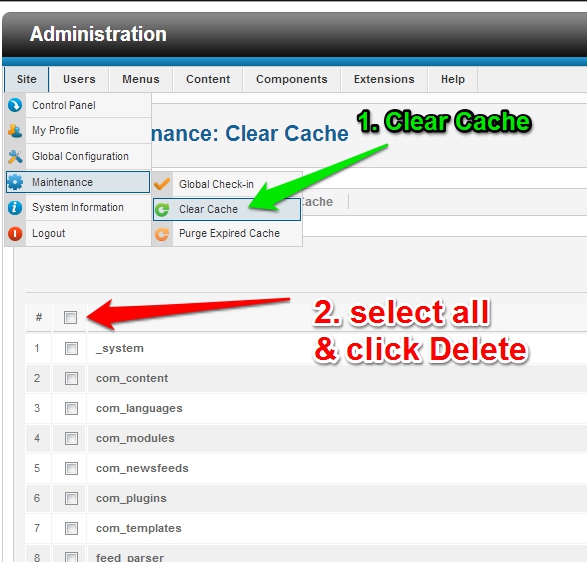
Now your RSS feed will not disappear anymore!
Best Joomla Hosting Recommendation
ASPHostPortal.com provides our customers with Plesk Panel, one of the most popular and stable control panels for Windows hosting, as free. You could also see the latest .NET framework, a crazy amount of functionality as well as Large disk space, bandwidth, MSSQL databases and more. All those give people the convenience to build up a powerful site in Windows server. We offer Joomla hosting starts from $5/month only. We also guarantee 30 days’ money back and guarantee 99.9% uptime. If you need a reliable affordable Joomla Hosting, we should be your best choice.
4c5f2ec8-764a-4aea-a77f-8ef6cf1c6bb1|0|.0
June 28, 2016 23:08 by
ben
ASPHostPortal.com is trusted web hosting provider since 2008. We strongly believe in high quality standards and hence, you’ll always find our services better than every other host in this industry. We understand the value of time and hence our ordering process is very simple. Customers can choose servers from multiple price levels to suit their business model. Today, we offer premium WordPress 4.5.3 hosting with fast speed, and uptime guarantee.
WordPress has grown into what would be called a content management system, or CMS. A CMS is a tool to store all of the information required for your website and present it to your visitors in a professional, organized way. Other content management systems include Joomla and Drupal, but the reality is that WordPress is the easiest to understand, the easiest to work with, and the most easily adaptable.
WordPress makes creating, editing and organising your content simple and, as a result, less time-consuming. That gives you more time to focus on other areas of your business. WordPress also gives you the chance to get a professional design to make your website look great - often free of charge.
The best way to see how WordPress streamlines setting up your website is to try it for yourself. WordPress is easy to install on your web hosting or, if you sign up on the WordPress website, you can explore its features with no set-up required.
ASPHostPortal.com provides Premium WordPress 4.5.3 Hosting plans on high performance servers and high-speed internet connection in the world. Every server is equipped with at least 2x Intel Xeon Quad-Core processors and massive amounts of memory. We are using SSD's for storage, which provides much higher performance in terms of I/O and data transfer speed. The servers are connected to the network using multiple 1Gbps ports (bond network). To learn more about their WordPress 4.5.3 Hosting, please visit http://asphostportal.com/WordPress-Hosting
About ASPHostPortal.com:
ASPHostPortal.com is The Best, Cheap and Recommended ASP.NET & Linux Hosting. ASPHostPortal.com has ability to support the latest Microsoft, ASP.NET, and Linux technology, such as: such as: WebMatrix, Web Deploy, Visual Studio, Latest ASP.NET Version, Latest ASP.NET MVC Version, Silverlight and Visual Studio Light Switch, Latest MySql version, Latest PHPMyAdmin, Support PHP, etc. Their service includes shared hosting, reseller hosting, and Sharepoint hosting, with speciality in ASP.NET, SQL Server, and Linux solutions. Protection, trustworthiness, and performance are at the core of hosting operations to make certain every website and software hosted is so secured and performs at the best possible level.
0be88118-f714-4f68-98c9-681182cd2582|0|.0
June 15, 2016 23:51 by
ben
Joomla offers the ability to click a button in the system and take the site down. Instead of your web site showing up when someone goes to your URL, they get a message that indicates the site is down for maintenance. This message can be changed, as can the Joomla logo.
To change the offline message
The default message that shows up for a site in maintenance is, "This site is down for maintenance. Please check back again soon."
To change this message, log into the Joomla administrator page.
- Click on "Global configuration" on the control panel, or select "Global configuration" from the site menu.
- On the Site tab, click "Yes" next to site offline. Underneath Site Offline is the Offline Message.
- Change the text in the entry box to whatever message you wish.
- Hit Save or Apply
- Go to your site, and you'll see the offline message.
To change the Joomla logo that appears with the offline message
To do this, a php file needs to be modified. If you know unix, you can do this directly on the system. If you do not know unix, you'll need to copy the file via ftp to your computer, edit the file on your machine, and then ftp the file back to the server.
Whether you need to ftp or you choose to edit the file directly on the system, the file is located in the same place. Go into the templates directory and then go into the system directory. You should see the following files in this directory.
component.php css error.php html images index.html index.php offline.php
Css, images, and html are directories and component.php, error.php, index.html, index.php, and offline.php are files.
Make a backup copy of your offline.php file. To keep it simple, I always call my copy "offline.php.backup" Next, put the logo you wish to display in your images directory on your site. Don't put it in the images directory located in templates/system. Put it in the images directory at the root of the system.
Edit the offline.php file. (If you can't edit it directly on your system, ftp it over to your desktop. You can edit the file in any text editor, such as notepad. Dreamweaver can also be used.)
Find the code in the file that matches the code below. This code is in the top third of the file.
img src="images/joomla_logo_black.jpg" alt="Joomla! Logo"
Change the filename "joomla_logo_black.jpg" to the name of the graphic you want to appear.
Save the file. Reload your home page on your system and the new logo should appear.
If you can follow the php, you can change the whole look and feel of the offline page, but I don't recommend doing that unless you are confident in your php. Of course, if you make a backup copy of your offline.php file first, you can always replace it. If you ruin your offline.php file and you haven't made a copy of it, you can always go to Joomla.org, download a fresh copy of joomla, extract the files somewhere other than where your web site is, and get the offline.php file from there.
Best Cheap Joomla Hosting Recommendation That Can Enhance Your Business
Are you looking for Best Joomla 3.5.1 Hosting? Finding a high quality Best Joomla 3.5.1 Hosting provider is crucial for your web application. Your Joomla 3.5.1 application can only run smooth if it will be hosted on a server which can provide a higher up time & plenty of computing resources. There’re thousands of web hosting providers which offer asp.net hosting, but choosing Best Joomla 3.5.1 Hosting provider is a time consuming task. To make your buying decision easy we suggest you to choose ASPHostPortal.com as the best and Cheap Joomla 3.5.1 Hosting providers which are reliable and offer affordable Joomla 3.5.1 Hosting so that every one can afford it.
39aef5e0-ee11-420c-8e48-e6eda0e8c1d7|0|.0
June 14, 2016 23:24 by
ben
ASPHostPortal.com was established with the goal to provide high quality Drupal hosting services for everyone. They believe that providing high quality services should come at an affordable price. For this reason they have provided exceptional Drupal hosting plans, at the lowest prices, for the best services possible, on fastest nodes ever. Today, they offer Drupal 8.2.1 hosting with very easy installation.
Drupal is an open source CMS that gives its users a large degree of flexibility to modify, share, and distribute content (text, video, data, business services). Still, Drupal is more than a CMS. It is a Software as a Service (SaaS) solution that is perfect for a small business and scalable for any large enterprise.
Unlike many website content management systems that offer narrow frameworks and custom coding, Drupal comes out of the box ready to showcase your brand in an interactive, highly-useable environment. You can design your Drupal web design to match your business needs without many of the restrictions of previous CMS tools.
ASPHostPortal.com is a web hosting provider dedicated to providing high quality Drupal hosting at an affordable price. They care for the clients, ensuring each and every client is more than just satisfied day in and day out. They only use the best hardware, super fast network, covered by 24/7 Support Team. They have 12 world class data centers, located in USA, Europe, Asia and Australia. Each of locations will provide with amazing performance to make Drupal website more powerful. To learn more about their Drupal 8.1.2 Hosting, please visit http://asphostportal.com/Drupal-8-1-2-Hosting
About ASPHostPortal.com:
ASPHostPortal.com is The Best, Cheap and Recommended ASP.NET & Linux Hosting. ASPHostPortal.com has ability to support the latest Microsoft, ASP.NET, and Linux technology, such as: such as: WebMatrix, Web Deploy, Visual Studio, Latest ASP.NET Version, Latest ASP.NET MVC Version, Silverlight and Visual Studio Light Switch, Latest MySql version, Latest PHPMyAdmin, Support PHP, etc. Their service includes shared hosting, reseller hosting, and Sharepoint hosting, with speciality in ASP.NET, SQL Server, and Linux solutions. Protection, trustworthiness, and performance are at the core of hosting operations to make certain every website and software hosted is so secured and performs at the best possible level.
0b519ba3-b507-492e-8afc-b03d285b8506|0|.0
June 8, 2016 23:26 by
benSlideshow CK Module
In this tutorial, we will use Slideshow CK. Slideshow CK supports images and videos, is fully responsive and is really easy to use. Oh, and it's completely free.

Step 1: Download and Install
- Go to the Slideshow CK extension page and click the download button.
- Login to your Joomla administrator area.
- Go to Extensions > Extensions Manager.
- Click Upload a Package File and browse for the zip file.
- Click the Upload and Install button.
Step 2: Create a module
- Go to Extensions > Module manager > New
- Click on Slideshow CK
Step 3: Create slide images
- Editing the module
- Go to Slides manager tab. Here you will add and edit your slides.
- To add a single image, click the "Add a slide" button.
- Select your image
- Set the title
- Set the description
- Click on “Link options”
- Set a link for this slide
- Repeat the same process to add more slides.
- Finally, publish the module and see what it looks like on the front of your site.
Best Joomla Hosting Recommendation
ASPHostPortal.com provides our customers with Plesk Panel, one of the most popular and stable control panels for Windows hosting, as free. You could also see the latest .NET framework, a crazy amount of functionality as well as Large disk space, bandwidth, MSSQL databases and more. All those give people the convenience to build up a powerful site in Windows server. We offer Joomla hosting starts from $5/month only. We also guarantee 30 days’ money back and guarantee 99.9% uptime. If you need a reliable affordable Joomla Hosting, we should be your best choice.
a0d1116d-596f-41c4-a6f7-3fe283e5bdbd|0|.0
June 8, 2016 21:50 by
ben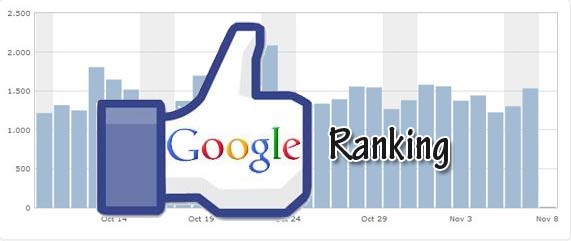
Once you have created your site in Joomla the next important task on hand is to improve its Google Rank or in simple words increase the visibility of the website. Most of the traffic to your Joomla site would come via the web portal and hence you need to optimize the site to have maximum impact on your customers and visitors. Joomla by default is extremely web crawlers friendly but you still need to optimize it further to generate best results. So let us discuss a few ways in which you can improve the Google Rank with Joomla.
Unique Content
The most important part of your website is the content and hence you need to focus on it to improve your page rank. Write unique content that is relevant to your products, services or business model. Once you have this in place Google's crawlers bots would offer you better position on the search engine results pages. You can also create a blog in your site as this gives you the opportunity to post content regularly on your website.
Robot.txt
This is a simple approach of telling the search engine spiders which page to index on your site and which ones to ignore. You would always want the users to visit pages that are highly relevant to your business. This is a great way to ensure that dead links and the non-relevant pages don't find prominence on the web spider.
Sitemaps
Search engine crawlers are indexing millions of pages each day and it is wise to make their task easy on your Joomla powered website. Creating a Sitemap is one of the best techniques to make the website professional as well as add to its search engine friendliness. You can make use of the Xmap Sitemap extension that generates dynamic.Xmap Sitemap. Add this sitemap to the Google Webmaster tool and all new pages added to your site will be indexed faster.
Search Engine Friendly URLs
The default URLs generated in Joomla aren't search engine friendly. They merely follow a pattern which doesn't get you any mileage. So you need to tweak the default system and come out with a mechanism to create URLs which are rich in keywords and search engine friendly. For this purpose you can make use of an extension such as Artio that generates search engine friendly URLs automatically.
Canonical Issue
You are aware of the fact that Google would penalize you for having duplicate content on your website and this happens when you have the same content on both the WWW and non-WWW versions of your domain. There are a number of extensions such as Canonical Url, Avatar Tools and Finch - Canonical URLs that help you get rid of this problem on your website and gain high rank on the web spider.
These are some of the most important things that you need to implement on your Joomla website to improve its Google Rank.
Best Joomla Hosting Recommendation
ASPHostPortal.com provides our customers with Plesk Panel, one of the most popular and stable control panels for Windows hosting, as free. You could also see the latest .NET framework, a crazy amount of functionality as well as Large disk space, bandwidth, MSSQL databases and more. All those give people the convenience to build up a powerful site in Windows server. We offer Joomla hosting starts from $5/month only. We also guarantee 30 days’ money back and guarantee 99.9% uptime. If you need a reliable affordable Joomla Hosting, we should be your best choice.
3bcd1531-290f-48a9-b18c-8ab1f1ea63ad|0|.0
June 7, 2016 20:20 by
ben
ASPHostPortal.com provides affordable and high performance SQL 2016 hosting to customers around the world. We have ASP.NET Hosting, Plesk Hosting, Reseller Hosting, Cloud Hosting, Dedicated Hosting plans for small to large to fit peoples' requirements. Our company is passionate about hosting and strive to deliver an excellent level of service to each customer. Today, we launch SQL 2016 hosting with cheap price and great support.
Microsoft SQL Server 2016 turns your mission-critical applications into intelligent applications with in-memory performance and advance analytics built in. SQL Server 2016 comes with a suite of new features over its predecessor, including a new Stretch Database function that allows users to store some of their data in a database on-premises and send infrequently used data to Microsoft's Azure cloud. An application connected to a database using that feature can still see all the data from different sources, though.
Many of the new features in SQL Server 2016 like Always Encrypted and Stretch Database are already available in Microsoft's Azure SQL Database managed service, but the virtual machine will be useful for companies that prefer to manage their own database infrastructure or that plan to roll out SQL Server 2016 on premises and want to test it in the cloud.
ASPHostPortal.com has served people since 2008 and we know how to deliver Powerful, Fast and Reliable SQL 2016 Hosting with the Superior Customer Support. Our superior servers are housed in the US, UK, France, Germany, Netherlands, Italy, Canada, Brazil, India, Australia, Hongkong and Singapore with up to 100MB/s connection and Cisco Hardware Firewalls. Fully managed and monitored around the clock, Our servers run on Windows Operating system with lots of memory (RAM) and up multiple Quad-Core Xeon CPU's, utilizing the power of the Cloud Services. Our SQL 2016 Hosting plans come with up to 99.99% uptime and 30-Day Full Money Back Guarantee. To learn more about Our SQL 2016 Hosting, please visit http://asphostportal.com/SQL-2016-Hosting
About ASPHostPortal.com:
ASPHostPortal.com is The Best, Cheap and Recommended ASP.NET & Linux Hosting. ASPHostPortal.com has ability to support the latest Microsoft, ASP.NET, and Linux technology, such as: such as: WebMatrix, Web Deploy, Visual Studio, Latest ASP.NET Version, Latest ASP.NET MVC Version, Silverlight and Visual Studio Light Switch, Latest MySql version, Latest PHPMyAdmin, Support PHP, etc. Their service includes shared hosting, reseller hosting, and Sharepoint hosting, with speciality in ASP.NET, SQL Server, and Linux solutions. Protection, trustworthiness, and performance are at the core of hosting operations to make certain every website and software hosted is so secured and performs at the best possible level.
6e61cd54-e394-417c-9cda-db0a8af75be7|0|.0
June 3, 2016 00:05 by
ben

Joomla is fast gaining approval as one of the most used content management systems in our planet. The first and foremost attraction of Joomal is that it is free and open source. However there are several other free and open source management systems too. Even then most of the government and educational institution websites are built on this software. Government and educational institute websites are revered even by the search engines and they give much preference for the back links from such websites. When Joomla is used mostly for such sites, there should be many advantages.
Joomla is highly user-friendly and search engine friendly. There are thousands of extensions and applications which can be used to make the website a unique one. Active Joomla groups and forums are other attraction where you will get an answer to all your queries. Joomla is 100% risk free and it is regularly updating with latest technology.
Although there are several advantages, you need the touch of a professional hand to create a highly performing website from Joomla. The crucial area is PSD to Joomla conversion. Here the design in the PSD format should be converted to HTML and then to Joomla. The original charm of the design can be maintained only when you do it perfectly and precisely. Here you need to have the help of a professional PSD to Joomla conversion service provider.
Once the website is created professionally, you can certainly enjoy the benefits. A properly constructed Joomla website will be search engine friendly and will get high ranks naturally. Besides, the users will not find any problem in navigation or in any other areas. These are the two reasons for government websites and educational websites to go with Joomla.
A website can any time meet with some technical problems. Here you need timely help. Active Joomal communities will take care of such situations and will come forward for your help. As you know the government websites and educational institution websites are the two categories browsed quite frequently. Here they cannot afford more down time and hence they depend on Joomla.
However, the most fascinating fact is that Joomla developers have built a large number of templates and extensions over a period which more than any commercial content management systems. When such good facilities are available free of cost, how can we avoid using Joomla? As they keep on updating their technology and coming out frequently with new versions, there is no doubt that Joomla will be the major content management system in the future.
Best Joomla Hosting Recommendation
ASPHostPortal.com provides our customers with Plesk Panel, one of the most popular and stable control panels for Windows hosting, as free. You could also see the latest .NET framework, a crazy amount of functionality as well as Large disk space, bandwidth, MSSQL databases and more. All those give people the convenience to build up a powerful site in Windows server. We offer Joomla hosting starts from $5/month only. We also guarantee 30 days’ money back and guarantee 99.9% uptime. If you need a reliable affordable Joomla Hosting, we should be your best choice.
835f7826-68ed-4e2e-abfa-922f8fa4a476|0|.0