
January 28, 2014 09:12 by
 ben
benASPHostPortal.com officially launches ASP.NET MVC 5.1 hosting at affordable prices. Instant Setup, Fast and Friendly Support!
ASPHostPortal.com, a leading innovator in Windows Hosting, announces the launch of ASP.NET MVC 5.1 Hosting. The ASP.NET MVC 5.1 Framework is the latest evolution of Microsoft’s ASP.NET web platform. It provides a high-productivity programming model that promotes cleaner code architecture, test-driven development, and powerful extensibility, combined with all the benefits of ASP.NET.

ASP.NET MVC 5.1 contains a number of advances over previous versions, including the ability to define routes using C# attributes and the ability to override filters,Enum support in Views, Support for current Context in Unobtrusive Ajax, Filter Overrides and etc. The user experience of building MVC applications has also been substantially improved.
“Our customers have been asking us about MVC 5.1 and we are happy to deliver a hosting platform that supports all the latest in the Microsoft Web Stack.” said said Dean Thomas, Manager at ASPHostPortal.com. "And it proves that we remain at the forefront in Microsoft technology".
Where to look for the best ASP.NET MVC 5.1 hosting service? How to know more about the different types of hosting services? Read more about it on http://www.asphostportal.com.
About ASPHostPortal.com:
ASPHostPortal.com is a hosting company that best support in Windows and ASP.NET-based hosting. Services include shared hosting, reseller hosting, and sharepoint hosting, with specialty in ASP.NET, SQL Server, and architecting highly scalable solutions. As a leading small to mid-sized business web hosting provider, ASPHostPortal.com strive to offer the most technologically advanced hosting solutions available to all customers across the world. Security, reliability, and performance are at the core of hosting operations to ensure each site and/or application hosted is highly secured and performs at optimum level.
cad8cfcb-9d27-44b8-88c5-a61e053a7fa7|0|.0
December 20, 2013 07:46 by
ben
In the process of updating some of our Joomla template packages from Joomla 2.5 to Joomla 3.2, I've just come across an easily circumvented bug during the update process
What is the error?
The error occurs during the installation of the Joomla 3.2 via the Joomla Update component and ends in the user being presented with a blank screen. In most cases a blank screen means that there is a php error and because error reporting is set to default the error is not displayed on the screen and so all we see is a blank screen.
How to turn error reporting on in Joomla if you can't access the administrator.
To confirm the error that you are dealing with you need to turn error reporting on in the site's global configuration. Normally this is accessible via the control panel however since it's not possible to access any pages in the administrator you need to adjust the setting manually.
1. In your site's root locate the file called configuration.php

2. Open the file with a text or code editor and edit the current setting for error reporting.

3. The default setting is usually "default" and so in order to display errors on the page you need to change this settign to maximum.

4. After doing this and refreshing the front or back end of your site you should see the following error.
Fatal error: Call to a member function get() on a non-object in /PATH-TO-YOUR-SITE/plugins/system/remember/remember.php on line 94
Now we know what we are dealing with
So now that we have a discernible error on the page we know which fiel is causing the issue and gives us some material to start doign a google search with.

The solution
The solution is to temporarily disable the remember.php file which is a part of the core Joomla installation. Renaming files in your installation with error reporting on is a very useful tool to investigate the cause of errors in your Joomla installation.

If all goes well after you refresh the page you should now be able to navigate around the administrator.
Renamed the remember.php file to the original name again the site functioned properly.
93bdbdd4-c3bc-4d5a-aab9-79557ace4457|0|.0
December 20, 2013 07:46 by
ben
In the process of updating some of our Joomla template packages from Joomla 2.5 to Joomla 3.2, I've just come across an easily circumvented bug during the update process.
What is the error?
The error occurs during the installation of the Joomla 3.2 via the Joomla Update component and ends in the user being presented with a blank screen. In most cases a blank screen means that there is a php error and because error reporting is set to default the error is not displayed on the screen and so all we see is a blank screen.
How to turn error reporting on in Joomla if you can't access the administrator.
To confirm the error that you are dealing with you need to turn error reporting on in the site's global configuration. Normally this is accessible via the control panel however since it's not possible to access any pages in the administrator you need to adjust the setting manually.
1. In your site's root locate the file called configuration.php
2. Open the file with a text or code editor and edit the current setting for error reporting.
3. The default setting is usually "default" and so in order to display errors on the page you need to change this settign to maximum.
4. After doing this and refreshing the front or back end of your site you should see the following error.
Fatal error: Call to a member function get() on a non-object in /PATH-TO-YOUR-SITE/plugins/system/remember/remember.php on line 94
Now we know what we are dealing with
So now that we have a discernible error on the page we know which fiel is causing the issue and gives us some material to start doign a google search with.
The solution
The solution is to temporarily disable the remember.php file which is a part of the core Joomla installation. Renaming files in your installation with error reporting on is a very useful tool to investigate the cause of errors in your Joomla installation.
If all goes well after you refresh the page you should now be able to navigate around the administrator.
Renamed the remember.php file to the original name again the site functioned properly.
0a113282-c8d1-4ec0-929c-ed1f6c7fb140|0|.0
December 17, 2013 05:26 by
benASPHostPortal.com, a leading Windows web hosting provider, proudly announces Enterprise Email Hosting for all costumer. With Email Hosting Services from ASPHostPortal.com, you’ll find the perfect hosted email solution for your small business. These professional tools and features enable you to access and manage your email and communicate and collaborate from your desktop or mobile devices anywhere in the world.
Enterprise Email Hosting uses the Internet to communicate information about promotions, company offerings, product updates and more. It is a valuable dialogue between a prospective or current customer and a company. Enterprise Email Hosting is more cost effective, and achieves results faster than traditional direct mail marketing. Most importantly, This service is twice as effective as traditional direct mail in getting a response from the targeted audience.

ASPHostPortal.com offer Enterprise Email hosting with the following features:
- 2 GB Mailbox Space
- Support Blackberry
- WebMail Access
- POP/SMTP/IMAP
- Total Bulk Email up to 10.000 emails/month
"An enterprise email hosting account costs $8.00 per month and gives you 10 mailbox that you can access using your smartphone especially Blackberry, Webmail and POP3 Email programs like Outlook. Once it is ordered it is available to use immediately."said Dean Thomas, Manager at ASPHostPortal.com.
Web hosting is gaining huge amount of popularity because of its several benefits. The most popular hosting of all is Email hosting. A good email hosting has the ability to protect all the important emails.
Where to look for the best email hosting service? How to know more about the different types of hosting services? Read more about it on http://www.asphostportal.com.
About ASPHostPortal.com:
ASPHostPortal.com is a hosting company that best support in Windows and ASP.NET-based hosting. Services include shared hosting, reseller hosting, and sharepoint hosting, with specialty in ASP.NET, SQL Server, and architecting highly scalable solutions. As a leading small to mid-sized business web hosting provider, ASPHostPortal.com strive to offer the most technologically advanced hosting solutions available to all customers across the world. Security, reliability, and performance are at the core of hosting operations to ensure each site and/or application hosted is highly secured and performs at optimum level.
77d86b38-e17a-4556-a48a-dda0329f0930|0|.0
December 11, 2013 05:34 by
ben
Entity Framework is actively developed by the Entity Framework team which is assigned to the Microsoft Open Tech Hub and in collaboration with a community of open source developers. Together we are dedicated to creating the best possible data access experience for .NET developers.
The Entity Framework version 6 Release Candidate is now available to developers for immediate download. The open source object-relational mapper is designed to enable .NET developers to work with relational data using domain-specific objects. Entity Framework allows programmers to create a model by writing code or using boxes and lines in the EF Designer. Both of these approaches can be used to target an existing database or create a new database

There are The Top features of Entity Framework 6 :
- Connection Resiliency - enables automatic recovery from transient connection failures.
- Async Query and Save - dds support for the task-based asynchronous patterns that were introduced in .NET 4.5. With .NET 4.5 Microsoft introduced async and await keywords but in EF 5 Microsoft didn't have time to add support for async query and save but now with EF6 it is supported.
- Code-Based Configuration - gives you the option of performing configuration - that was traditionally performed in a config file - in code.
- Dependency Resolution - introduces support for the Service Locator pattern and we’ve factored out some pieces of functionality that can be replaced with custom implementations.
- Interception/SQL logging - provides low-level building blocks for interception of EF operations with simple SQL logging built on top.
- Testability improvements - make it easier to create test doubles for DbContext and DbSet.
- Features that come for free - These are capabilities that are part of the core. You don’t even have to know they’re there to benefit from them, much less learn any new coding. This group includes features such as performance gains brought by a rewritten view-generation engine and query compilation modifications, stability granted by the ability of DbContext to use an already open connection, and a changed database setting for SQL Server databases created by Entity Framework.
- DbContext can now be created with a DbConnection that is already opened - which enables scenarios where it would be helpful if the connection could be open when creating the context (such as sharing a connection between components where you can not guarantee the state of the connection).
Top Reasons To Choose Entity Framework 6 Hosting
- Fast and Secure Server - Our powerfull servers are especially optimized and ensure the best Entity Framework 6 performance. We have best data centers on three continent, unique account isolation for security, and 24/7 proactive uptime monitoring.
- Best and Friendly Support - Our support team is extremely fast and can help you with setting up and using Entity Framework 6 on your account. Our customer support will help you 24 hours a day, 7 days a week and 365 days a year.
- Dedicated Application Pool - With us, your site will be hosted using isolated application pool in order to meet maximum security standard and reliability.
- Uptime & Support Guarantees - We are so confident in our hosting services we will not only provide you with a 30 days money back guarantee, but also we give you a 99.9% uptime guarantee.
- World Class Control Panel - We use World Class Plesk Control Panel that support one-click installation.
So, you'll get the best, cheap and reliable Entity Framework 6 hosting with us. Why wait longer?
95026ba2-7943-4812-a06b-ac97da088e87|0|.0
November 15, 2013 06:47 by
benNow that we have added the CSS and JS files to the Joomla 3.0 template that we are creating, we will now add the Necessary bootstrap files.
While the bootstrap Necessary files can be downloaded from the official site, Joomla 3.0 actually includes the Necessary bootstrap css and javascript files as well. As a template developer, this will the make incorporating these files much Easier.

Some bootstrap loaded with <jdoc:include type="head" />
When we added <jdoc:include type="head" /> within our template's head tag, Joomla automatically added a few JavaScript and CSS files. In the list of files below that Joomla added, you will notice that we've highlighted the bootstrap files that it included:

According to the official bootstrap documentation, we need to include the following files:
1. bootstrap.css (or bootstrap.min.css)
2. bootstrap.js (or bootstrap.min.js)
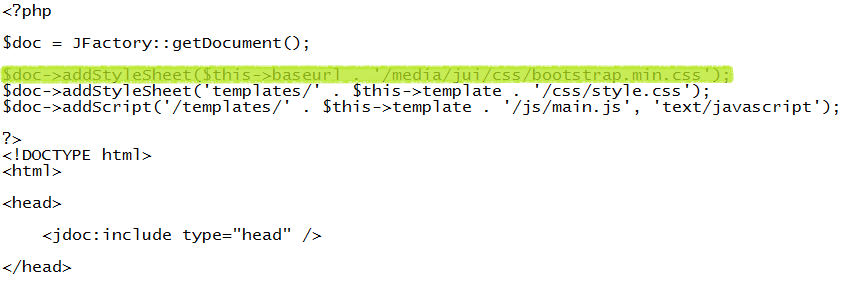
As <jdoc:include type="head" /> already included bootstrap.min.js for us, we only need to include bootstrap.min.css. To do this, we will update our template's index.php on our Joomla hosting server to include this file. You can see the code we added below that includes bootstrap.min.css, which we've highlighted:
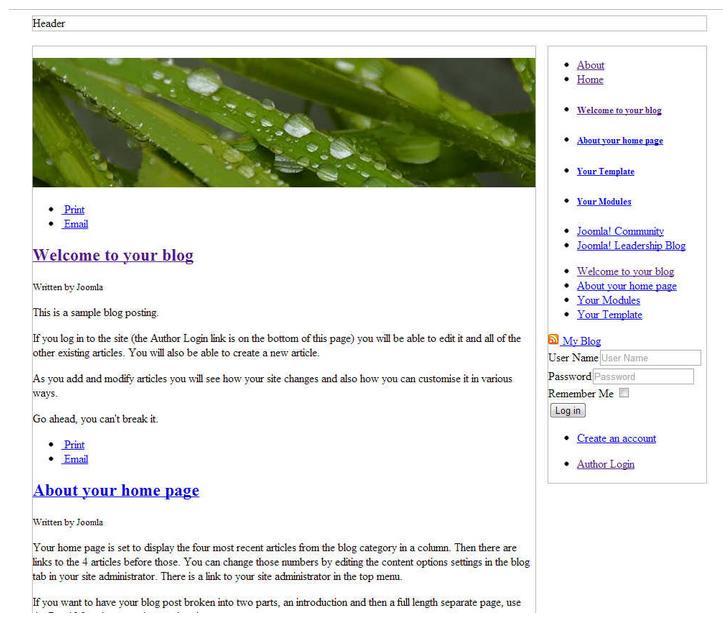
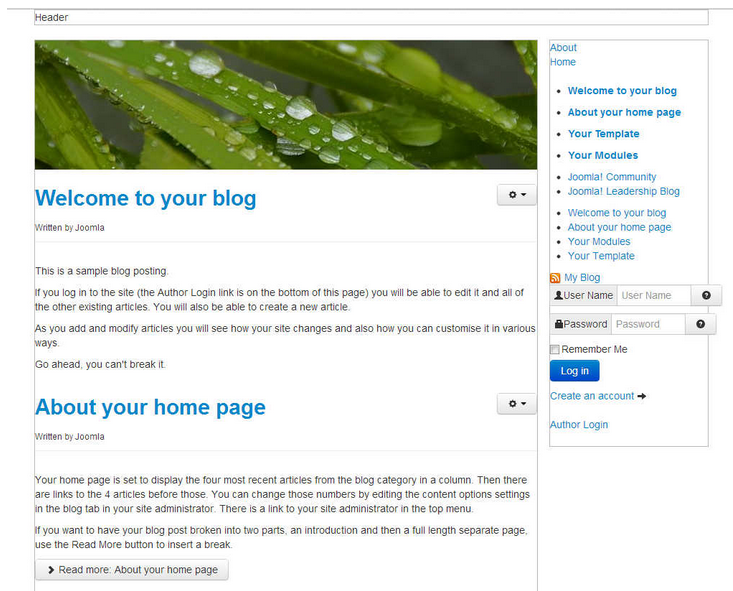
After editing our template's index.php on the server and saving the changes, our template is taking a little more form. You can see in the screenshots below how our template looks with and without this css file.
e3993468-1fbd-4546-a669-819444531977|0|.0
October 22, 2013 07:22 by
benEven if you have a relatively small website, it is likely that you eventually have to deal with hackers. One of the most common methods of hacking is the brute force attack – here hackers will cycle through numbers and letters to try to crack your password. It has happened to Joomla users in recent memory, so it is important to be prepared as much as possible.
The reason that these brute force attacks were successful encompasses a number of different factors. First, you have unlimited login attempts with the Joomla platform. This means that brute force hackers can continue to try until they gain access or are detected. While there is not much the average user can do about this, you can use different tactics to make your site more secure against these hackers.

1. Don’t use the admin username
Many times, the most common usernames are targeted such as admin, webmaster, administrator, test, etc. These all are very common usernames and that’s why, it makes sense to avoid using them. Don’t worry, from the backend, you can select a different name that’s publicly visible. This means that your username can be “amazingme” and you can choose a different name to be displayed on the front-end.
2. Use a strong password
Use a strong password and avoid common passwords such as fghj, 2221, 12345, your name, etc. The brute force attack targets all the common passwords first, and that’s why you should use a strong password that is a combination of uppercase and lowercase letters, numbers and special characters like #@*^. For example; a strong password would be something like h@LL003v3ryB0dy^^#. Also, never use the same password at two different places.
3. Limit login attempts
It is highly recommended that you limit login attempts. This can be done by using a security plugin like Better Joomla Security, or by using Limit Login Attempts plugin.
4. Update core and add-ons to improve Joomla security
Since the most common successful attacks are due to known vulnerabilities in outdated Joomla versions and add-ons, one of the most important tasks for anyone responsible for Joomla security is to ensure that all the software remains up to date.
Thus, one of the most important features that has been added to Joomla is the new Joomla Update Manager which can be used to easily update many extensions, as well as the Joomla Update component to update Joomla itself.
5. Backup often
Take regular backup of your complete Joomla site. Some people don’t give importance to backup, and unfortunately, they realize the value of backup only after a disaster strikes. Also don’t rely much when your host says that they regularly perform backup, because if they don’t, then it will create more problems.
2c37da97-c074-458e-895e-ae76469bb74f|0|.0
October 3, 2013 10:58 by
ben
ASPHostPortal.com is a premier Windows and ASP.NET Web hosting company that specializes in Windows and ASP.NET-based hosting. We proudly announces 7 Day Free Trial Windows and ASP.NET Hosting to all new customers. The intention of this FREE TRIAL service is to give our customers a "feel and touch" of our system. This free trial is offered for the next 7 days and at anytime, our customers can always cancel the service.

The 7 Day Free Trial is available with the following features:
- Unlimited Domains
- 5 GB Disk Space
- 60 GB of Bandwidth
- 2 MS SQL Database
- Unlimited Email Account
- Support ASP.NET 4.5
- Support MVC 4.0
- Support SQL Server 2012
- Free Installations of ASP.NET And PHP Applications
ASPHostPortal.com believes that all customers should be given a free trial before buying into a service and with such approach, customers are confident that the product / service that they choose is not faulty or wrong. Even we provide free trial service for 7 days, we always provide superior 24/7 customer service, 99,9% uptime guarantee on our world class data center. On this free trial service, our customer still can choose from our three different data centre locations, namely Singapore, United States and Amsterdam (The Netherlands)
Anyone is welcome to come and try us before they decide whether or not they want to buy. If the service does not meet your expectations, our customer can simply cancel before the end of the free trial period.
For all the details of packages available visit ASPHostPortal.com
About ASPHostPortal.com:
ASPHostPortal.com is a hosting company that best support in Windows and ASP.NET-based hosting. Services include shared hosting, reseller hosting, and sharepoint hosting, with specialty in ASP.NET, SQL Server, and architecting highly scalable solutions. As a leading small to mid-sized business web hosting provider, ASPHostPortal strive to offer the most technologically advanced hosting solutions available to all customers across the world. Security, reliability, and performance are at the core of hosting operations to ensure each site and/or application hosted is highly secured and performs at optimum level.
af60f9a9-58c2-4f8a-bdfb-03cc79643555|0|.0
June 20, 2013 10:06 by
ben
The Joomla core is not inherently slow, however many Joomla webmasters are not taking the necessary steps to optimize their website. Along with some “traditional” steps to website optimization, there are also some tactics that are specific to Joomla itself.

The first thing that most webmasters will focus on after they have their website up and running is speed. Now after Google have stated that website performance could impact SEO results in the near future, speeding up websites has become even more important. Joomla is similar to many other content management systems so many times the best way to speed up a Joomla website is the same as any other website. However, there are also some Joomla specific changes that can help speed up Joomla website. Let's take a quick look at some fundamental ways to speed up a website as well as some changes that are really only relevant for Joomla users.
Fundamental Ways to Speed Up Any Website and How It Relates to Joomla
1. Optimizing Your Template
The template that your website is using is often the number one cause of speed loss. While it may look great, it could be slowing your website performance down to a standstill. Joomla has thousands of templates and more are being created every day, however many of them are very inefficient. Some templates use more than 70 small images per page. Even worse is the fact that these images are not always optimized, making your website even slower.
2. Optimizing the Rest of Your Website
There are a number of tactics that can be used to utilized on any website, including Joomla based websites. One of the first things that many people do make sure that they are encoding their pages with Gzip. This will almost always speed up your website, but not always. If your servers processor is the problem then Gzip will actually slow down your websites loading speed. However, this is rarely the case and Gzip will help website performance of almost everyone.Many of the other tactics relate to your CSS, PHP, and the like. The essence of all of these tactics is less is more. Remove all of the white space from your template files, especially your index.php file. Remove CSS commands that are not necessary. If there are CSS commands that are used, but only in rare circumstance, then it may help to take those commands and create another CSS file that is only used when needed.
Joomla Specific Methods to Speeding Up a Website
3. Use Joomla's Inbuilt Caching
Joomla has a built in way to ensure that your website is caching. This can even be used by webmaster who are using a server that doesn't have PHP caching installed by setting it to the file method.
4. Utilize Joomla Updates
While the biggest reason that you should always have the most updated version of Joomla is security, new versions of Joomla often have small changes to the core that will speed up the load time of Joomla itself. The same is true regarding the Joomla extensions that you are using. In fact, many of the biggest problems relating to a Joomla website often are rooted in the extensions that have been added.
5. Keep an Eye on Your New Extensions
The Joomla extensions directory has an extension that can do pretty much anything short of washing the dishes. Unfortunately, many of these extensions are often terribly inefficient and can slow down your website dramatically. If you want to single out which components that are slowing your website down the most, there is an easy way to accomplish this. Install a page caching component, but don't enable the caching. This allows you to see the load time for each URL. After four or five days, go through the list that was created and find all of the URL's that are the slowest. There is a good chance that all of the slow URL's have a certain component or two in common that is not on the faster pages.
Another great way to keep an eye on additional extensions is to enable Joomla's core content cache. Then take a look at all of the database queries that are being executed. The goal is to keep this number as low as possible, ideally under 30 although that isn't always possible. Using this information, take a look at any recurring queries and find out what component is the cause. The easiest solution is to simply disable and then uninstall the component. However, if you feel like the component is a valuable asset to your website, contact the components developer and ask them to optimize it, or find/hire a freelance developer to do it for you. Of course, if you can do it yourself then by all means do it yourself.
It is also important to ask yourself if you really need the component. Every component will increase your load time, so it is unwise to frivolously add every component that you see. It is also a good idea to completely delete any components that you will not be using. (The same is true for templates.
6. SEF?
One the first things that most webmasters do is make their URL's more search engine and user friendly. The Joomla core does this to a certain extent automatically, however many webmasters want a little more control, or believe that it could be done better with an additional component. The problem is that most of these components are extremely inefficient. Many webmasters are willing to trade some load time to keep using SEF URL's, but it is worth keeping in mind.
7. Avoid Bridges at All Costs
While Joomla is considered to be a very functional CMS, many webmasters choose to bridge it with another program to further enhance functionality. While this seems like a great idea, because both programs work together well and seem to compliment each other, it is often not worth it. Remember, both of these programs function independently, which means that the core of both programs will have to load. This will always cause a huge hit to your websites performance because essentially two pages are loaded every time. If the functionality is vastly improved, then it might be worth it, but this is rarely the case.
There are a number of other tactics that people use to optimize their website and Joomla websites are no different. There are also a number of free tools that can be used to make optimizing your Joomla website easier. What tactics and tools do you use to optimize your Joomla website?
7344c188-63c3-4b74-ae08-3204e4c854f2|0|.0
June 14, 2013 06:56 by
ben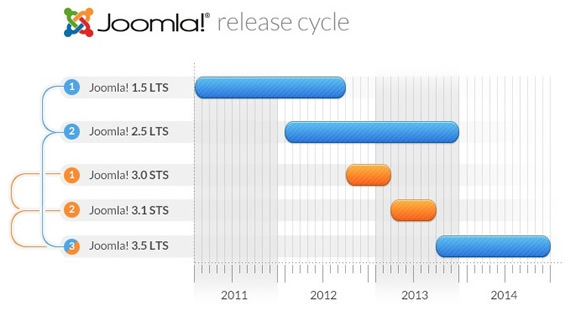
Joomla 3.0 was released on September 27th and it marks the first of the STS (standard term support) releases that will culminate with Joomla 3.5 LTS (long term support) release in September of 2013. Joomla 3.0, and the next STS version Joomla 3.1, are intended for early adopters and as such they are not recommended for the vast majority of people for developing their production sites.
What's new in Joomla 3?
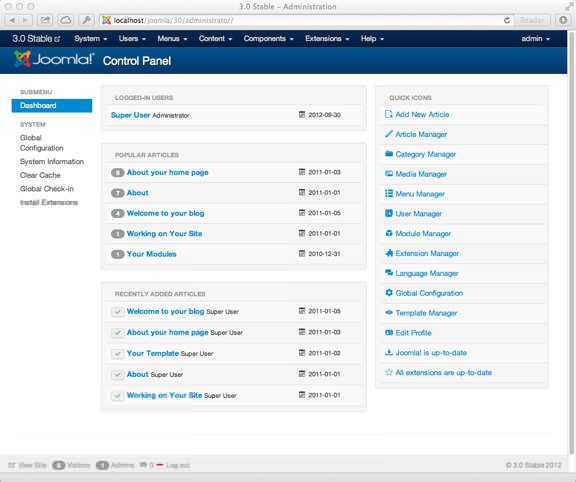
Joomla 3 is a major new version of Joomla and as such there are some significant changes. From a users persepctive the first thing you will notice is the all new administration UI that is powered by Twitter's Bootstrap. This HTML and CSS scaffolding allows for consistent styling and more rapid development of HTML interfaces. This is a great bonus for Joomla as it has long suffered from a UI that has not evolved much since the early days of the project. A quick hilight of some of the key features in Joomla 3 include:
- Twitter Bootstrap CSS/LESS files in a JUI package
- New responsive administration template - Isis
- New responsive bootstrap powered front end template - Protostar
- Simplified installation process
- ProstreSQL Database Drivers Support
- New administrator statistic modules
- Improvements to searching
- More code standardization
- Updated to use version 12.2 of Joomla Platform
Of course there are many other new features, changes, and additions, making Joomla 3.0 a very significant release with real usability and functional improvements.
Here is the list of new features in Joomla 3
1. Mobile Ready
Joomla! takes a big leap into the mobile space with a total overhaul of both its frontend design and administrator interface. With the adoption of the Bootstrap framework, Joomla! has become the first major CMS to be mobile ready in both the visitors and administrator areas. Now every website can have mobile friendly content for visitors and mobile friendly tools for administrators.
- Fully Responsive Site Template
- Fully Responsive Admin UI
- Fully Responsive Core Output
2. User Friendly
Joomla administration has a brand new look and feel, built with the power of Bootstrap responsive framework, along with a touch of the awesome UI/UX work of the Joomla JUX team. Joomla comes ready to go and fully responsive for mobile devices, tablets, and normal computer screens. The entire backend of Joomla has a brand new look and feel that will improve your workflow with any type of device.
- New User Friendly Interface
- Streamlined 30 Second Install
- Refined Admin User Experience
3. Developer Tools
Spend less time coding and building interfaces with Joomla 3. The Joomla User Interface (JUI) library gives you a standardized backend & frontend interface via CSS and Javascript Frameworks. LESS CSS and jQuery means you can write less code and the Icomoon font icon library provides a wealth of retina-optimized icons.
- Build a Component with Zero CSS
- Style a Site with 1 CSS File
- Icomoon Font Icon
- jQuery & Mootools
4. Whole Lot More
Joomla 3.0 is a whole new exciting world. We took a little from the top, bottom, and side to create a whole brand new look and feel, along with many features under the hood features that bring Joomla to the forefront of the content management system world.
- Extensive work on code style standardisation and consistency
- Incorporation of Bootstrap into a jui media package.
- A new responsive administrator template Isis and interface.
- A new frontend template Protostar built using Bootstrap and updated accessible template called Beez3
- PostgreSQL Driver. You will be able to run Joomla 3.0 sites using the PostgreSQL database.
- PHP Memcached Driver
- Use of JFeed for feed management rather than SimplePie
- Installation of language packages directly from the extension manager
- Guest user group present by default
- Saving blank articles allowed
- New administrator statistics module
- Update TinyMCE to version 3.5.6
- Continued clean up of older unused code, files and database fields and tables and improved standardization of tables.
- Improvements to Smart Search
- Unit testing in the CMS
- Updated system tests in the CMS
55af1cec-edbd-4c86-bbb3-b2623276a4e0|0|.0