
November 15, 2013 06:47 by
 ben
benNow that we have added the CSS and JS files to the Joomla 3.0 template that we are creating, we will now add the Necessary bootstrap files.
While the bootstrap Necessary files can be downloaded from the official site, Joomla 3.0 actually includes the Necessary bootstrap css and javascript files as well. As a template developer, this will the make incorporating these files much Easier.

Some bootstrap loaded with <jdoc:include type="head" />
When we added <jdoc:include type="head" /> within our template's head tag, Joomla automatically added a few JavaScript and CSS files. In the list of files below that Joomla added, you will notice that we've highlighted the bootstrap files that it included:

According to the official bootstrap documentation, we need to include the following files:
1. bootstrap.css (or bootstrap.min.css)
2. bootstrap.js (or bootstrap.min.js)
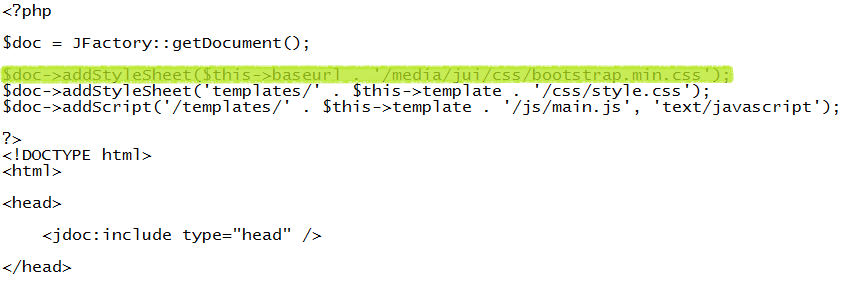
As <jdoc:include type="head" /> already included bootstrap.min.js for us, we only need to include bootstrap.min.css. To do this, we will update our template's index.php on our Joomla hosting server to include this file. You can see the code we added below that includes bootstrap.min.css, which we've highlighted:
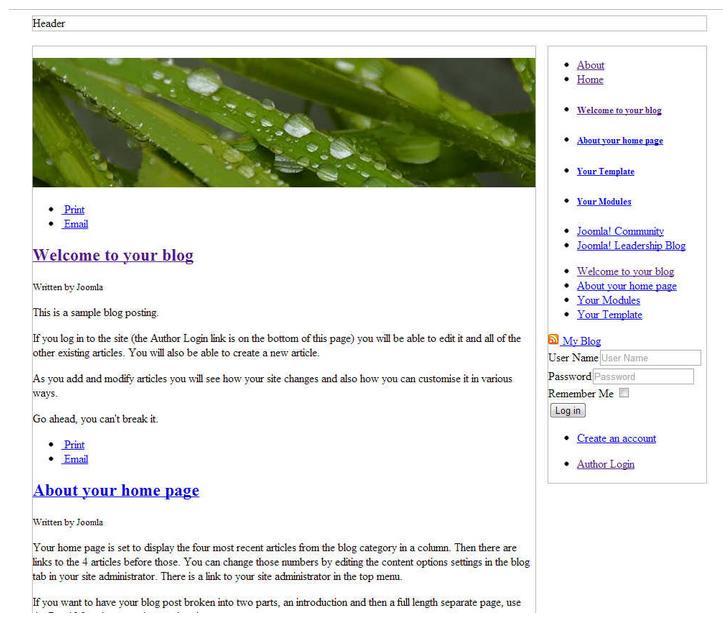
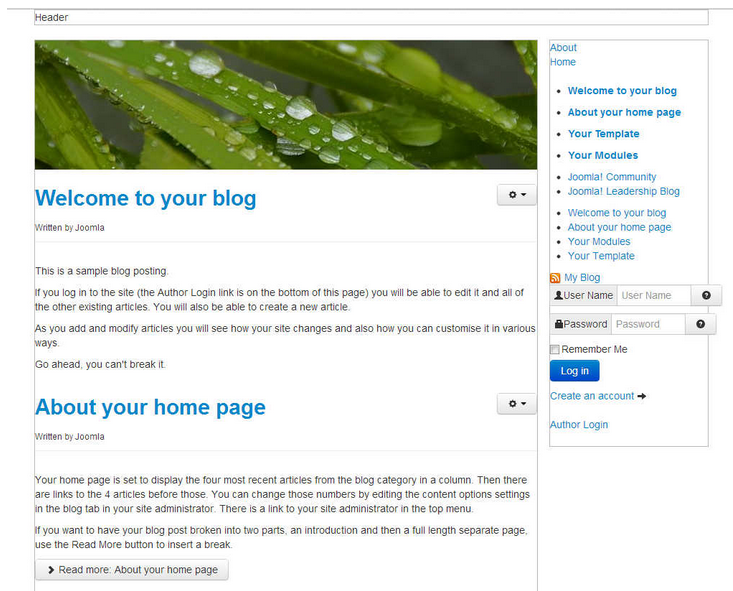
After editing our template's index.php on the server and saving the changes, our template is taking a little more form. You can see in the screenshots below how our template looks with and without this css file.
e3993468-1fbd-4546-a669-819444531977|0|.0
October 22, 2013 07:22 by
benEven if you have a relatively small website, it is likely that you eventually have to deal with hackers. One of the most common methods of hacking is the brute force attack – here hackers will cycle through numbers and letters to try to crack your password. It has happened to Joomla users in recent memory, so it is important to be prepared as much as possible.
The reason that these brute force attacks were successful encompasses a number of different factors. First, you have unlimited login attempts with the Joomla platform. This means that brute force hackers can continue to try until they gain access or are detected. While there is not much the average user can do about this, you can use different tactics to make your site more secure against these hackers.

1. Don’t use the admin username
Many times, the most common usernames are targeted such as admin, webmaster, administrator, test, etc. These all are very common usernames and that’s why, it makes sense to avoid using them. Don’t worry, from the backend, you can select a different name that’s publicly visible. This means that your username can be “amazingme” and you can choose a different name to be displayed on the front-end.
2. Use a strong password
Use a strong password and avoid common passwords such as fghj, 2221, 12345, your name, etc. The brute force attack targets all the common passwords first, and that’s why you should use a strong password that is a combination of uppercase and lowercase letters, numbers and special characters like #@*^. For example; a strong password would be something like h@LL003v3ryB0dy^^#. Also, never use the same password at two different places.
3. Limit login attempts
It is highly recommended that you limit login attempts. This can be done by using a security plugin like Better Joomla Security, or by using Limit Login Attempts plugin.
4. Update core and add-ons to improve Joomla security
Since the most common successful attacks are due to known vulnerabilities in outdated Joomla versions and add-ons, one of the most important tasks for anyone responsible for Joomla security is to ensure that all the software remains up to date.
Thus, one of the most important features that has been added to Joomla is the new Joomla Update Manager which can be used to easily update many extensions, as well as the Joomla Update component to update Joomla itself.
5. Backup often
Take regular backup of your complete Joomla site. Some people don’t give importance to backup, and unfortunately, they realize the value of backup only after a disaster strikes. Also don’t rely much when your host says that they regularly perform backup, because if they don’t, then it will create more problems.
2c37da97-c074-458e-895e-ae76469bb74f|0|.0