
November 15, 2013 06:47 by
 ben
benNow that we have added the CSS and JS files to the Joomla 3.0 template that we are creating, we will now add the Necessary bootstrap files.
While the bootstrap Necessary files can be downloaded from the official site, Joomla 3.0 actually includes the Necessary bootstrap css and javascript files as well. As a template developer, this will the make incorporating these files much Easier.

Some bootstrap loaded with <jdoc:include type="head" />
When we added <jdoc:include type="head" /> within our template's head tag, Joomla automatically added a few JavaScript and CSS files. In the list of files below that Joomla added, you will notice that we've highlighted the bootstrap files that it included:

According to the official bootstrap documentation, we need to include the following files:
1. bootstrap.css (or bootstrap.min.css)
2. bootstrap.js (or bootstrap.min.js)
As <jdoc:include type="head" /> already included bootstrap.min.js for us, we only need to include bootstrap.min.css. To do this, we will update our template's index.php on our Joomla hosting server to include this file. You can see the code we added below that includes bootstrap.min.css, which we've highlighted:
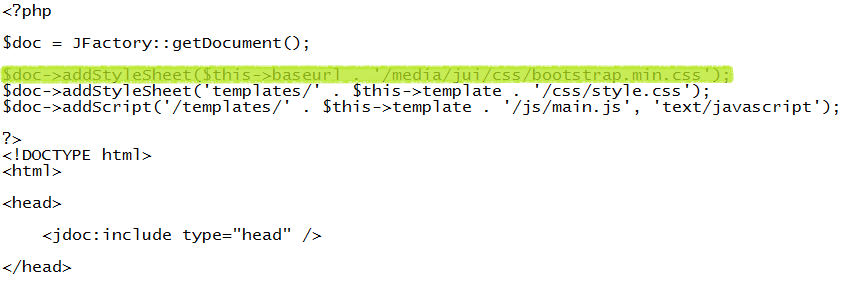
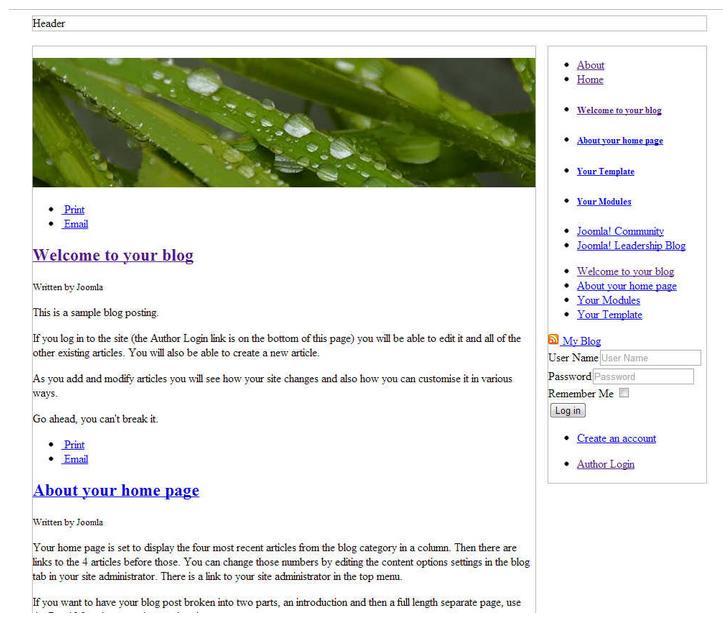
After editing our template's index.php on the server and saving the changes, our template is taking a little more form. You can see in the screenshots below how our template looks with and without this css file.

e3993468-1fbd-4546-a669-819444531977|0|.0