Best Tips to Speed Up a Joomla Site
No one wants to wait for a site to load. And that’s why we need to minimize the loading period when building a website.Today in this article we will introduce you 10 best tips to speed up a Joomla site.
Actually, this is not a new topic but we really hope that it can help. Let’s choose the most suitable ones for yourself. Before apply these tips, let’s check to see the current speed of your site. You can use Google Pagespeed Insights for full details. And here is the most expected part, the tips. Please note that your site should be backed up before changing anything.
- Choose a good hosting
It’s crucial for you to choose the right host for your site. This is the decisive factor to slow or speed up your site no matter how well you have optimized your Joomla site.
Therefore, before choosing a hosting, you should find more information in the forum. Let’s find a web hosting that is best suitable with your site demand: web space, monthly traffic, data transfer, backup, database type support, CDN, etc.
- Enable Joomla Cache
If you enable the cache in your site, it will be more responsive. Luckily, Joomla is capable of serving 3 types of cache: Component views, Module views and Page views.
The first 2 settings are determined by one setting in your Systems > Global Configuration and set it as Conservative. Optionally you can also set the time different than the default of 15 minutes.
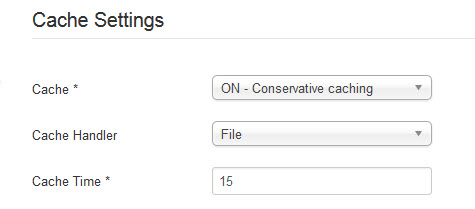
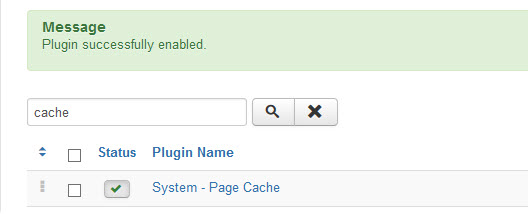
If globally, cache is switched on, you can switch it off again for specific modules from the Advanced tab in selected modules. Page views are only cached if you switch on the System - Cache plugin in the Extensions> Plugin. Just set it to Enabled, and leave default parameters.
- Use G-Zip
In Systems > Global Configuration, on the Server tab, you will find the setting to turn on Gzip:
By this way, your pages are compressed in a zip-file, sent to the browser on your PC, and unpacked there. Except for really ancient versions of IE, it is supported in all browsers, and should be safe to turn on.
To use this function, please make sure that your host supports mod_gzip.

- Remove unnecessary extensions | It’s true that any Joomla site needs extensions. However it’s really important for us to choose the good ones. Some extensions need additional Javascripts, connect to the remote network, or take time to be loaded can surely slow you down terribly. Also, any unneeded extensions should be removed even they are not in use
- Browser caching in .htaccess | After renaming your htaccess.txt file into .htaccess, you can add some code to prevent browser to request specific image types from the server if they are already present on your PC. By this way, you can reduce the loading time.
- Optimize your images | We can’t deny the important role of the images in a website. However, images account for for more KB's than the rest of your web page and that’s why they need optimizing. Firstly, you should use the image with correct size. Secondly, you can use the compression tools to further reduce the size by stripping the unnecessary data.
- Use a CDN | CND or Content Delivery Network is the one that can serve your static files from the global network of the CND provider. By this way, the user far from the server can receive the files faster from the nearest location. This tip is not only good for sites operating globally, but also specially for sites in large countries.
- Optimize CSS + Javascript | Most Joomla sites now have many CSS and Javascript files which will all add up in size AND number of HTTP-requests. Also they will take lots of time for loading the site while they are executing. Luckily, you can over this issue by:
- Compressing these files.
- Combining multiple files into one.
- Using a defer or a sync attribute in the scripts to execution.
If you’re an amateur, you can use the extension for this optimization.
- Use speed optimization extensions | One of the easiest ways to optimize your site is to use the speed up extensions. Just after installation and some configuration steps, your site will be significantly speeded up! JCH-Optimize and JBetolo are ones of them.
- Optimize for mobile devices | “Mobile device” is one essential point that decides the rank of your site on search engine. Your site may not perform well on mobile device even though it works great on desktops. Therefore, we need to optimize the site for mobile devices too. The key here is to load only what is really needed in the site. You can use user-agent detection to check if you are on a mobile device, not just on a resized browser window and then you can then selectively disable module positions.
0a9a732c-3c8f-4ea9-88f1-d0a4e3f73052|0|.0

June 3, 2016 00:05 by
 ben
ben
Joomla is fast gaining approval as one of the most used content management systems in our planet. The first and foremost attraction of Joomal is that it is free and open source. However there are several other free and open source management systems too. Even then most of the government and educational institution websites are built on this software. Government and educational institute websites are revered even by the search engines and they give much preference for the back links from such websites. When Joomla is used mostly for such sites, there should be many advantages.
Joomla is highly user-friendly and search engine friendly. There are thousands of extensions and applications which can be used to make the website a unique one. Active Joomla groups and forums are other attraction where you will get an answer to all your queries. Joomla is 100% risk free and it is regularly updating with latest technology.
Although there are several advantages, you need the touch of a professional hand to create a highly performing website from Joomla. The crucial area is PSD to Joomla conversion. Here the design in the PSD format should be converted to HTML and then to Joomla. The original charm of the design can be maintained only when you do it perfectly and precisely. Here you need to have the help of a professional PSD to Joomla conversion service provider.
Once the website is created professionally, you can certainly enjoy the benefits. A properly constructed Joomla website will be search engine friendly and will get high ranks naturally. Besides, the users will not find any problem in navigation or in any other areas. These are the two reasons for government websites and educational websites to go with Joomla.
A website can any time meet with some technical problems. Here you need timely help. Active Joomal communities will take care of such situations and will come forward for your help. As you know the government websites and educational institution websites are the two categories browsed quite frequently. Here they cannot afford more down time and hence they depend on Joomla.
However, the most fascinating fact is that Joomla developers have built a large number of templates and extensions over a period which more than any commercial content management systems. When such good facilities are available free of cost, how can we avoid using Joomla? As they keep on updating their technology and coming out frequently with new versions, there is no doubt that Joomla will be the major content management system in the future.
Best Joomla Hosting Recommendation
ASPHostPortal.com provides our customers with Plesk Panel, one of the most popular and stable control panels for Windows hosting, as free. You could also see the latest .NET framework, a crazy amount of functionality as well as Large disk space, bandwidth, MSSQL databases and more. All those give people the convenience to build up a powerful site in Windows server. We offer Joomla hosting starts from $5/month only. We also guarantee 30 days’ money back and guarantee 99.9% uptime. If you need a reliable affordable Joomla Hosting, we should be your best choice.
835f7826-68ed-4e2e-abfa-922f8fa4a476|0|.0
June 1, 2016 20:48 by
benWhat is Jomres?
Jomres is the most powerful, commission-free Joomla and WordPress online booking system and property management solution used by thousands of businesses worldwide to better manage their properties, reservations, payments and increase sales. It provides a unified tool set that can be easily used by businesses that accept bookings in daily, nightly or hourly allotments.

Jomres and it's plugins are all Open Source software. We strongly believe that as far as possible the software should always be on your server, and under your control. It is not a Cloud solution that could disappear at any time, and your business's intimate details aren't shared with anybody else.
There are no adverts, no commission fees and no hidden costs for "optional" extras that aren't really optional.
How to Install Jomres on Your Joomla?
In this article, we will tell you how to install Jomres in your Joomla site. Once you have installed Joomla, will need to login to your Joomla’s admin dashboard and navigate to the Extensions>Manage section. Now you will have to search for the Jomres plugin using the search bar on the page, click the magnifying glass button and then on the Jomres extension result. You will need to click on the Install button and after you are directed to the next page, click Install again. This will initiate the installation process for the Jomres extension which we will discuss in the next step of this tutorial.
For the next steps of the installation, you will be aided by the Jomres Web Installer. You will need to click the GO button to initiate the installation process. Now all of the tables and content for the extension will be created by the installation. You will need to click on the Complete Installation button.
You will receive a yellow colored message at the top of the page prompting to delete the installation file as it is no longer needed and might become a security issue in the future. Just click on the delete file section and Jomres will remove the file for you.
Best Joomla Hosting Recommendation
ASPHostPortal.com provides our customers with Plesk Panel, one of the most popular and stable control panels for Windows hosting, as free. You could also see the latest .NET framework, a crazy amount of functionality as well as Large disk space, bandwidth, MSSQL databases and more. All those give people the convenience to build up a powerful site in Windows server. We offer Joomla hosting starts from $5/month only. We also guarantee 30 days’ money back and guarantee 99.9% uptime. If you need a reliable affordable Joomla Hosting, we should be your best choice.
b0572996-e135-40bc-afa7-171bad795c06|0|.0